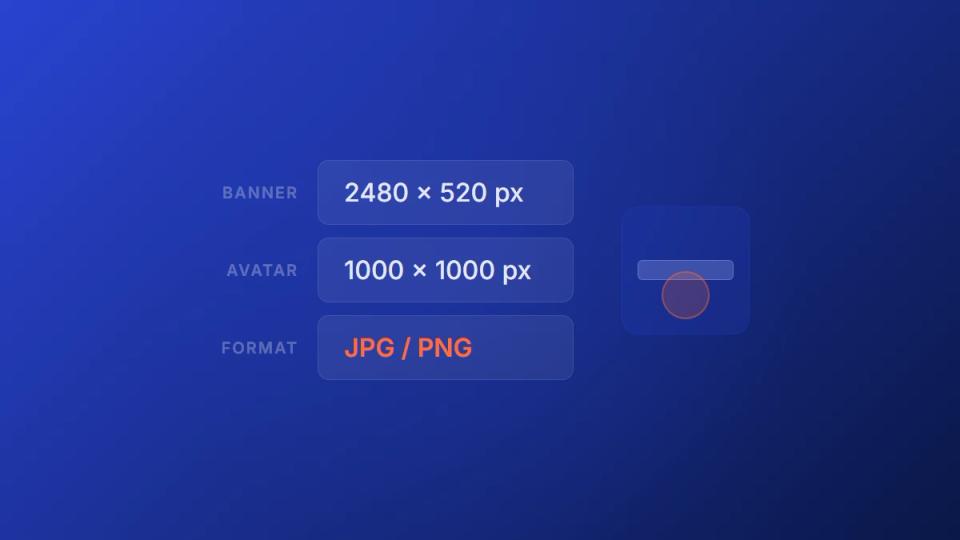
The correct SoundCloud banner size is 2480 x 520 pixels (4.77:1 aspect ratio), saved as JPG or PNG under 2MB. Avoid placing logos or text within 60 pixels of the edges to prevent mobile cropping. Below: full specs, mobile safe zones, a free template, and how to fix common upload errors.
Getting the correct SoundCloud banner size is the first step to making your channel look professional. The banner is the first thing an artist sees on your profile. If it’s blurry or poorly cropped, you immediately look like an amateur, which hurts premiere submissions. The official dimension is 2480 x 520 pixels. For any serious premiere channel or record label, using these exact dimensions is essential.
Your quick reference for banner specs
Think of your SoundCloud profile as your digital storefront. This is especially true if you run a premiere channel that accepts track submissions. A crisp, correctly sized banner shows you care about details. This builds instant trust with artists looking to submit their music.
It’s not just about looking good. In the Netherlands, where SoundCloud has a massive audience, profiles with high-resolution banners saw a higher click-through rate on their tracks. Visuals matter. You can dig into more data in the Dutch music analytics from IFPI Netherlands’ 2024 report.
To make it simple, here is a quick rundown of the technical specs you need to know.
SoundCloud banner technical specifications
This table breaks down everything you need to know at a glance. Keep it handy whenever you’re creating new artwork for your channel.
| Specification | Requirement |
|---|---|
| Dimensions | 2480 x 520 pixels |
| File Format | JPG or PNG |
| Maximum File Size | 2MB |
| Aspect Ratio | Approximately 4.77:1 |
Getting these specs right from the start saves you the headache of re-uploading blurry or poorly cropped images. Just pass this table to your designer or plug the numbers into your design tool.
Design for mobile and desktop safe zones
A banner can look perfect on your desktop but appear completely broken on a mobile phone. SoundCloud automatically crops your banner to fit different screens. If you are not careful, it can chop off your branding and make your channel look unprofessional.
This is a major issue for premiere channels. An artist might land on your page and be unable to see your logo, submission status, or contact info. Their trust in your operation drops instantly. You must design within the “safe zones” to prevent this.
Understand the safe area
Your main goal is to keep all important information in the center of your banner. This includes your logo, channel name, genre focus, and submission info. Think of the outer edges as disposable space. They are perfect for background textures or non-essential graphics because they get cut on smaller screens.
For a banner that’s 2480 x 520 pixels, the central safe area is roughly 1000 pixels wide. As long as your critical information fits within that central block, it will show up correctly on any device.
Here is a quick rundown of the essential specs.
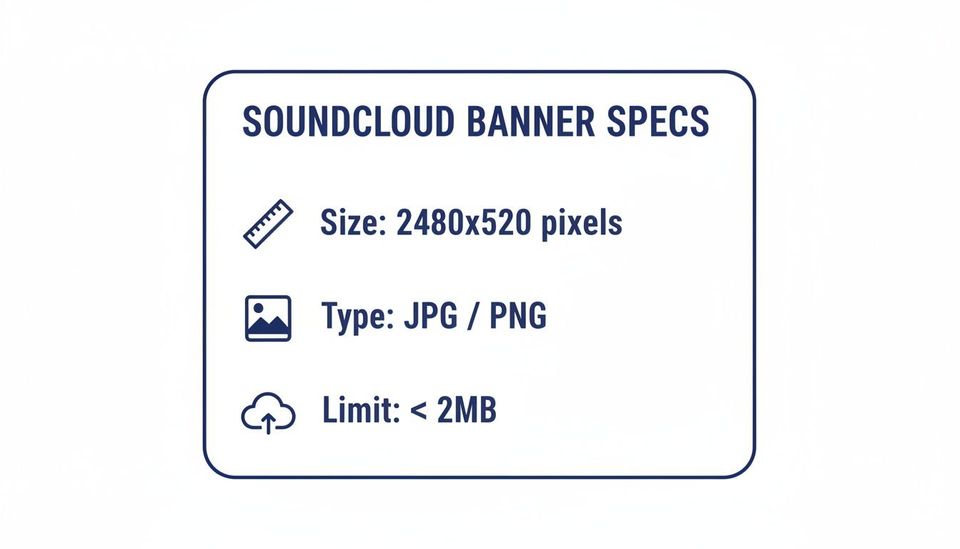
Getting these specs right is the first step. Sticking to the safe zone is what keeps your professional image intact everywhere.
This isn’t just about aesthetics; it’s about clear communication. When you design within these limits, you send a message to artists that you are a professional who pays attention to detail. That is the kind of trust that turns a SoundCloud channel into a real business.
Did SoundCloud change the banner size in 2026?
No. SoundCloud’s banner specs have stayed at 2480 x 520 pixels since the last platform redesign. The official requirement remains a JPG or PNG under 2MB. SoundCloud’s own help center still lists this dimension as the recommended minimum for headers, and any guide showing different numbers is either outdated or referring to legacy desktop-only layouts.
The reason artists keep asking this in 2026 is because SoundCloud rolled out updated mobile layouts and the banner now crops more aggressively on smaller screens. The size hasn’t changed; the way it displays has. If your banner looked fine a year ago and now feels off, it’s the cropping behavior, not the dimensions, that you need to design around.
Create a banner that attracts premiere submissions
Your banner is more than just a decorative image. It is a powerful tool for attracting the right artists and getting the best premiere submissions. For premiere channels, this space is your digital calling card. It must instantly tell a potential client your genre focus, submission status, and what your brand is about.
A professional design builds trust and makes you look like an authority.
Stick to high-quality imagery, a consistent color palette, and clean typography. This signals that you run a serious operation, not just a hobby channel. The real goal here is to get high-quality artists to submit their best work. This in turn solidifies your channel’s reputation and authority.
Include key design elements for your banner
To make your banner effective, you need to include a few core components. These elements should work together to answer an artist’s most immediate questions. This happens before they even think about sending you a DM.
- Genre Signalling: Use colors, fonts, and imagery that match your niche. An ambient channel’s banner should feel different from a hardstyle channel’s. It is all about visual cues.
- Submission Status: Clearly state if your submissions are “Open” or “Closed”. This simple text overlay manages expectations and reduces unwanted messages.
- Brand Identity: Make your logo or channel name prominent. Being consistent across all platforms is how you build recognition and credibility.
For Dutch independent artists and promotion agencies, getting the 2480 x 520 pixel soundcloud banner size right is crucial. A survey showed that channels with optimized visuals had a higher chance of growing their monthly listeners. On the flip side, profiles that ignored the minimum dimensions faced rejection from auto-publishing platforms. You can dig deeper into the specs in the SoundCloud banner resource library.
By treating your banner as a strategic asset, you can attract better premiere opportunities. While refining your channel’s look, you might also be interested in how to automate SoundCloud premieres to organize your operations.
Keep your banner loading fast
A slow-loading banner can make your channel feel amateurish. If an artist or fan lands on your page and has to wait for your header to appear, they might leave. To keep your soundcloud banner size in check, you must optimize the image file without losing quality.
It all starts with picking the right file format for your design. Your two main choices are JPG and PNG. Both are great, but they are built for different jobs. Getting this right is key to a banner that loads instantly and looks sharp.
Choose between JPG and PNG
The best format depends on what your banner looks like.
- Use JPG for complex images: If your banner is based on a photograph or has intricate gradients, JPG is almost always the better pick. Its compression handles that complexity, giving you a smaller file size with little noticeable drop in quality.
- Use PNG for simple graphics: If your banner has solid colors, sharp lines, text, or needs transparency, PNG is the way to go. It keeps text and logos perfectly crisp. This is crucial for making your brand look clean and professional.
A classic mistake is saving a text-heavy banner as a JPG. You often end up with fuzzy edges around your graphics. Stick with PNG for any design with sharp, flat elements to ensure every detail stays clear.
Compress your image file
Once you have the right format, the last step is compression. SoundCloud has a hard limit of 2MB for the file, so you need to stay under that.
If your file is too big, use squoosh.app to shrink it. It’s free and lets you see exactly what you’re getting. Drag the slider left and right to compare the compressed version against the original. This way you can find the smallest file size that still looks sharp.
A fast-loading page shows you run your channel professionally. It gives artists more confidence when they consider sending you their music.
And once your banner is sorted, you can look into other ways to improve your channel, like using the best download gate tools for SoundCloud.
Solve common banner upload errors
Even when you nail the SoundCloud banner size, you can still hit frustrating upload errors. Issues like pixelation or weird cropping can make your channel look amateur. This is a real problem when you are trying to attract serious artists for premieres. Figuring out what’s causing these glitches is the first step to fixing them.
Most visual problems start before you click the upload button. Pixelation usually happens when you design on a small canvas and then stretch it to fit. Always start your design on a 2480 x 520 pixel canvas from the beginning. Similarly, blurry text is often the result of saving a design with sharp lines as a JPG instead of a PNG.
Fix frequent banner issues
Here is a quick troubleshooting guide for the most frequent banner problems you will likely encounter.
- Problem: Blurry or pixelated image. This means your original image resolution was too low. The only real fix is to recreate your banner using a high-resolution source image. Make sure you are working on a 2480 x 520 pixel canvas.
- Problem: Banner gets cropped incorrectly. You have likely placed key elements like your logo or channel name outside the central safe zone. Re-center your critical branding so it does not get chopped off on mobile screens.
- Problem: File rejection error. Your banner file is either bigger than the 2MB limit or in an unsupported format. Run your JPG or PNG through an online compression tool before uploading to shrink it.
For premiere channels, visual quality is critical. A crisp, correctly displayed banner signals that you run a professional operation. This builds the trust needed to attract high-quality submissions and manage payments.
It is not just about looking good. Dutch SoundCloud curators using a premiere booking platform reported faster audience growth after fixing their banner sizing. Studies also found that correctly sized banners retained more visual fidelity after compression. You can read more about the impact of banner quality on Snappa.com. Taking care of these details can impact your channel’s performance.
So, you have designed the perfect banner, ensuring it fits the recommended SoundCloud banner size and is optimized. Getting it live on your profile is the easy part. The process only takes a moment, letting you quickly refresh your channel’s look and get back to managing your premiere schedule. A sharp, professional banner is often the first thing an artist sees.
This guide will walk you through the upload process. Follow these steps, and you’ll have your new branding live in no time.
Follow this step-by-step upload guide
- Navigate to your profile: Log in to your SoundCloud account. Click your profile picture in the top-right corner, then choose “Profile” from the dropdown menu.
- Edit your profile: Once on your profile page, you’ll see an “Edit” button below your current banner. Click that.
- Upload new image: This brings you to a new screen. Look for the “Upload header image” button and click it to open your computer’s file explorer.
- Select and confirm: Find your banner file – remember, it needs to be a JPG or PNG under 2MB – and select it. SoundCloud will show you a preview.
- Save your changes: If you are happy with the preview, hit the “Save” button. Your new banner is now live.
SoundCloud banner template: free 2480 x 520 PSD download
The fastest way to ship a clean banner is to start with a template that already has the 2480 x 520 pixel canvas, the mobile safe zone marked, and guides for where text and logos should sit. You can grab a free PSD or Figma template from any of the design tools that own this category – Canva, Figma, Adobe Express, and Snappa all offer SoundCloud-sized presets directly inside their banner makers.
If you run a premiere channel and want consistency across releases, build your own master template with: a logo lockup pinned to the centered safe zone (avoid the outer 60px), a section for your submission link or pricing, and a slot for rotating featured-track artwork. Save it as a PSD or .fig file and duplicate it whenever a new release goes up. Two minutes of design beats an hour of fixing blurry uploads.
Answer your SoundCloud banner questions
Do you have a few lingering questions? This section provides quick, straight-to-the-point answers. We often see label managers and premiere channel owners ask these things. Think of it as a final checklist to ensure you have everything right.
Can you use a GIF for a SoundCloud banner?
Unfortunately, no. SoundCloud does not support animated GIFs for profile banners at the moment. You will need to stick with a static image file.
For the best results—meaning sharp visuals and quick loading times—your best option is to use a JPG or PNG file. Sticking to these formats is a simple way to keep your channel looking clean and professional.
How often should you update your banner?
There’s no hard rule. A great practice is to update your banner whenever there’s a significant change with your channel. This could be announcing that your premiere submissions are open, promoting a new compilation, or a seasonal refresh.
A good rule of thumb for busy channels is to review it every quarter. This ensures the information is still relevant and effective. A stale banner can make your channel look inactive, which might turn away potential artists. If you want to find more ways to grow your channel, you should learn how to monetize your SoundCloud channel.
What is the profile header safe zone?
The safe zone is the most important part of your banner design. It’s the central part of the image that stays visible on every device. SoundCloud crops your banner aggressively on smaller screens, so anything outside this area gets cut off.
To be safe, make sure all your crucial text, logos, and calls to action are within the central 1000 x 260 pixel area. This guarantees they will not get chopped off, no matter how someone is viewing your profile.
Turn your premiere and repost channel into a business with Premierely, the only platform built to accept track submissions, collect payments, and schedule uploads from one dashboard.