Just want to convert a video right now? Use our free TikTok to MP3 converter – no watermark, no signup. This guide covers how the conversion works, audio quality, and what is legal.
A TikTok to MP3 converter extracts the audio from a TikTok video URL and saves it as a downloadable MP3 file. Premierely’s converter runs entirely in your browser – paste the link, preview the video, and download the audio at 320 kbps. No account, no app install, no watermark on the audio.
Extract audio from any TikTok video and download it as an MP3 file using this free TikTok to MP3 converter. Paste a link, preview the video details, and save the audio at 320 kbps. No account needed, no software installs – the conversion runs in your browser. If you need the whole clip rather than just the sound, our TikTok video downloader saves the MP4 without the watermark.
TikTok is the biggest music discovery platform on the planet. 84% of songs entering Billboard’s Global 200 in 2024 went viral on TikTok first. With 1.9 billion monthly active users scrolling 95 minutes per day, TikTok is packed with unique audio. The sounds you hear often don’t exist anywhere else – at least not in the form you want.
Premierely’s TikTok to MP3 converter lets you grab that audio in seconds. Paste the link, hit convert, and download. That’s it.
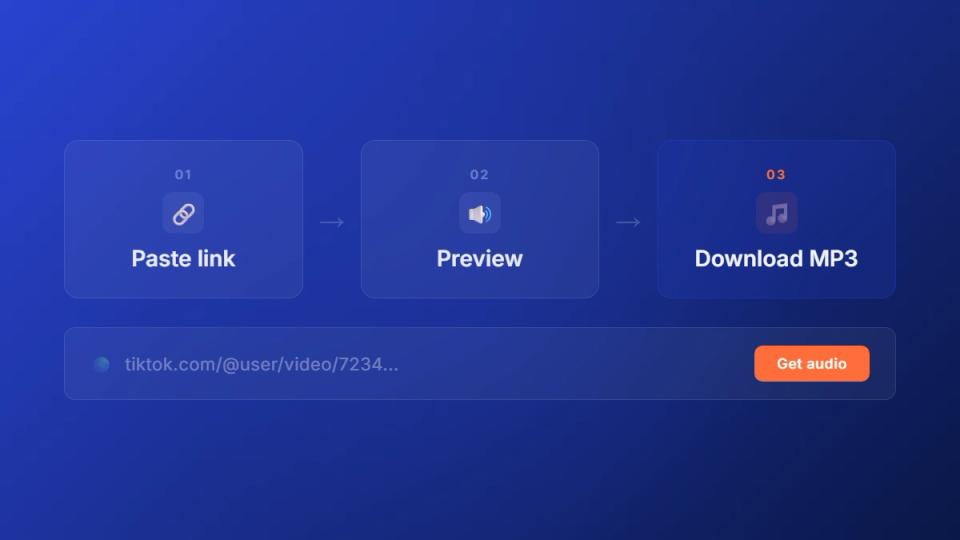
How to download TikTok audio as MP3 in 3 steps
This TikTok audio download tool converts any public TikTok video into a 320 kbps MP3 file. The process takes seconds and runs entirely in your browser – no server uploads, no account, and no software to install. It works with regular videos and photo slideshows.
Here’s the workflow:
- Copy the TikTok link – open the video in TikTok and tap the share button, then copy the link
- Paste and fetch – drop the URL into the converter and click “Get audio” to preview the video title, author, thumbnail, and duration
- Download the MP3 – hit download to convert and save the audio file to your device
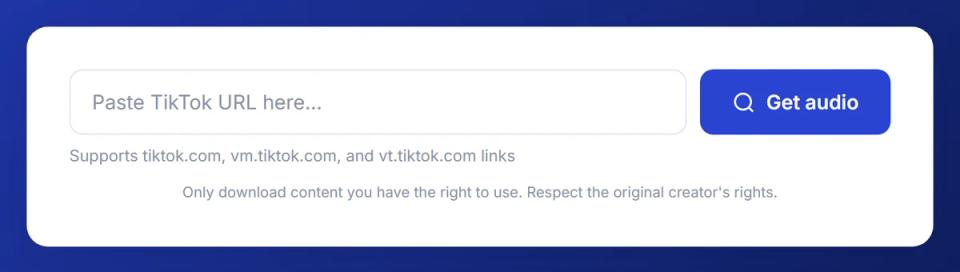
Paste a TikTok link, preview the video info, and download the audio as MP3. Everything processes in your browser.
Once the TikTok MP3 download is ready, you’ll see the video thumbnail, title, author, and duration. The built-in audio player with waveform visualization lets you listen before saving. Processing depends on video length, but most clips convert in under 10 seconds.
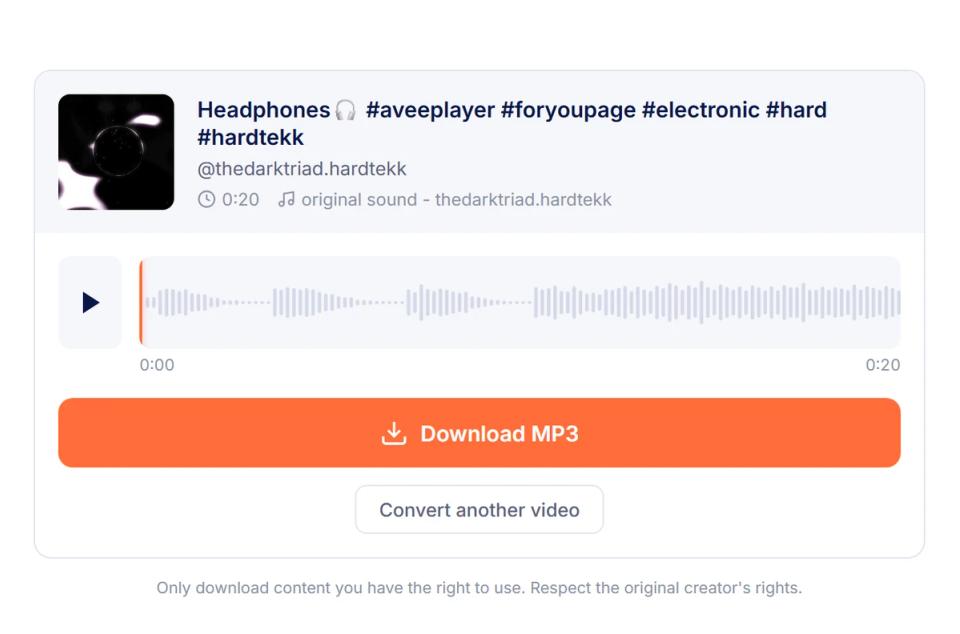
After clicking “Get audio,” the converter shows the video details, a waveform audio player, and the Download MP3 button.
TikTok MP3 downloader vs converter: which one do you need?
“TikTok MP3 downloader” and “TikTok to MP3 converter” search the same thing – tools that pull audio out of a TikTok video and give you an MP3 file you can save. The labels are interchangeable in practice, even though they suggest slightly different mechanics.
A converter technically transforms one media format into another – in this case, the original TikTok video file (an MP4 with both video and audio) into an MP3 audio-only file. That’s what’s happening under the hood when you use any TikTok-to-MP3 service.
A downloader is the broader label – it covers any tool that fetches the file from TikTok’s servers. Some downloaders save the full video (MP4), some save just the audio (MP3), and some let you choose. A pure “TikTok MP3 downloader” is just a downloader scoped to audio output.
If your goal is to keep just the song, the music, or the spoken audio from a TikTok and not the visuals, you want the MP3 output. Either tool category gives you that.
One thing to watch for: free tools that re-encode the audio multiple times can degrade sound quality. Look for tools that download once and convert once at a high bitrate (256 kbps or 320 kbps). Anything below 192 kbps will sound muddy on headphones.
Which TikTok link formats does this converter support?
This TikTok MP3 converter accepts every URL format TikTok uses to share videos. You don’t need to modify or clean up the link before pasting it in. Just copy whatever TikTok gives you and drop it straight into the input field.
Here are the supported formats:
| Link type | Example format | Where you get it |
|---|---|---|
| Full URL | tiktok.com/@user/video/123456 | Browser address bar |
| Short link | vm.tiktok.com/ZMxxxxxxx/ | Share button on mobile |
| Short link (alt) | vt.tiktok.com/ZMxxxxxxx/ | Share button (some regions) |
| Mobile share link | tiktok.com/t/ZMxxxxxxx/ | Copy link from app |
The most common issue people run into is pasting a link to a private video. This tool only works with public TikTok videos. If the creator set their video to private or friends-only, the converter can’t access the audio.
Photo carousels (slideshow posts) work too. TikTok attaches an audio track to every slideshow, and the converter extracts it the same way it handles regular video audio.
What audio quality do you actually get from TikTok?
The converter outputs MP3 files at 320 kbps – the highest bitrate MP3 supports. But the real audio quality depends on what TikTok stores on its servers. Understanding this helps you set the right expectations for the downloaded file.
TikTok compresses all uploaded audio to roughly 128 kbps AAC before serving it to viewers. AAC is a more efficient codec than MP3 – at 128 kbps, AAC sounds noticeably better than 128 kbps MP3. When the converter re-encodes that AAC source into a 320 kbps MP3, it preserves all the detail from the TikTok version. The file size is larger, but no quality is lost compared to what you heard in the app.
Here’s what that means in practice:
| Scenario | What you get | Quality verdict |
|---|---|---|
| Casual listening | 320 kbps MP3 from 128 kbps AAC source | Sounds identical to the TikTok version |
| Content creation | Usable for background audio in videos | Good enough for most projects |
| Music production | Compressed source, not studio quality | Source the original track from Spotify, Bandcamp, or the artist instead |
| Ringtone or alarm | Short clip, compression barely matters | Works perfectly |
The key takeaway: your TikTok MP3 download sounds exactly like what you heard in the app. If the audio sounded good on TikTok, it’ll sound good as the MP3.
For music production or professional projects, always source the original track from the artist or a music platform. TikTok audio is optimized for mobile playback, not studio use. You can convert those original files using Premierely’s WAV to MP3 converter if you need MP3 format with full bitrate control.
How to save TikTok sounds on phone and desktop
The TikTok sound downloader works on any device with a browser. The process is the same whether you’re on iPhone, Android, or desktop – paste the link and download. But how you copy the TikTok link differs between devices.
On phone (iOS and Android):
- Open the TikTok app and find the video
- Tap the share arrow (bottom right)
- Tap “Copy link” from the share menu
- Open your browser and go to the converter
- Long-press the input field, paste the link, and tap “Get audio”
- Tap download – the MP3 saves to your Downloads folder
On desktop:
- Open TikTok in your browser at tiktok.com
- Navigate to the video
- Click the share icon and copy the URL (or copy it from the address bar)
- Paste into the converter and click “Get audio”
- Click download – the file saves to your default download location
Both workflows take under 30 seconds. The downloaded TikTok MP3 file is named with the video details so you can identify it later without playing it first.
Is downloading TikTok audio legal?
Most audio on TikTok is copyrighted material owned by artists, labels, or creators. Songs from major artists, indie tracks, and even original sounds are protected by copyright law. Downloading them for personal, offline listening falls into a gray area. The exact legality depends on your country’s copyright laws and how you use the file.
Here’s the practical breakdown by audio type:
- Licensed music (songs from Spotify, Apple Music, etc. used in TikToks) – owned by labels and artists. Downloading for personal use is low-risk, but any public or commercial use requires a license.
- Original sounds (audio the creator recorded themselves) – owned by the creator. Same rules apply. Personal use is generally fine. Reposting or using it commercially without permission is not.
- Royalty-free sounds (some sounds in TikTok’s commercial music library) – may have more permissive terms, but check the specific license.
The safe rule: use downloaded TikTok audio for personal listening only. If you want to use a song in your own content, find it on a platform that offers proper licensing. If you want to use an original sound, reach out to the creator for permission.
This TikTok audio extractor is built for personal use cases. Save a sound you liked, grab audio for a private playlist, or keep a clip for reference. For anything public-facing, source the audio properly.
Key takeaways
- Paste a TikTok link and get an MP3 in seconds – the converter handles all URL formats including short links and mobile share links
- 320 kbps output preserves everything TikTok stores – the downloaded MP3 sounds identical to the audio you heard in the app
- Works on any device with a browser – no app installs, no account, no server uploads required
- Photo slideshows work too – the converter extracts audio from both video and carousel posts
- TikTok compresses audio to 128 kbps AAC – the MP3 output captures the full quality of that source, but don’t expect studio-grade audio
- Keep it personal – most TikTok audio is copyrighted, so downloaded files are best used for offline listening
Try the TikTok to MP3 converter free in your browser. And if you’re a SoundCloud channel owner managing premieres, reposts, and submissions, check out Premierely to run your channel like a business.
Sources: