When deciding between WAV or MP3 files, the rule for your premiere channel is simple. Always ask artists to submit a WAV file. However, you must also accept that SoundCloud will compress it like an MP3 anyway. This is not a contradiction. It's a two-step logic that protects audio quality while being realistic about how streaming platforms work. It helps you run your premiere channel as a business, not a hobby.
WAV vs MP3: the actual sound difference
A WAV file stores every bit of the original recording. A 320kbps MP3 throws away roughly 90 percent of that data using a model of what human ears struggle to hear. On most speakers and earbuds, most people cannot tell the two apart in a blind test. On studio monitors, with quiet passages, cymbals, or heavy reverb tails, the difference starts to show up as a slight smearing in the high end.
The gap matters more when a file gets processed again after you make it. Every time an MP3 is re-encoded, the losses stack. That is the real argument for keeping WAV masters: not because you can hear the difference today, but because the file still has room to survive whatever a platform does to it next.
File size is the trade you make. A four minute track is roughly 40 MB as a 44.1kHz 16-bit WAV and roughly 9 MB as a 320kbps MP3. For sending demos and previews, MP3 is the practical choice. For archiving and for anything that gets re-encoded downstream, keep the WAV. If you need to move between the two, our free WAV to MP3 converter runs in your browser at 320kbps.
Define your premiere channel with your file choice
As a channel owner, your required file format is more than a technical detail. It signals to artists and labels whether you run a professional operation. Requesting the right format is the first step in building a brand known for quality. Your choice impacts the listening experience and how smoothly your download gates convert. Understanding the difference between lossless (WAV) and lossy (MP3) lets you build a clear submission policy.
Compare WAV vs MP3 for premiere channels
This table shows what matters when managing premieres and download gates on SoundCloud.
| Attribute | WAV (Lossless) | MP3 (Lossy) |
|---|---|---|
| Best Use Case | Receiving submissions from artists for master-level quality. | Offering fast downloads through a download gate to collect emails and social proof. |
| File Size | Large. Expect 50-100 MB for a single track. | Small and practical, usually around 8-12 MB per track. |
| Audio Quality | Perfect, uncompressed audio. It’s a copy of the studio master. | Good quality, but data is removed to shrink the file size. |
| Submission Standard | The professional standard. It shows you prioritize quality control. | Looks unprofessional for initial submissions. A red flag for serious artists. |
| Download Gate Impact | Impractical. Slow downloads reduce conversions and frustrate fans. | Ideal. Quick downloads lead to more email sign-ups and social follows. |
| Editing Flexibility | Maximum flexibility. You can master or edit it without quality loss. | Very limited. Each time you re-save an MP3, the quality degrades. |
The WAV file is your master copy. It's the highest quality source material you can get from a label or artist. You need this file to ensure that when SoundCloud applies its compression, the stream sounds as clean as possible. Your listeners will never hear the original WAV. But starting with it is non-negotiable for a serious channel. A Premierely booking page lets you specify required file types, creating a professional workflow.
Break down the technical specs that matter
If you're running a premiere channel, you must get the technical details right. This isn't about being a studio engineer. Knowing the real differences between WAV and MP3 will prevent many headaches. It is the key to setting submission standards that get you the best audio from artists and labels. This knowledge protects the quality of every track you feature.
Bit depth defines your dynamic headroom
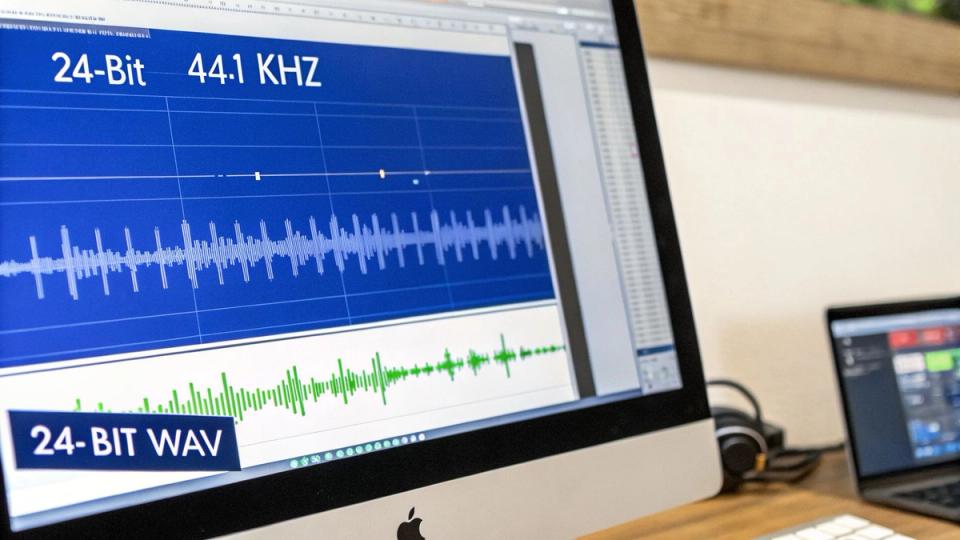
Bit depth – like 16-bit or 24-bit – is about an audio file's dynamic range. Think of it as the number of "steps" available to describe a sound's volume.
- 16-bit audio: This gives you 65,536 steps. It was the standard for CDs and is still common.
- 24-bit audio: This jumps to 16,777,216 steps, providing far more dynamic headroom.
For your premiere channel, make 24-bit WAV files your standard. That extra headroom means the source file is less likely to be clipped or distorted. It gives SoundCloud's transcoding engine a cleaner, more detailed file to work with. This is vital for getting the best possible streaming quality.
When you're creating your own tracks, like by recording your mix, your initial format choice dictates its quality later on. Understanding this ensures your audio sounds its best from the start.
Sample rate is all about frequency detail
The sample rate, measured in kilohertz (kHz), tells you how many times per second the audio was captured. You'll almost always see two main rates: 44.1 kHz and 48 kHz.
- 44.1 kHz: This is the standard for music distribution. It can reproduce frequencies up to 22.05 kHz, covering human hearing.
- 48 kHz: This is the standard for audio in video. The higher frequency range helps keep audio synced with video frames.
For a SoundCloud channel focused on music, 44.1 kHz is the perfect standard. It guarantees compatibility and aligns with how music is distributed elsewhere. Anything higher gives no audible benefit and can create file processing problems.
Bitrate for MP3s: constant vs. variable
When you use MP3s for download gates, bitrate is the term that matters. It measures how much data encodes one second of audio. It’s the single biggest factor in an MP3's quality. A higher bitrate means better quality but a larger file. This is usually expressed as CBR or VBR.
| Bitrate Type | Description | Best Use Case for Channel Owners |
|---|---|---|
| CBR (Constant Bitrate) | Uses the same amount of data for every second of audio. | Predictable file sizes and universal compatibility. A 320kbps CBR MP3 is best for download gates. |
| VBR (Variable Bitrate) | Uses more data for complex parts and less for simple ones. | Can be more efficient, but CBR is safer for maximum compatibility. |
For your download gate strategy, a 320kbps CBR MP3 is the professional move. It delivers excellent quality at a tiny fraction of a WAV's file size. This simple technical choice helps you collect more emails and social proof through gated downloads.
See how SoundCloud handles your audio file uploads
A common misconception is that your uploaded WAV or MP3 is what listeners hear. In truth, every file goes through SoundCloud's system in a process called transcoding. This is a non-negotiable step that standardizes your audio for streaming. It ensures smooth playback for everyone, regardless of their connection.
Understanding this is key to managing premiere quality. It helps you set realistic expectations for your channel and for submitting artists. Your job is not to get a lossless file to the listener. Your job is to give SoundCloud’s machine the best source material to work with.
SoundCloud's transcoding engine explained
When you upload a track, SoundCloud's servers convert it into a few compressed formats. They do this to create different quality options for different listeners. Your original file is never streamed directly. For most of your audience, this means your track plays as a 128kbps MP3. This bitrate balances quality and file size for mobile streaming without buffering.
The most important thing to realize is that SoundCloud's transcoding is a one-way street. Once your file is compressed, that lost audio data is gone forever. This is exactly why starting with a high-quality source file is not optional.
High-quality streaming and what it means
SoundCloud offers a "High Quality" streaming option reserved for paying Go+ subscribers. When a Go+ user plays your premiere, they get a better-sounding stream.
- Standard Streaming: Everyone else hears your track as a 128kbps MP3 equivalent.
- High-Quality Streaming: SoundCloud Go+ subscribers listen at 256kbps in the AAC format. AAC is a more modern codec than MP3, so it can sound better at a similar bitrate.
Even for these premium listeners, the audio is still compressed. The source file you upload is converted into a different, higher-quality lossy format. Obsessing over whether to send a WAV or MP3 is pointless. SoundCloud makes that decision for you. If you need help, learn more about converting a WAV file to MP3 with our tool.
Your job is to feed the transcoder
Think of SoundCloud's transcoder as a photocopier. A crisp original document (your WAV file) produces a clear copy (a decent 128kbps stream). A fuzzy document (a low-bitrate MP3) will produce an even worse copy. This is why your submission policy should demand a high-quality lossless file. Ideally, this is a 24-bit, 44.1kHz WAV. By giving the transcoder maximum information, you minimize quality degradation during compression.
Set your premiere submission and download gate policy
Turning technical details into a solid policy is what separates a smooth channel from a chaotic one. Deciding between WAV or MP3 is a business decision. It shapes how artists and fans see you. The best approach balances two different needs. You need the highest quality file from the artist. You also need to give fans a fast download.
Your professional submission standard
For every premiere or repost, you need a strict "WAV only" rule. This is about quality control. When an artist or label pays for a premiere, they expect you to respect their master recording. That starts with the file you receive. Your official requirement should be a 24-bit, 44.1kHz WAV file.
- 24-bit depth provides necessary dynamic headroom.
- 44.1kHz sample rate is the standard for digital music.
When you put this standard on your booking page, you eliminate back-and-forth emails. It instantly positions your channel as a serious operation. A platform like Premierely lets you build this rule into your submission form.
Policy in Action: Your submission form should state: "Please upload a 24-bit, 44.1kHz WAV file. We cannot accept other formats (like MP3 or M4A)."
Your download gate and audience experience policy
While WAV is king for submissions, it’s a bad choice for download gates. Forcing your audience to download a 60MB file is a fast way to kill conversions. For any track offered through a download gate, use a 320kbps CBR MP3. This format is the sweet spot. The audio quality is fantastic for listening, but the file size is tiny. That means a quick experience for your fans. Faster downloads mean more people will complete the gate, whether it's giving an email or following you. Find out more in our guide on how to set up a SoundCloud email gate.
The music industry’s own shift proves fans choose convenience. In the Netherlands, streaming revenues hit €278 million in 2024, accounting for 83% of the industry's income. This growth is built on accessible formats like MP3. You can see more stats on Dutch music industry trends on hardnews.nl. The data is clear: for wide distribution, convenience wins.
Automate your file management and upload workflow
Manually managing audio files for dozens of premieres leads to burnout. Chasing artists for the right format and juggling Dropbox links wastes time. This is a messy, error-prone process. A system can fix this. Imagine a label submitting a master WAV file through your branded booking page. The file is stored securely, and the system automatically sends it to SoundCloud.
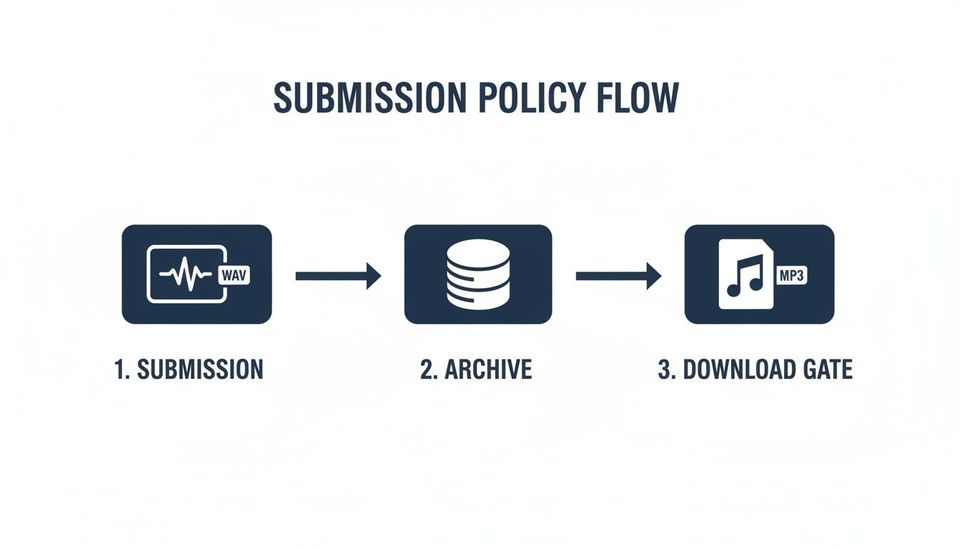
The path is clear: accept the high-quality WAV, archive it, and serve a fast MP3 through your download gate. All of this can be automated.
Centralize submissions to eliminate errors
The heart of this automation is a single entry point for every submission. Replace DMs and emails with a dedicated booking page where you set the rules.
- Require WAV Files: Your booking form can be set to only allow WAV uploads. This stops artists from sending low-quality MP3s.
- Secure Cloud Storage: Once submitted, the master WAV is stored in the cloud. It is linked directly to that specific booking.
- Automated Scheduling: The submission lands directly on your premiere calendar.
This system replaces a messy, manual habit with a clean, structured booking process. For channels managing a large library, a SoundCloud audio downloader can help keep content organized.
The power of automated uploads and gated downloads
True automation handles the entire premiere from start to finish.
A premiere booking platform like Premierely is designed for this model. It turns premiere requests into a professional booking system instead of an email backlog.
With an automated system, the platform handles the final, crucial steps:
- Scheduled SoundCloud Posting: At the premiere time, the system uploads the master WAV file directly to your SoundCloud channel.
- Download Gate Integration: For download gates, you provide a link to a 320kbps MP3. This ensures a quick download for your listeners.
This workflow can reduce your booking admin time from hours to just minutes. This lets you focus on growing your channel. For a deeper dive, check out our guide on how to automate SoundCloud uploads.
24-bit WAV vs MP3: does bit depth matter?
Bit depth controls how much dynamic range a file can hold. A 16-bit WAV covers about 96 dB between the quietest and loudest sound it can store. A 24-bit WAV covers about 144 dB. That extra headroom is genuinely useful while you are recording and mixing, because it lets you track at safer levels without pushing noise up into the audible range.
Once the track is finished, the advantage mostly disappears. Streaming platforms convert everything to a lossy stream anyway, and a 24-bit master and a 16-bit master usually arrive at the listener sounding identical. Comparing a 24-bit WAV to an MP3 is really comparing two different things: the WAV is the working format, the MP3 is the delivery format.
The practical rule for premiere channels: ask for 24-bit WAV if the artist has it, accept 16-bit WAV without complaint, and only fall back to MP3 when nothing else exists. What you are protecting is the quality of the file going in, because you do not control what happens to it after upload.
SoundCloud bitrate: what you actually get
SoundCloud transcodes every upload. Free listeners get roughly 128kbps Opus, and the HLS stream most browsers receive sits in the same range. SoundCloud Go+ subscribers can get a higher quality AAC stream, and artists on paid plans can enable high quality streaming for their own uploads at around 256kbps AAC.
This is why the format you upload still matters even though nobody hears your original file. The transcoder works from whatever you hand it. Feed it a WAV and it compresses once. Feed it a 192kbps MP3 and it compresses something that was already compressed, which is where audible artefacts come from – the muddy hi-hats and swirling cymbals that make a track sound cheap next to the one before it in a mix.
The other thing bitrate decides is what your download gate can offer. If you gate the original file rather than the stream, your listeners get the full quality version, which is a real reason for someone to hand over an email address. That only works if you collected a WAV in the first place.
Answer your most pressing questions on audio formats
Running a premiere channel means constantly dealing with files. Get the format wrong, and you create headaches. When it comes to WAV or MP3, the right choice depends on the context. Let’s clear up common questions from channel owners.
Should I reject submissions if an artist sends an MP3 instead of a WAV?
Yes. As a professional premiere service, you should politely but firmly enforce your policy. You are protecting the quality of your channel. Explain to the artist that your process needs a WAV file. State your requirements clearly on your booking page from the start. If you must accept an MP3, ensure it's a high-quality 320kbps file. Be warned: you're uploading a lossy format that SoundCloud will compress a second time.
Does the file format affect metadata for my premiere?
No, not in practice. Both WAV and MP3 carry embedded data like artist name and track title. But in a professional premiere workflow, that information is irrelevant. When you upload to SoundCloud, you input this data through its own system. Or, if you’re using a dedicated premiere booking platform like Premierely, the system handles it for you. Your system, not the file, is the source of truth for metadata.
Is there a real audio difference between a WAV and a 320kbps MP3 on SoundCloud?
For most people listening on earbuds, the difference is almost impossible to spot. Once SoundCloud applies its 128kbps streaming compression, the audible gap shrinks dramatically. The real quality drop happens during that transcoding step. Starting with a lossless WAV gives SoundCloud's algorithm the most data to work with. The result is a slightly cleaner final product.
How does my file choice impact my download gate strategy?
Your file choice for WAV or MP3 is critically important here. It directly affects how well your download gate performs.
- WAV files are too big for fan downloads. At over 50MB, they lead to slow downloads and frustrated listeners.
- MP3 files (at 320kbps) are the perfect solution. They are much smaller, offering a fast and convenient download.
A quick download means a higher conversion rate for your gate. You make it easier for fans to follow, repost, or give you their email. It's a small technical choice that helps you collect emails and social proof automatically.
Premierely is the only platform built specifically for the premiere and repost business model, turning your manual processes into a structured, automated system.