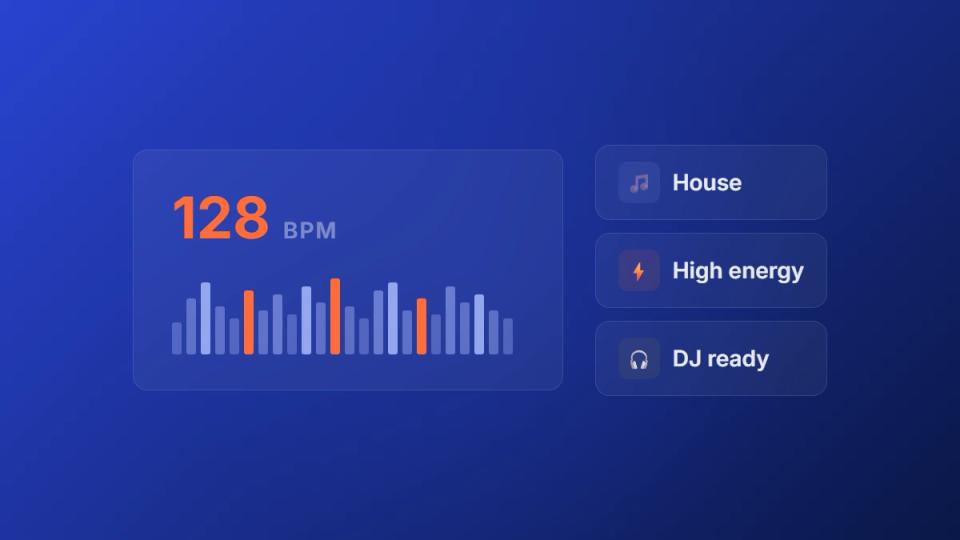
Any serious SoundCloud channel owner needs a reliable BPM analyzer. This tool helps you build cohesive listening experiences that keep followers engaged. When you know a track’s tempo, you can group similar songs, build energy in a playlist, or curate a specific mood for your channel.
Analyze a track now: the free BPM finder and key finder gives you tempo, musical key and Camelot notation for any audio file, straight in the browser with no signup.
Use a BPM analyzer to shape your channel’s sound
Using a BPM analyzer shifts your premiere scheduling from guesswork to a precise method. It is a critical step in treating your channel like a business. With accurate tempo data, you can make informed curation decisions that directly improve your channel’s quality and professional reputation. This process is about taking control of the flow you create for your audience.
If you run a premiere or repost channel, you are a curator. Your ability to deliver a consistent, high-quality stream of music brings in both listeners and submitting artists. Inconsistent scheduling-like placing a high-energy track after a chill one-can break a listener’s immersion. A BPM analyzer is your defense against jarring transitions, giving you data to build sets that flow logically.
Turn tempo data into a curation strategy
The value of a BPM analyzer is clear when you start applying its data. Once you have accurate BPM info for every submission, you can categorize your entire music library more effectively. This structured approach is powerful for anyone managing a high volume of tracks. It turns a chaotic inbox into a searchable, valuable asset.
This level of organization has direct business applications:
- Themed Content Days: Schedule “Melodic Mondays” with confidence, knowing every track falls between 110-125 BPM.
- Energy-Based Scheduling: Group high-tempo submissions for weekend slots when listeners want energetic music.
- Artist Grouping: Notice which artists produce within a certain BPM range, helping you build strong creator relationships.
For channel owners, BPM is more than a technical detail-it is a tool for brand building. A consistent sonic identity, guided by tempo, makes your channel memorable and builds a loyal following.
This data-driven curation is powerful in mature streaming markets. In the Netherlands, streaming accounted for 80% of digital music revenue by 2023. Dutch listeners show an appetite for well-curated content, which suggests that BPM-tailored premieres can capture a dedicated audience. Better organization also makes your operation more efficient, a key part of effective SoundCloud channel management.
Choose the right BPM analyzer for your workflow
Picking the right BPM analyzer is a decision that shapes how efficiently you run your channel. The best tool for you is the one that fits into your existing workflow. Your needs will vary based on your business model and submission volume. An independent label owner sifting through 50+ submissions a month has different problems than a small producer collective.
Your choice falls into three main categories: standalone software, DAW functions, and web-based tools. Each has its place depending on your submission volume and technical needs. For a promotion agency processing dozens of tracks for paid placements, a tool with batch processing is essential. For a producer starting out, the free options inside their DAW are often enough.
Standalone software vs. online tools
Standalone BPM analyzer applications are built for volume. They offer features like batch processing and detailed metadata editing. This is the ideal route for label owners or channel managers who need to process a large number of submissions quickly. Imagine getting a folder with 50 new tracks. With dedicated software, you can process the entire batch in minutes.
Online tools offer pure convenience. They require no installation and are perfect for quickly checking a single track. However, they lack batch processing capabilities and can sometimes struggle with accuracy for complex electronic genres. For a one-off check, they are fine. For a high-volume premiere business, they become a bottleneck.
Here is a look at a typical software interface for BPM detection from the open-source DJ software Mixxx.
Dedicated software often gives you more control over the analysis range. This control is crucial for avoiding the double-time or half-time errors that plague automated systems.
DAW integration and workflow
For producers and smaller collectives, the BPM detection tools in DAWs like Ableton Live or FL Studio are practical. You are already working in that environment, so analyzing tempo is a natural part of the process. The accuracy for projects created within the DAW is usually perfect.
The main weakness of relying on your DAW is its clumsiness with bulk processing external files. Dragging 50 new submissions into a DAW session one by one is not a practical solution for a busy channel manager. This is where you must weigh convenience against scale.
Your BPM analyzer should reduce your workload, not add to it. If you spend more than a few seconds per track on analysis, your tool is hindering your ability to manage submissions effectively.
The decision comes down to volume and integration. A channel handling 10-50+ submissions monthly needs a dedicated tool with batch capabilities. A solo producer curating a small collective can get by just fine using their DAW. The goal is to get accurate data quickly so you can focus on curating and scheduling great music.
Confirm BPM with manual and automated techniques
Automated tools are fast, but they are not perfect. Learning to manually check a track’s tempo is a necessary skill for any serious channel owner. Trusting software blindly can ruin a perfectly curated premiere schedule with a jarring transition. The real goal is to blend the speed of automation with the accuracy of a trained ear.
An automated BPM analyzer gives you a number in seconds. For most electronic music, this reading is usually correct. But you have to know when to be suspicious. The most common mistake is a double-time or half-time reading, where software mistakes a snare for a kick. This often happens with genres that have complex syncopation.
This process flow shows the main ways you can approach BPM analysis, from fully automated software to manual tapping.
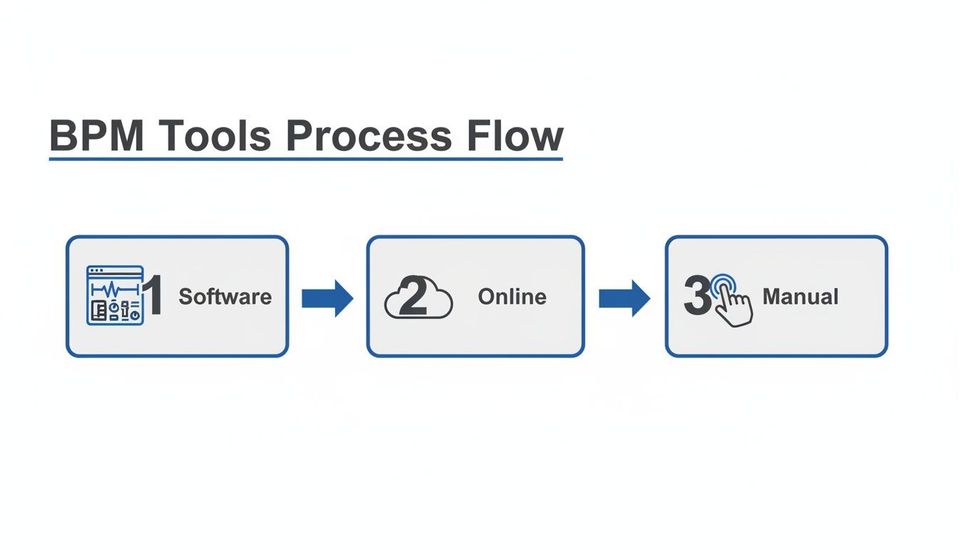
A professional workflow uses automation for speed and manual checks for guaranteed accuracy. These methods are not mutually exclusive.
Master manual BPM verification
The ‘tap tempo’ method is your most reliable tool for verification. It is as simple as it sounds: listen to the track and tap a key in time with the beat. Most DAWs and many online tools have a feature that calculates the average BPM from your taps. This process is essential for double-checking automated results or analyzing tracks with fluctuating tempos.
To get it right every time:
- Find the Downbeat: Lock onto the main pulse of the track, usually carried by the kick drum.
- Tap Consistently: Tap along for at least 8 to 16 beats to give the tool enough data for a stable average.
- Check Against the Software: If the software says 150 BPM but you tap around 75, you have caught a half-time error.
A channel’s reputation is built on consistency. Spending an extra ten seconds to manually confirm a BPM is a small investment to protect the listener experience.
Apply BPM data in a pro workflow
Having accurate BPM data allows for strategic scheduling, which is vital in active music markets. In the Netherlands, the streaming sector hit 78% of all recorded music income. With a huge chunk of Dutch listening time on major platforms, channels can use a BPM analyzer to schedule tracks that align with popular playlist tempos. This could include the 120-130 BPM range common in the Dutch EDM scene.
This data-driven approach helps labels use a premiere booking platform to automate their submissions. It turns premieres into a reliable revenue stream. You can dive deeper into insights about the Dutch music market and its streaming dynamics. This kind of precision separates a hobby channel from a professional premiere business.
Build your curation workflow around BPM data
Getting an accurate BPM is only half the battle. The real value comes when that data shapes your curation decisions and sharpens your channel’s identity. A structured workflow turns raw tempo numbers into a powerful tool for keeping listeners engaged. It is about building a system that makes finding the perfect track for any slot quick and automatic.
For indie label owners and event promoters, this means organizing submissions around BPM and other key metadata. Instead of a chaotic inbox full of untitled MP3s, you create a searchable, logical catalog. Imagine pulling together a themed premiere day like ‘Deep House Thursdays’ featuring tracks only in the 120-125 BPM range. That consistency builds audience loyalty.
Organize your music library with BPM
Effective organization starts the moment a new track arrives. After running it through a BPM analyzer, your next step should be embedding that data into the file’s metadata. Most audio software lets you edit ID3 tags to include BPM, key, genre, and mood. This simple habit transforms your library from a messy folder into a filterable database.
Need a chilled, melodic track around 95 BPM in A-minor? A properly tagged library gives you options in seconds. This level of organization separates amateur channels from professional ones, especially when managing high submission volumes. Once your tracks are analyzed, these BPM insights become valuable for effective Spotify playlist curation.
Connect curation to business goals
A well-paced schedule driven by BPM data can directly affect your ability to collect payments. Take Dutch listeners, for example-they are highly engaged, with streaming accounting for 80% of the country’s 2023 music industry revenue. Crafting playlists with specific BPM ranges, like a 90-110 BPM chill house selection, can improve engagement on platforms where listeners seek immersion.
Using BPM to create a predictable listening experience justifies the prices you set for premiere and repost slots. Artists are paying for access to an audience that trusts your curation.
This systematic approach makes your channel a more valuable partner for artists. When you automate your premiere process, you’re not just avoiding administrative headaches; you’re building a reliable platform. A steady flow of well-curated music keeps listeners coming back, making your premiere slots more desirable. You can learn more about how to automate SoundCloud premieres and build a more efficient system.
Schedule better premieres with BPM insights
You have nailed down how to find a track’s BPM. Now, this is where the analysis becomes part of your business strategy. When you start weaving tempo data into your premiere schedule, you’re not just uploading tracks-you’re curating an experience. This is how you transform your channel into a professional operation.
An artist submits a track through your booking form. You run it through your BPM analyzer and see it is a high-energy track at 140 BPM. Your schedule shows an open slot tomorrow, but it is after a chilled, 80 BPM ambient piece. Dropping the 140 BPM track there would create a jarring shift for your listeners. Instead, you slot the new track into a weekend spot, grouping it with other energetic music.
Turn curation into a premium service
This thoughtful scheduling is what artists are paying for. They are not just buying an upload; they are buying access to your carefully cultivated audience. When you can show artists a clear, data-driven approach to how you build your channel’s flow, you can confidently charge premium prices. It also helps you set premiere prices and collect payments automatically.
You are no longer just selling exposure; you are selling expert placement. This professional approach, built on solid BPM data, elevates your channel from a promo service to a respected tastemaker.
A system that integrates this data automates what you are likely already doing manually. It is time to replace DM requests with a booking form. Over time, this process builds a more valuable channel. Knowing the tempo of your content can even inform the best time to post YouTube videos to catch your audience when they are most receptive.
Connect BPM to channel growth
A consistent, well-paced schedule managed by BPM directly fuels audience growth. Think about features like download gates. When the listening experience is smooth, people are more likely to engage. A well-placed premiere makes them want to follow, like, or repost a track to get that download.
This creates a powerful feedback loop:
- Better curation: BPM data helps you build a more professional listening experience.
- Increased engagement: Listeners stick around and interact with music that fits the mood.
- Audience growth: Features like gated downloads convert that engagement into new followers and social proof.
This process turns raw tempo data from a BPM analyzer into a cornerstone of your business. It lets you build a better product, justify your pricing, and grow your audience more effectively. If you are serious about your channel, find more strategies for running a successful SoundCloud premiere operation.
Get answers to your BPM questions
Even with the best tools, questions will arise as you refine a new workflow. Here are some common ones that come up when using a BPM analyzer for SoundCloud curation.
How accurate are online BPM tools?
For most electronic music with a solid 4/4 beat, they are remarkably good. If you are analyzing straightforward house or techno, an online analyzer will be correct over 95% of the time. They start to have trouble with complex rhythms or tracks that change tempo. In those cases, you might get a double-time or half-time reading. A quick manual check is always a smart idea.
Will a BPM analyzer damage my audio files?
No. A BPM analyzer never alters your audio. It only reads the data to figure out the tempo. When it writes the BPM value to the file’s metadata, it is just adding information to the file’s tag. The original audio itself is completely untouched. Think of it like putting a sticky note on a folder.
What is the best way to handle tracks with multiple tempos?
This is a great question. Most automated tools will either give you an average BPM or pick the tempo from the dominant section. The best professional approach is to listen and decide which tempo best represents the track’s main energy. Once you decide, you can manually set that BPM in the metadata. For scheduling, add a note in your system like ‘95 BPM / transitions to 120 BPM‘ to place it perfectly.
The point of a BPM analyzer is not just to get a number; it is to gather intelligence to make informed curation decisions. This protects your channel’s professional reputation and keeps your listeners returning.
For any SoundCloud channel owner who treats premieres and reposts like a real business, baking BPM data into your workflow is non-negotiable. It helps you deliver a more consistent, high-quality experience. It also provides a more valuable service to the artists you work with. The goal is to get past manual guesswork and build a system you can rely on.
Juggling submissions, chasing payments, and scheduling uploads should not be a chaotic mess of DMs and spreadsheets. Premierely is built for channel owners who treat premieres and reposts as a business, letting you accept track submissions, collect payments, and schedule uploads from one dashboard. Check out the premiere booking platform built for channel owners.