Free downloads FL Studio matter because a lot of tracks hitting your inbox were started with free tools, free samples, or a free template someone found at 2 a.m. That isn't a problem by itself. The core issue for a SoundCloud premiere channel is whether those free assets are legal, usable, and solid enough to support a release with your brand attached.
I run this from the curator side. The best submissions usually aren't the ones with the biggest plugin folder. They're the ones built on clean sources, finished with intent, and delivered without licensing surprises. If you want better premieres and fewer copyright headaches, you need a clear standard for how artists get FL Studio, where they source sounds, and what they can use commercially.
Get FL Studio legally for free
The cleanest answer to free downloads FL Studio is simple. Start with the official trial from Image-Line, not a mirror site, torrent, or repack.
That matters because cracked DAWs create two problems fast. First, they break. Second, they put your channel in a bad spot when a submitter sends a track built on unstable or pirated software.
Image-Line's own forum reported 352,354 FL Studio trial downloads across platforms, averaging 71,435 downloads per day, with 296,065 on Windows and 61,100 on macOS as of Sunday, January 27th in the forum post. The same post also noted 238,966 manual usage instances after download, which shows active follow-through rather than casual curiosity. You can review the forum post directly on the Image-Line forum trial download thread.
Treat the trial like a real production tool
A lot of producers still talk about the FL Studio trial like it's a toy. It isn't. For a premiere submission, it's enough to build, arrange, mix, and export a full track.
For channel owners, that's useful because it means a submitter doesn't need a paid DAW before they can make something release-ready. The barrier to entry is low, but the output can still be serious.
Here's the practical view:
- Good for writing full tracks – Artists can produce complete ideas, bounce demos, and send masters for consideration.
- Good for submission cycles – If a producer is testing records before an EP rollout, the trial is often enough to finish promo material.
- Bad for sloppy revision habits – If a project depends on reopening unfinished sessions later, the producer needs a clearer plan or a paid version.
Practical rule: If an artist submits a strong export and clean metadata, I care less about whether they used a trial and more about whether they can supply revisions on request.
What to tell artists before they submit
If you accept music from newer producers, make your submission notes direct. Tell them to get FL Studio from Image-Line only. Tell them to export final audio before submission. Tell them not to rely on random installers from forums or file hosts.
That removes a lot of drama early.
A short pre-submission checklist helps:
- Download from the official source – Avoid third-party installers.
- Export the final version before sending – Don't submit a track that only exists as a fragile project file.
- Keep stems ready – If the vocal is too loud or the intro needs a bar cut, stems make fixes possible.
- List every third-party plugin used – You may need that later if the artist has to revise the track.
Why this matters for premiere channels
Premiere channels sit between producers and an audience. You're not just posting music. You're attaching your channel name to the release.
That changes the standard.
If an artist built the track with a legal FL Studio setup, your first risk drops. You still need to check samples, templates, and rights. But at least the production chain started in a legitimate place, which is more than you can say for many inbox submissions.
Source high-quality free sample packs and presets
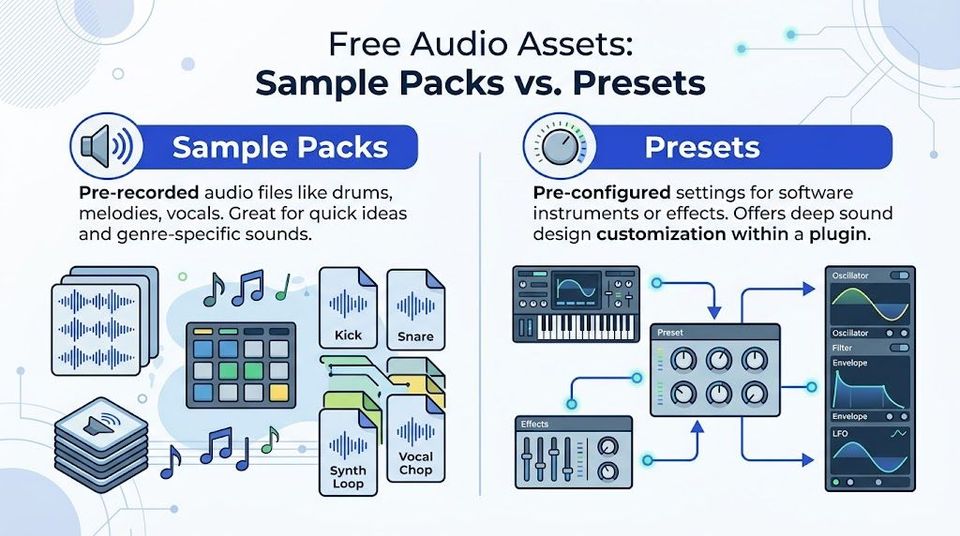
The software is only half the story. The sound of a track usually comes down to the source material. In practice, free packs fall into two buckets. Some are useful. Others are recycled junk with weak drums, overprocessed loops, and no licensing clarity.
Image-Line offers free legacy data packs with classic samples, and communities such as Myloops provide over 6GB of free, royalty-free WAV loops and MIDI files for dance music producers through the FL Studio download ecosystem described on the official FL Studio download page. That's enough to build a workable starter library if the producer knows how to choose carefully.
Know what you're downloading
A producer who says "I downloaded free sounds" may mean three very different things. Those assets don't behave the same way in a session.
| Asset type | What it is | Best use | Main risk |
|---|---|---|---|
| One-shots | Single drum hits or stabs | Building custom drums and fills | Weak source quality |
| Loops | Pre-made drum, melody, or texture phrases | Fast sketching and layering | Overused sounds |
| Presets | Saved synth or effect settings | Faster sound design inside plugins | Missing plugin compatibility |
| MIDI | Note data, not audio | Rewriting melodies with your own sound | Generic arrangements |
The producers who send stronger premieres usually use free packs as raw material, not as a finished identity. They chop loops, replace drums, resample textures, and rebuild MIDI with their own synth choices.
That approach matters for curation. If five tracks in your queue use the same untouched free vocal loop, your channel starts sounding interchangeable.
Build a shortlist of trusted free sources
I like free libraries that are easy to audit. That means the pack states what's inside, whether it is royalty-free, and who made it.
Good starting points include:
- Image-Line legacy packs – Useful for classic sounds, old-school drums, and FL-native workflow.
- Myloops freebies – Better suited to dance music producers who need WAV loops and MIDI that drop into genre-specific projects.
- Curated pack roundups – Helpful if you want your artists to start with a narrower style palette.
If you're building a style-specific resource page for your roster, genre examples help more than giant "everything" packs. A techno channel needs very different starter assets than a future bass premiere page.
For producers making bass music or drum-heavy club records, this guide to a drum and bass sample pack is a solid reference for how to think about source material by genre instead of downloading random folders.
Clean free assets beat huge free assets. A small folder of usable kicks, hats, bass presets, and MIDI ideas is worth more than a giant dump you'll never sort.
How to judge a free pack before using it on a release
You can usually spot weak packs in minutes. I tell artists to test a free download the same way they'd test a demo in the inbox.
Look for these signs:
- Naming is clear – Files are labeled by key, tempo, or type.
- The pack has a use case – It fits a genre or workflow instead of trying to cover everything.
- The audio is dry enough to shape – Heavy mastering on samples makes them hard to mix.
- The terms are visible – If the creator says "royalty-free," save that page or screenshot it.
What doesn't work:
- Packs with no creator info
- Reuploads on file-sharing sites
- Folders packed with obvious rips
- Templates bundled with unnamed samples
A premiere channel benefits when artists work from cleaner materials. Better raw sounds lead to fewer mix issues, fewer takedown worries, and a stronger channel identity over time.
Expand your sound with free VST instruments
Free sample packs help, but they won't cover everything. Sometimes a track needs a sharper synth, a better piano, or a drum plugin that responds more naturally than stock sounds.
That's where legal free VST instruments come in.
Use free plugins, not cracked ones
A VST instrument is a plugin that adds new playable sounds inside FL Studio. A VST effect processes audio after the sound is already there. Both can expand what a producer can do without paying upfront.
For a premiere channel, the legal point matters more than the technical one. Cracked plugins are a bad bet for three reasons:
- They can break sessions – Missing plugin states lead to recall problems when revisions are needed.
- They can carry malware – That risk isn't worth one synth preset.
- They create business exposure – If a release turns into a dispute, nobody wants to explain a cracked toolchain.
I don't reject a track because it used free plugins. I get cautious when the producer can't clearly name what they used, where it came from, or whether they can reopen the session.
Install only from known plugin sources
A simple plugin routine beats a huge plugin collection.
Use this workflow:
- Download from the developer or a known plugin marketplace
- Install the correct plugin format for your system
- Scan the plugin inside FL Studio
- Save a test project
- Reopen it before using that plugin on a real submission
That last step catches a lot of problems early.
If the producer wants realistic drums without spending money, this roundup of a free drummer VST is useful because it frames the choice around musical fit, not just "most free stuff possible."
For a broader shortlist, this guide to free VST plugins is a good companion when artists need legal tools that don't drag a session down.
If a plugin crashes on a blank test project, it has no place in a release session.
Keep plugin management boring
Boring is good here. Producers get into trouble when every project depends on obscure freeware from dead websites.
A stable setup usually looks like this:
- A handful of dependable synths
- A few utility effects
- One or two specialist plugins for drums or texture
- Clear version control on installed plugins
That makes revisions possible. It also helps if a label asks for a version without vocals, radio edit, or cleaner master after the premiere date is already booked.
A walkthrough can help if someone on your roster is new to plugin setup:
The producers who last longest on premiere channels usually don't have the biggest setup. They have the most repeatable one.
Navigate licensing to avoid legal risks
A common failing point for most free downloads FL Studio advice is apparent. Lists of templates and packs are everywhere, but legal clarity usually isn't.
That gap matters more for a premiere channel than for a hobby producer. Once you upload someone else's track to your SoundCloud, you aren't just listening to it. You're distributing it under your brand.
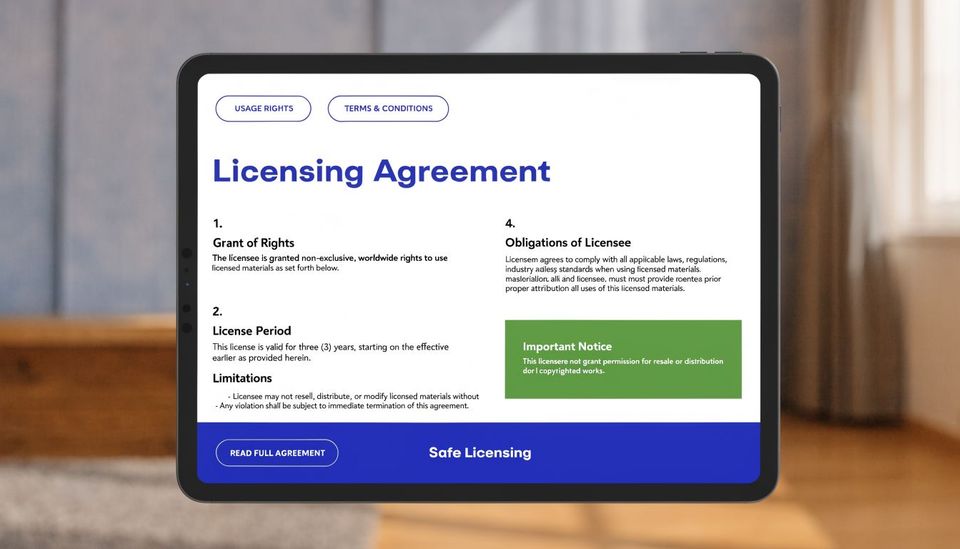
Many websites offer free FL Studio project files, but almost none clarify commercial usage rights. That legal gap is outlined in the WA Production template roundup discussion. The core problem is simple. A producer may use a free template for learning, then release a derivative track commercially without clear permission.
Separate royalty-free packs from free FLP templates
These two categories get mixed together constantly, but they are not the same.
A royalty-free sample pack usually gives direct permission to use included sounds in commercial music, subject to the pack's terms. A free FLP template is often a project file meant for learning arrangement, mixing, or sound design. That doesn't automatically mean the included samples, melodies, presets, or project structure are cleared for release use.
Here's the practical difference:
| Resource | Safer for commercial release | Why |
|---|---|---|
| Royalty-free sample pack | Usually yes, if terms say so | Permission is typically stated |
| Free MIDI pack | Often yes, but verify terms | MIDI itself may be licensed |
| Free preset bank | Often yes, but plugin rights still apply | Sound settings aren't the whole track |
| Free FLP template | Often unclear | Project may contain restricted content |
If you're accepting premiere submissions, don't treat "free" as a license category. It isn't one.
Add a licensing screen to your submission process
Every serious channel needs a small rights check before posting. It doesn't need to be dramatic. It does need to be consistent.
Ask for these confirmations:
- Original production – Did the artist create the track, or is it built from a template?
- Sample rights – Are all samples cleared for commercial use?
- Third-party vocals – Is there written permission or a valid license?
- Preset and plugin source – Were all third-party tools obtained legally?
- Co-producer approval – Does everyone involved approve the upload?
Submission policy: Reject any track where the producer says, "I found the FLP online and changed a few things."
That sentence is a warning sign, not a workflow.
Audit risky submissions before they go live
Some tracks deserve a second look even if they sound great. I get more cautious when I hear a familiar demo melody, a template-style arrangement, or a pack vocal that's been left untouched.
A quick audit helps:
- Ask for the asset list – Samples, vocals, presets, templates.
- Check the release intent – Free bootleg, label promo, monetized release, or official premiere.
- Request proof if anything is unclear – A license page screenshot is often enough.
- Hold the upload if the answer is vague – "It should be fine" isn't a clearance process.
If you're trying to get your head around broader platform enforcement, this piece on music copyright on YouTube is useful context. It's about YouTube, but the core lesson carries over. Distribution platforms react to rights problems after upload, not before your inbox gets messy.
This is not optional for channels charging for premieres or repost support. Labels are trusting your page with unreleased music. If your intake process ignores rights, you're running a booking business with no quality control.
Use free assets to grow your channel
Free assets don't need to stay on the producer side. A channel owner can turn them into audience tools, if the rights are clear and the pack is built carefully.
The best version of this is small and specific. Put together a mini pack for your niche using assets you have the right to redistribute, or create your own original drums, FX, MIDI, or template-style starting points from scratch. Then tie that pack to a gated download so listeners trade an action for access.
That action can be a follow, repost, comment, like, or email signup. The point isn't vague "growth." The point is building a contactable audience and stronger social proof around each premiere.
Build a pack your audience actually wants
Generic folders don't work well. A focused freebie does.
Examples that fit a premiere channel:
- Label-style drum toolkit – Kicks, tops, rides, and FX shaped around your niche
- DJ intro tools – Risers, impacts, and transitions for radio edits and opening sections
- Melodic starter MIDI – Chord progressions and arp ideas that match your channel's sound
- Promo-ready rack presets – Channel strips or mixer presets you built yourself
For inspiration on how downloadable music assets connect to channel strategy, this guide to downloads free beats is useful because it frames the offer around audience actions rather than random file sharing.
Tie the asset to the premiere business model
A premiere channel already has attention. The missed opportunity is failing to capture anything from that attention.
A gated free pack can support the release cycle in practical ways:
- Before a premiere – Offer the pack to warm up traffic around the announcement
- On release day – Turn listeners into followers or email subscribers
- After the upload – Keep collecting interest from long-tail plays
That works especially well for labels running regular premieres. Each upload promotes the track and adds another entry point into your own audience funnel.
If you're running premieres or reposts as a real business, Premierely gives you one place to accept track submissions, collect payments through Stripe Connect, schedule uploads, automate SoundCloud posting, and use download gates that collect emails or require likes, reposts, comments, and follows. It's built for channel owners who want a structured booking system instead of an inbox full of loose files and missed release dates.