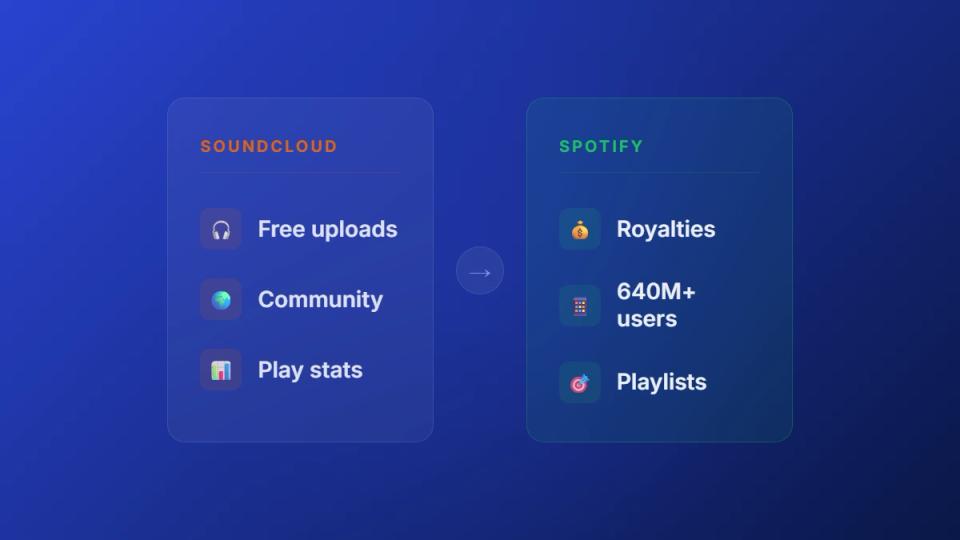
Moving tracks from SoundCloud to Spotify is a key part of a modern release strategy. SoundCloud is the launchpad for building initial hype with premieres and reposts. Spotify is the amplifier that scales that buzz to a global audience. This guide explains how to manage that transition professionally.
Use SoundCloud and Spotify for different release goals
Treating SoundCloud and Spotify as separate worlds is a missed opportunity. Smart labels view them as two connected stages of a single release campaign. This dual-platform approach helps electronic music artists and labels build real momentum.
Build hype on the launchpad and scale on the amplifier
SoundCloud is your launchpad. It is where new music finds its first footing within a community of fans and tastemakers. Premiere channels introduce your track to a hungry, engaged audience. This first wave of plays, likes, and comments is crucial social proof. Strong reaction on SoundCloud validates a track’s potential before you push it to a wider market.
Spotify is the amplifier. Its large user base and algorithmic playlists turn that initial energy into sustained, global reach. Data makes this clear. For example, Spotify holds a massive market share in many regions. A SoundCloud-first strategy builds targeted heat before scaling up on a major streaming platform.
To get a better sense of how these two platforms serve different strategic purposes, look at the roles they play.
See the role of each platform in your release strategy
| Phase | SoundCloud Role (The Launchpad) | Spotify Role (The Amplifier) |
|---|---|---|
| Pre-Release | Building anticipation with private links for DJs, tastemakers, and premiere channels. | Pitching to editorial playlists and pre-save campaigns. |
| Launch Week | Premieres and reposts on key channels to create a concentrated burst of initial hype. | Driving traffic to the official release, triggering algorithmic playlists like Release Radar. |
| Post-Launch | Continued promotion through repost networks and download gates for DJs. | Long-term growth via Discover Weekly, Radio, and user-generated playlists. |
| Audience | Niche, highly-engaged communities, DJs, and early adopters. | Broad, mainstream listener base focused on consumption and discovery. |
| Goal | Generate social proof, validate the track, and build community buzz. | Maximise streams, reach a global audience, and collect payments automatically. |
This table shows a natural handoff from one platform to the other. Your job is to make that transition as smooth and impactful as possible.
As a premiere channel owner, your role is to manage this critical handoff. You are not just uploading a track. You are deliberately positioning it for success on the world's largest streaming service.
Align your strategy for maximum impact
A well-coordinated move from SoundCloud to Spotify separates a professional release from an amateur one. When labels and artists submit tracks to your channel, they are looking for that early traction. Running your operation through a premiere booking platform shows you understand this.
Instead of a chaotic inbox, you replace email requests with a booking form. This lets you schedule premieres that align perfectly with an artist’s official Spotify release date. This professional approach transforms your channel from a simple repost service into a genuine strategic launch partner.
To dig deeper into the unique strengths of each platform, check out our complete guide on SoundCloud vs Spotify.
Prepare your track for official distribution
A track just had a massive premiere on your SoundCloud channel. Before that tune can make its way onto Spotify, it needs proper preparation. Walking labels and artists through this process is a huge value-add. It ensures a smooth handoff from your channel to the wider world.
This is not just about sending an audio file. It's about packaging the entire release into a format that distributors will accept.
Deliver high-quality audio and artwork
First, focus on the audio file. You need a high-resolution, uncompressed file for a proper release.
The industry standard is a WAV file (16-bit, 44.1 kHz). Anything less will sound thin on Spotify and will likely get rejected by the distributor. It is a basic quality check.
Artwork is just as critical and has its own set of non-negotiable rules.
- Format: It has to be a high-quality JPG or PNG.
- Dimensions: A perfect square, with a minimum size of 3000 x 3000 pixels.
- Colour Mode: Always use the RGB colour space.
- Content: The image cannot have any URLs, social media handles, or pricing info.
Submitting a track with a low-res image or a compressed audio file signals an amateur release. It undermines the credibility you have worked hard to build.
Understand ISRC and UPC codes
Every official release needs a digital passport. This is where ISRC and UPC codes come in. Their job is simple: track the music and make sure people get paid.
An International Standard Recording Code (ISRC) is a unique fingerprint for a single track. A Universal Product Code (UPC) is the barcode for the entire product, like a single or an EP.
These codes are how royalties get tracked. When a song gets played on Spotify, its ISRC is used to identify who owns the rights. The screenshot below from the official ISRC agency breaks down the structure.
The 12-character code contains info about the country, registrant, year, and track. Most distributors can assign these for you. To get a bit deeper, check out our guide on how to read and manage your audio metadata.
Confirm ownership and clear all samples
This is the final, and most important, checkpoint. Before anything goes to a distributor, you must be 100% certain you own all the rights.
This means having written agreements with any collaborators, producers, or vocalists. Most importantly, it means every single sample in the track has been legally cleared. An uncleared sample is the fastest way to get your track pulled from Spotify.
For labels and artists submitting to your premiere channel, this work should be done beforehand. A structured submission form helps collect this info upfront. This confirms a track is not just good, but genuinely ready for its launch.
Choose your music distributor
A track has its moment on your SoundCloud channel. Getting it onto Spotify requires a music distributor. Understanding this piece of the puzzle makes you a professional partner for artists and labels.
A distributor is the middleman between a finished track and digital stores. They handle delivering audio and metadata, collecting royalties, and providing sales reports. They have made worldwide releases possible for any independent artist.
Know the key players in music distribution
While the list of distributors seems endless, the independent scene revolves around a few key players.
- DistroKid: This is the go-to for prolific artists. You pay a single yearly fee for unlimited uploads. It is simple, fast, and includes tools like automatic payment splitting.
- TuneCore: Another major player with an annual fee for unlimited releases. TuneCore’s detailed analytics make it a favorite for labels that need to dive deep into performance data.
- CD Baby: One of the originals. Instead of a subscription, CD Baby charges a one-time fee per release and takes a 9% commission. This model works well for artists who release only a couple of tracks a year.
Others like Amuse and RouteNote offer their own mix of fees and services. The right choice depends on an artist's budget and release frequency.
Align premieres with distribution timelines
Your premiere channel can be a serious strategic asset. Distributors take a few days to a few weeks for a release to go live on all platforms. That "go-live" date is the key you need to coordinate around.
When a label sends you a track for a premiere, they are also uploading it to their distributor. Using a proper booking system, you can sync your premiere with their official Spotify street date. This is not just a promotion; it is a coordinated launch campaign.
A SoundCloud exclusive that leads directly into a worldwide Spotify release is a professional launch strategy. This turns your channel from a simple tastemaker into an indispensable part of an artist's success.
This coordinated effort is valuable to the artists and labels you work with. You give their track an initial blast of hype on SoundCloud. Then, as that buzz peaks, the track goes live everywhere else.
A premiere booking platform is built for this workflow. It lets you manage submissions, collect payments, and schedule everything from one dashboard. You ensure every premiere is a perfectly timed launch event.
Coordinate your SoundCloud premiere with a Spotify release
Smart channel owners know that moving a track from SoundCloud to Spotify is one coordinated campaign. You are not just uploading a file. You are building hype that carries an artist from a niche premiere to a global release.
The best way to do this is with a ‘premiere window’. This is an exclusive period – usually one to two weeks – where the track lives only on your SoundCloud channel. This exclusivity creates a concentrated burst of plays and comments.
Use the premiere window for your Spotify game plan
During this exclusive period, your mission is simple. Funnel all that initial excitement toward the upcoming Spotify release. The most effective way to do this is by pushing a Spotify pre-save link everywhere.
Pre-saves are a massive signal to Spotify's algorithms. They prove a track has an audience waiting for it before it even goes live.
This timeline shows how a coordinated release flows.
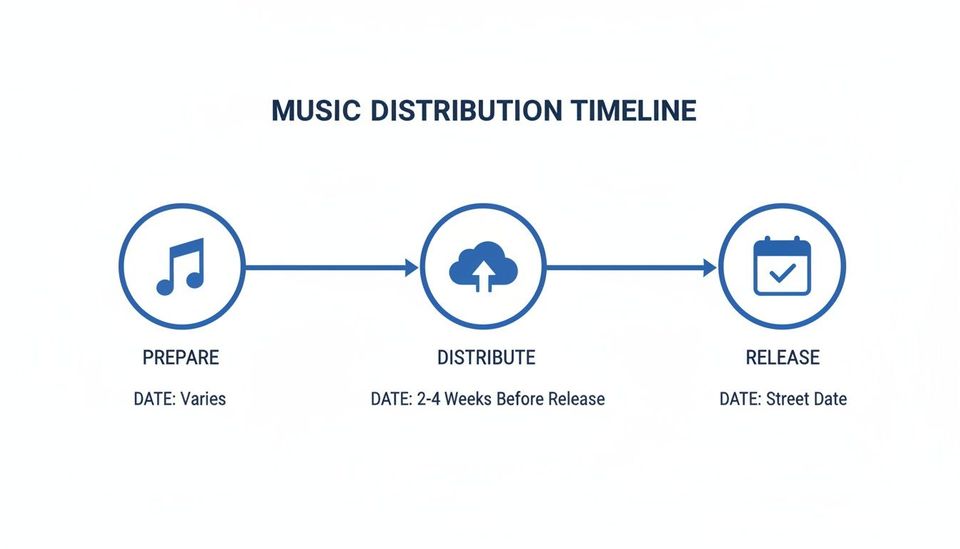
The track gets sent to distributors weeks before the official release. This creates the perfect gap for you to run your premiere and pre-save campaign. A high number of pre-saves can boost a track’s chances of landing on algorithmic playlists. For a deeper dive, check our guide on how to use pre-saves to boost your Spotify launch.
A link management tool like Linkie.bio is useful for this transition. You can create one link that points to the pre-save before the release. It can automatically switch to the live Spotify link on release day.
Keep your schedule straight to avoid conflicts
When you are managing multiple premieres, things can get messy fast. Double-bookings and scheduling conflicts can derail a perfectly planned launch. This makes your channel look unprofessional.
A premiere booking platform becomes non-negotiable here. It acts as a shared calendar for you and the submitting artist. A central dashboard lets you see all your bookings, ensuring your premiere goes live at the perfect moment. This organization transforms your channel into a reliable launch partner.
Move your SoundCloud playlists to Spotify
As a channel owner, you are a tastemaker. Your playlists are the lifeblood of your brand. They are curated assets that have built you a loyal following on SoundCloud.
Moving those playlists from SoundCloud to Spotify is a smart move to expand your reach. It lets you tap into a new audience without starting from zero. But you must transfer the tracklist, recreate the vibe, and get your community to follow you.
A few tools can take the most tedious part of this process off your plate.
Use third-party tools for playlist transfers
Nobody has time to manually search for hundreds of tracks on Spotify. Tools like Soundiiz and Tune My Music are built to do the heavy lifting for you.
The process is straightforward. You connect both your SoundCloud and Spotify accounts. You point the tool to the playlist you want to move and let it work. It finds matching tracks on Spotify based on metadata and creates the final playlist.
A word of warning: these tools are not magic. They rely on clean metadata. Any unofficial remixes, bootlegs, or tracks with different titles on Spotify will not be found. Plan on manually finding 10-20% of your tracks.
To help you pick the right service, here’s a quick breakdown of popular options.
Compare popular playlist transfer tools
Each tool offers a slightly different experience. The best one depends on whether you need a quick transfer or a permanent sync.
| Tool | Key Feature | Pricing Model | Best For |
|---|---|---|---|
| Tune My Music | Simple, user-friendly interface with support for a huge number of platforms. | Free tier with limitations; Premium subscription for unlimited transfers. | Quick, one-off playlist transfers and users who value ease of use. |
| Soundiiz | Advanced features like playlist syncing and managing multiple platforms. | Free tier for single playlist transfers; Premium for advanced features. | Channel owners who want to maintain playlists across both platforms. |
| Songshift | iOS-native app with a clean design and reliable matching algorithm. | Free with limits; Pro subscription unlocks more features. | Curators who primarily manage their music from an iPhone or iPad. |
Any of these will get the job done far faster than doing it by hand. Just choose the one that fits your workflow best.
Optimize and promote your new Spotify playlist
Getting the playlist onto Spotify is just the first step. The real work is making sure people find and follow it. A successful move is more about marketing it to your community.
First, make it look professional. Optimize the playlist for discovery on Spotify's platform. This means creating sharp, custom cover art and writing a compelling, keyword-rich description. Explain what it is for, who it is for, and why your followers will love it.
With the playlist looking its best, promote it relentlessly. Announce it in the descriptions of your new SoundCloud uploads. But your most powerful tool is the email list you have built using download gates from a premiere booking platform. Use it to send your most dedicated listeners directly to your new Spotify home.
Answer common questions about moving music to Spotify
Your SoundCloud premiere is a hit. Getting that track onto Spotify is the natural next step. If you run a premiere channel, you need to know the answers to give artists professional advice.
Let's break down common questions that pop up when moving from SoundCloud to Spotify.
How do royalty splits work for collaborations?
This is a big one. When a track with multiple collaborators hits Spotify, how does everyone get paid? Your distributor handles it, not Spotify.
Platforms like DistroKid or TuneCore have payment splitting features. When the artist uploads the track, they specify who gets what percentage. The distributor automatically sends the money directly to each person.
As a channel owner, push artists to get these splits agreed upon before distribution. It prevents major headaches and payment disputes down the line.
SoundCloud plays have no bearing on Spotify royalties. They are completely separate. Money earned on Spotify comes only from plays on Spotify.
Can I upload unofficial remixes or bootlegs to Spotify?
Absolutely not. This is a hard line that separates the two platforms. SoundCloud might be a grey area for unofficial flips and bootlegs, but Spotify is black and white.
Every single track you upload to Spotify must have 100% cleared rights.
That means you need written permission from the original owners of every sample, vocal, or melody. If you try to sneak an uncleared remix through, your distributor will likely reject it. It might get taken down later, risking a permanent ban for the artist.
What happens to my SoundCloud play counts and comments?
They stay right where they are. When you move a track to Spotify, none of the social proof comes with it. The Spotify release starts from zero.
The two platforms do not talk to each other. This is exactly why a coordinated release strategy is so vital.
You use the hype from the SoundCloud premiere to drive traffic to the Spotify version. The goal is not to transfer the stats; it is to transfer the audience. You are turning SoundCloud buzz into Spotify streams and pre-saves.
Premierely is built for channel owners who treat premieres and reposts as a business. It lets you accept track submissions, collect payments, and schedule uploads – all from one dashboard. This automates what you are already doing manually, ensuring every premiere is a perfectly timed launch event.