The term Spotify streams counter refers to tools that tally your song plays. At its core, it tracks every time someone listens to your track for 30 seconds or more. This is the official number Spotify uses to count a stream. While many third-party apps exist, they all pull data from one source. The only definitive source of truth is your Spotify for Artists dashboard. This guide explains how to use that data effectively.
The best Spotify stream counters and checkers in 2026
A Spotify stream counter shows how many times your tracks have been played. Spotify for Artists is the only official source and updates daily. Third-party counters pull from the public play count on each track, so they can show live numbers faster, but they only see what Spotify makes public.
MyStreamCount is the most widely used free checker. Paste an artist or track link and it returns total streams plus a rough revenue estimate. It reads public data, so the figure trails your official dashboard slightly.
Artist.tools tracks stream counts live and is built for watching a release in its first days. It refreshes far more often than the official dashboard, which makes it useful on launch day when you want to see whether a playlist add is moving anything.
Soundcamps runs a simple stream checker aimed at independent artists, with follower counts and monthly listeners alongside the stream total. Good for a quick look at another artist before you approach them.
Trackify reports play counts and listening minutes and leans more analytical than the rest, which suits anyone comparing several releases at once.
volt.fm shows play counts next to discovery data, so you can see what else your listeners are playing. Handy when you are trying to work out which scene a track is actually landing in.
Kworb is the closest thing to a public chart archive. It tracks daily Spotify chart positions and cumulative streams for bigger artists, so it is more of a benchmarking tool than a counter for your own catalogue.
Use a third-party checker for speed and for looking up artists who are not you. Use Spotify for Artists for anything that has to be right, including royalty reconciliation and anything you show a label.
Find your official stream count in Spotify for Artists
For any independent label or promotion channel, your stream count is your pulse. It is the clearest signal of how your music is connecting with listeners. These numbers directly impact playlist placements, algorithm attention, and royalty payments. However, not every play is counted.
Spotify has a direct rule: a listener must play a track for at least 30 seconds. If they skip at the 29-second mark, the play is not registered. This rule is the foundation of their analytics system. It is designed to separate real engagement from accidental clicks or quick previews. It measures genuine listener intent.
Why Spotify for Artists is your primary data source
You will see many services offering to show your stream statistics. They are all using data that comes from Spotify itself. Think of your Spotify for Artists dashboard as your direct, unfiltered connection to the platform.
It is the definitive source for several key reasons:
- It is official data: The numbers come directly from Spotify's servers. There is no middleman or interpretation. What you see is what they see.
- Built-in fraud filtering: Spotify runs sophisticated checks to remove fake streams from bots. The count in your dashboard is what remains after these plays have been filtered.
- Deep analytics: It is more than just a raw number. Your dashboard shows who is listening and where they are. It also shows how they found you, whether from a playlist or your link in bio.
- Real-time view for new releases: For the first seven days of a new track, the dashboard provides a real-time stream count. This is critical for tracking launch day momentum.
Treating Spotify for Artists as your main Spotify streams counter means making decisions based on solid information. It is the data you can trust.
Check how Spotify verifies every stream
The 30-second rule is the well-known starting point. It is just the first step in what counts as a stream. Think of that 30-second mark as the ticket to enter. What happens next is a security check to ensure every listener is legitimate.
Behind the scenes, Spotify’s systems analyze every play that crosses that threshold. They look for genuine human engagement. This verification process is designed to protect artists by filtering out artificial streams. It ensures the numbers in your dashboard reflect real people listening to your music.
Spotify acts as a gatekeeper. This flowchart breaks down the basic journey from a listener hitting play to a stream being officially counted.
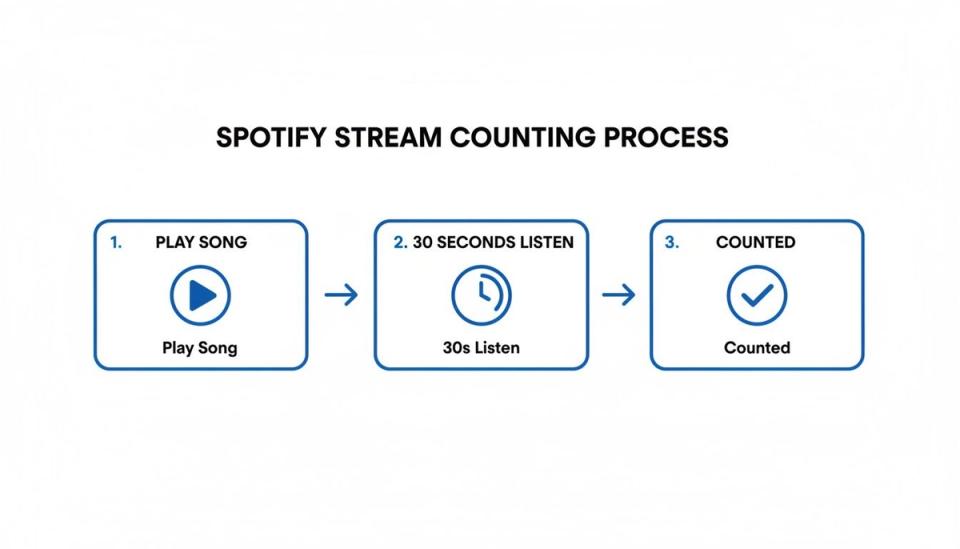
While that visual covers the core rule, the real work happens in Spotify’s anti-fraud system. This system runs constantly in the background to maintain data integrity.
Filter for authentic engagement
Spotify's main defense is an advanced filtering algorithm that is always learning. It acts like a digital detective, looking at playback data for non-human patterns.
This algorithm is trained to spot several red flags, including:
- Endless looping: An account playing the same song repeatedly for hours with no other activity. Real listeners might repeat a song, but not hundreds of times in a row.
- Muted plays: If a track is played for 30 seconds but the volume is muted, the system can flag it.
- Bot-like behavior: Accounts that play thousands of songs for exactly 30 seconds each are quickly identified. Their streams are then invalidated.
When these suspicious patterns appear, the associated plays are removed from your official count. This process is vital for ensuring your data is accurate.
Use the offline listening and data delay reports
Another piece of the puzzle is how Spotify handles offline listening. When a Premium user downloads your music and listens without an internet connection, those plays are not lost. They are stored locally on their device.
Once that user reconnects to the internet, their device syncs with Spotify's servers. All those offline streams are then uploaded and added to your total count.
This syncing process is a main reason your stream counts are not always instantaneous. The system must collect data from millions of users worldwide, including those recently offline. The numbers in your Spotify for Artists dashboard update on a cycle, typically once every 24 hours. It is a verified report from a specific time window, not a live ticker.
Turn stream data into promotional actions
Your Spotify for Artists dashboard is much more than a simple spotify streams counter. Think of it as a strategic control center, packed with insights that can shape your next promotion. Moving beyond the headline number is how you turn raw data into smart decisions for your label or channel.
The platform is built to give you a clear picture of your performance. You can focus on the last 24 hours, seven days, 28 days, or view all-time stats. This flexibility helps you spot both short-term spikes from a new campaign and long-term trends.
Navigate key analytics tabs
When you log in, you will find a few key tabs that break down your performance data. The 'Music' tab is your home base for track-specific metrics. Here you can see how your individual songs, EPs, and albums are performing. You can sort them by streams, listeners, or saves to find your strongest material.
The 'Audience' tab provides a complete look at who is listening. It breaks down your listeners by:
- Age and gender: Understand the core demographic connecting with your sound.
- Top countries and cities: Pinpoint where your fanbase is located around the globe.
- Listeners also like: See which other artists your audience listens to, providing intel for collaborations or ad targeting.
This demographic information is valuable for promotion. A sudden spike in listeners from Amsterdam can guide your next promotional push toward Dutch blogs. It removes guesswork and lets you make data-driven moves.
Interpret playlist and source data
One of the most powerful features is in the 'Music' tab. The 'Playlists' section for any track shows every playlist driving streams to your song. It tells you precisely how many streams each one has generated.
Spotting a track's inclusion on a playlist like 'Discover Weekly' is a clear signal of success. This data shows that your music is connecting with listeners. It also means Spotify's system is actively recommending it to new audiences.
The source of your streams is another critical metric. It shows how people discover your music. This is broken down into active sources (like your artist profile) and programmed sources (like editorial playlists). A high percentage of active streams is a great indicator of a loyal fanbase.
Spotify live stream count: how to see it in real time
For the first seven days after a new track is released, Spotify for Artists gives you a live stream count. This feature helps you track crucial initial momentum. You can watch the numbers increase as your premiere campaign goes live.
This immediate feedback is incredibly valuable. It helps you see the instant impact of your promotional efforts. For channel owners, you can measure the results of a premiere managed through a premiere booking platform. If you see a strong initial push, your launch strategy is working. If numbers are flat, you can adjust your approach.
Address discrepancies in your stream counts
It's a common issue: the numbers on your Spotify streams counter don't match your distributor’s statement. This is almost always normal. It is not a sign that something is broken. It is about how and when different platforms report their data.
The biggest reason for these differences is timing. Your Spotify for Artists dashboard is a near-real-time pulse check, updated roughly every 24 hours. Your music distributor operates on a longer cycle. They typically process numbers monthly or quarterly, after collecting official statements and royalties from Spotify.
Think of it like pending transactions versus a final monthly bank statement. Both are correct but represent different points in the reporting process. Your dashboard is the day-to-day tracker. The distributor report is the official, financially reconciled record.
Why different platforms show different numbers
Beyond reporting schedules, a few technical factors cause variations in your stream counts. Each platform has its own way of pulling and displaying information.
Here are the most common reasons your numbers might not align perfectly:
- Data caching: Many apps temporarily store data to load information quickly. If one platform refreshes its cache more often than another, their numbers can differ temporarily.
- Aggregation windows: One service might define a "day" as midnight to midnight UTC, while another uses a different time zone. These different windows mean they're adding up totals over slightly different periods.
- Anti-fraud filtering: Spotify constantly filters fake streams. Some third-party tools might grab raw data before this filtering is complete, showing an inflated number that Spotify later corrects.
This screenshot of daily charts shows how dynamic stream counts can be. Different tracks can gain thousands of plays in a single day.
These daily fluctuations make comparing data from different time windows tricky. They often lead to these apparent discrepancies.
Use Spotify for Artists as your benchmark
With all these variables, you need a single source of truth for daily monitoring. Your Spotify for Artists dashboard should be that benchmark. It is the most direct and timely data you can get.
While your distributor's report is the final word for royalty calculations, the dashboard is your go-to tool. It is for tracking campaign momentum and making quick decisions.
The key takeaway is that small differences between platforms are expected. Trust your Spotify for Artists dashboard for daily insights. Trust your distributor's statement for official financial reconciliation. Understanding this lets you focus on what matters: reading trends in your data to make smarter moves.
Measure promotion success with stream data
Your stream data reflects your promotional work. For channel owners who run their premieres like a business, the goal is turning a SoundCloud campaign into growth on Spotify. That is when your Spotify streams counter becomes a powerful analytics tool. You're no longer just counting plays; you are identifying what drives them.
A premiere managed through a platform like Premierely should leave a clear footprint in your Spotify data. The process is designed to create a ripple effect. You build momentum on SoundCloud, perhaps using gated download features to collect emails. That energy is meant to transfer to Spotify. Your job is to dive into the data and confirm it happened.
Monitor post-premiere stream velocity
Right after a campaign, watch your stream velocity. This is how fast a track is getting new plays. A successful premiere should trigger a clear spike in daily listeners, saves, and streams within the first 24-72 hours.
Keep a close eye on these indicators in your Spotify for Artists dashboard:
- Daily listeners: A sharp jump is the first sign the SoundCloud audience moved to Spotify.
- Saves: A save means someone added your song to their library. It signals strong interest and guarantees future listens.
- Playlist adds: Look for your track on user-created playlists. This is organic sharing and a powerful signal to Spotify's algorithms.
This is the same principle behind good social media engagement tracking, applied directly to your music. Watching these metrics turns your streams counter from a passive number into an active feedback loop.
A practical workflow for measuring impact
For channel owners, the workflow is straightforward. You start by using a system to replace DM requests with a booking form. Once the premiere is live on SoundCloud, your focus shifts to Spotify for monitoring.
The goal is to connect your promotional actions to actual listener behavior. For instance, did that premiere for an artist from Amsterdam lead to a spike in listeners from the Netherlands? The data will tell you.
This direct cause-and-effect analysis separates professional channel operators from hobbyists. You are not just uploading music; you are running targeted campaigns and measuring the return with hard data. This is crucial for anyone operating a SoundCloud repost service who wants to show concrete results.
Turn data into an actionable strategy
By analyzing your post-premiere data, you can make smarter decisions. If tracks from a certain genre consistently perform well after a SoundCloud push, seek out more artists in that niche.
What if a campaign drives high stream velocity but the save rate is low? That might tell you to adjust your call-to-action in the premiere description. You could explicitly ask listeners to save the track on Spotify. To get ahead of this, check our guide on how to pre-save on Spotify.
This data-driven approach proves your channel’s value to artists. You can show them the results- a clear spike in Spotify streams from your campaign. It transforms your premiere service from a simple promotion into a proven launchpad.
Connect stream counts to artist royalties
Your spotify streams counter is not a direct line to your bank account. It is a common mistake to think a million streams equals a fixed payday. The reality is far more complex. Your stream count is just one element in the recipe that determines your final earnings.
For any artist or label treating music like a business, understanding this is critical.
The cash value of a single stream is always changing. It is a moving target, influenced by who is listening, where they are, and how they are listening. This is why two artists with the same number of streams can receive different royalty payments.
Key variables affecting your payout
Spotify uses a "royalty pool" model. Your earnings are a slice of a larger pie. The size of that slice depends on your share of total streams. Its monetary value is shaped by these factors:
- Listener's subscription type: A stream from a Spotify Premium subscriber is worth more than one from the free, ad-supported plan.
- Listener's country: Payout rates vary significantly between countries. A stream from the United States will typically generate more revenue than one from a developing market.
- Your distribution agreement: Your contract with your music distributor dictates the percentage of royalties you keep. Their fees directly impact your final pay.
It is helpful to think of it like affiliate marketing models. Your streams generate a "commission" from a revenue pool. The final value depends on different performance factors.
Reconcile your dashboard with royalty statements
To get the full financial picture, you need to look at two different places. Your Spotify for Artists dashboard provides near-real-time data on stream volume. Your distributor’s royalty statements provide the final, official financial truth.
Spotify for Artists tells you how many people entered your shop. Your distributor's report tells you how much money you made after costs and variables. This two-source approach is standard in the industry. The dashboard is for tracking promotional impact; the royalty statement is for balancing the books. By understanding how your streams are valued, you can draw a clear line from promotional efforts to your bottom line.
FAQ about the Spotify streams counter
How often does the Spotify streams counter update?
The main stream count in your Spotify for Artists dashboard refreshes about once per day. For the first seven days of a new release, Spotify provides a live, real-time stream count. This tracker updates roughly every two seconds, so you can watch your launch momentum.
Do my own streams count towards my total?
You should not try to inflate your own streams. While a few plays from your own account might be counted initially, Spotify’s system is built to remove artificial streams. If it detects a track on a loop or many plays from one IP address, those streams will be filtered out.
Can I see which playlists are driving my streams?
Yes, and this is where you can find valuable insights. Go to the 'Music' tab in your Spotify for Artists dashboard and select any track. From there, the 'Playlists' section breaks down every playlist your track is on. It shows the exact number of streams each one has delivered.
Why do my streams not match my distributor's report exactly?
This is a common question. The two reports serve different purposes. Spotify for Artists is your daily marketing dashboard for quick, promotional insights. Your distributor's report is the official financial statement. It is calculated monthly or quarterly and represents the final, verified numbers for royalty payments. A small mismatch is normal.
Automate what you're already doing manually: submissions, payments, scheduling, uploads. With Premierely, you can accept track submissions, set premiere prices and collect payments automatically, and schedule uploads from one dashboard. Get started for free at Premierely.io.