If you run a premiere channel, the search for antares autotune free usually starts the same way. A label sends a strong track, the vocal is close, but not quite there. You know the record could land better with a little pitch work, and you also know your channel name sits on every upload.
That puts vocal tuning in the quality control lane, not just the creative lane. The smart move is to use legal Antares options, free companion tools, and a few reliable settings to clean up submissions before they go live. That protects your brand, helps labels trust your ear, and keeps your release schedule from getting wrecked by bad software.
How to get Antares Auto-Tune legally without paying
A strong submission can still miss the premiere slot if the vocal feels a little off. Such is the situation for channel owners. One shaky topline can make a release sound undercooked on upload day, and your channel branding sits next to it forever.
The legal way to test Antares is simple. Use Antares’ official trial options and treat the trial window like a live evaluation period, not a plugin scavenger hunt.

Start with the official trial route
One practical entry point is Auto-Key 2. According to Antares’ Auto-Key page, it offers a 14-day free trial and can detect key, scale, and BPM, then send that information to open Auto-Tune instances in supported DAWs.
For a premiere channel, that matters because trial time disappears fast. If the plugin spends half the test period sitting uninstalled or misconfigured, you learn nothing useful. The goal is to answer one business question quickly. Does this help you screen submissions faster and publish records that sound tighter?
Use the trial with active projects only:
- Install directly from Antares
- Use the official installer and activation flow only.
- Test current submissions
- Run it on tracks already being considered for premiere, not old folders you will never release.
- Measure speed and trust
- Check whether key detection and tuning decisions get easier under deadline.
- Watch stability in your DAW
- A tuning tool that crashes in FL Studio, Logic Pro, Ableton Live, or Pro Tools is not saving you time.
Practical rule: If a free trial does not help you protect release quality during a real submission cycle, it is not worth adding to your stack.
Look for bundled access when you upgrade gear
The second legal route comes through hardware and software bundles. Audio interfaces, production bundles, and creator promos sometimes include entry-level vocal tools or short-term access offers.
That route is often smarter than producers expect. If you already need better input quality, a better mic chain will usually improve results more than aggressive correction later. Start at the source. A cleaner take gives every tuning plugin less repair work. If you are reviewing gear before upgrading, this guide to the best mic for recording is a useful place to compare options.
Here is the trade-off:
| Option | Best use | Main downside |
|---|---|---|
| Official trial | Testing Antares on live submissions before paying | Access ends quickly |
| Hardware bundle | Getting legal tools while improving your recording chain | Included software varies by deal |
| Cracked version | None | Unstable sessions, malware risk, and legal exposure |
Treat tuning as part of quality control
I would not use pitch correction to repaint a weak performance and call it curation. I would use it to catch the small issues that stop a good record from sounding release-ready.
That distinction matters if you run a premiere channel. Better vocal prep improves your hit rate with labels that care about presentation. It also cuts revision emails, shortens approval cycles, and helps your channel sound more consistent from upload to upload.
As your inbox fills up, tuning stops being a nice extra and becomes part of the screening process. Antares can earn its place if the tool helps you keep weak submissions off the schedule and makes stronger labels more comfortable sending you music first.
Use free companion tools for professional results
You don’t need the full paid plugin to improve decisions. One of the most useful free Antares tools is Auto-Key Mobile on iOS.
It solves a common problem fast. A track comes in, the topline sounds good, but nobody is fully sure the vocal, lead, or sampled phrase is sitting in the right key. You can check that before you touch the session.
Use your phone as a fast quality check
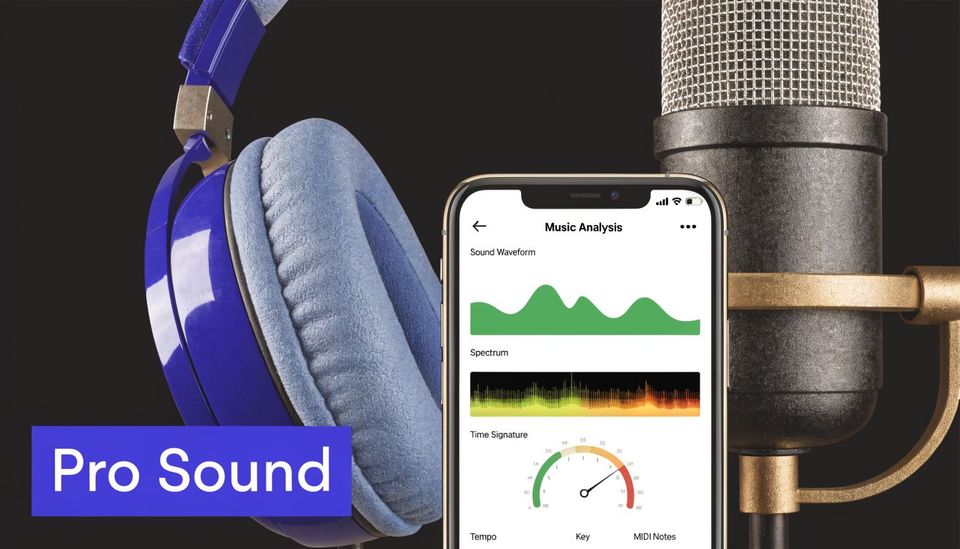
According to the Auto-Key Mobile App Store listing, Auto-Key Mobile is free for iOS, detects musical key and scale in seconds, and can send key and scale data directly to compatible Auto-Tune plugins. Antares says that workflow can boost efficiency by up to 90% in key detection time.
For a premiere channel owner, that’s not a gimmick. It’s a screening tool.
Use it like this:
- Play the submitted track out loud
- Let the app listen to the main section, usually the drop, hook, or strongest vocal phrase.
- Confirm the key and scale
- If the result clashes with what the artist wrote in the folder notes, you’ve found something worth checking.
- Open the DAW only if needed
- Not every submission needs hands-on repair.
- Send data to the plugin
- If you’re already working inside Auto-Tune, that handoff cuts guesswork.
Catch problems before they become public
A lot of vocal tuning mistakes start before the plugin. The wrong key gets entered, the correction grabs the wrong notes, and the whole top line gets that stiff, fake pull.
That’s why free key detection matters more than people think. It helps you make a yes or no decision early.
If a record needs too much rescue work, it may be better to send revision notes than to force a weak vocal across your channel.
There’s a second benefit. You also learn quickly whether the issue is tuning or recording. If the key is right and the vocal still falls apart, the source may be the mic, room, or delivery. If your artists ask why their takes sound thin before tuning, this guide on the best mic for recording is a solid resource to send them.
Where this fits in a premiere workflow
This free app is most useful at three moments:
| Stage | What to check | Why it matters |
|---|---|---|
| Before acceptance | Key consistency | Avoid weak submissions |
| Before light cleanup | Exact scale | Reduce tuning mistakes |
| Before final export | Vocal and instrumental agreement | Protect release quality |
That makes Auto-Key Mobile more than a toy. It’s a fast gatekeeping tool for people who want their uploads to sound deliberate.
How to install and configure Auto-Tune in your DAW
Installation gets overcomplicated because producers mix platform advice, old forum tips, and random videos. The actual path is straightforward if you stay inside the official ecosystem.
Install from the official Antares manager
Start with Antares’ own installer and activation flow. Log in, install the plugin formats your system needs, and let the software place files where your DAW expects them.
After that, open your DAW and run a plugin scan. Most failures happen because people skip that scan or point the DAW at the wrong plugin folder.
Use this checklist:
- Choose the right format
- VST3 works for many Windows and Mac setups.
- AU is the usual pick for Logic Pro.
- AAX is for Pro Tools.
- Restart the DAW
- Some hosts won’t show newly installed plugins until a full restart.
- Rescan plugins
- Force a fresh scan if the plugin doesn’t appear.
- Check permissions
- On some systems, the plugin installs correctly but needs approval in system security settings.
Set up one clean vocal channel first
Don’t drop Auto-Tune into a cluttered chain at the start. Put it on a simple vocal track with minimal processing. That gives the pitch engine the cleanest signal to read.
A reliable order is:
- Raw vocal
- Auto-Tune
- Corrective EQ
- Compression
- Creative effects
If the plugin acts strangely, strip the chain back and test again. Tuning works better when it isn’t reading a heavily processed signal.
Fix the common problems fast
Three issues show up most often.
The plugin isn’t in the effects list
Run another scan, confirm the correct format installed, and restart the DAW.
The plugin opens but doesn’t detect pitch well
Check the input type and feed it a clean vocal, not a bus with reverb and delay already printed on it.
Latency feels annoying while monitoring
Lower the buffer if your system allows it, or do the tuning during cleanup instead of live tracking.
If your main production rig is Ableton, this guide to Ableton Live 12 helps when you need a refresher on keeping your setup clean and session-ready.
Keep one template project just for vocal repair. One vocal track, one tuning slot, one export path. That setup reduces mistakes when deadlines pile up.
Apply essential tuning techniques for your premieres
Curators don’t need to treat every submission like a full vocal production project. Most of the time, you need one of two jobs. Either polish a nearly finished vocal, or fix a few notes that distract from an otherwise strong record.
Use Auto Mode for fast cleanup
For quick repair work, Auto Mode is the practical choice. According to Softonic’s Auto-Tune Pro overview, setting Retune Speed to 20-40 ms and Flex-Tune above zero allows natural pitch variance and achieves over 98% success for subtle corrections on professional recordings.
That range is useful because it keeps the vocal controlled without making it sound pinned to a grid. On premieres, that matters. You want polish, not a heavy-handed rewrite of the artist’s tone.
A simple working method:
- Pick the correct input type
- Match the singer or source closely so pitch detection behaves properly.
- Load the exact key and scale
- Don’t guess here. If the key is wrong, every setting after that gets worse.
- Set Retune Speed in the moderate zone
- That usually keeps vibrato and phrasing alive.
- Keep Flex-Tune above zero
- This helps the correction react musically instead of snapping everything flat.
Reserve Graph Mode for obvious problem notes
Sometimes the track is already strong, but one phrase lands sour enough to pull the listener out. That’s where manual editing is worth the time.
Graph Mode is better for those surgical moments. You inspect the pitch curve, deal with the note that drifts, and leave the rest alone.
That approach respects the original performance. It also saves time compared with overprocessing the whole vocal.
A premiere track doesn’t need perfect tuning. It needs tuning that never distracts from the record.
If you want to sharpen your ear before making those edits, this guide on how to master sound online is useful for building better judgment around what needs fixing.
Build a curator-friendly workflow
The best workflow for channel owners is hybrid, not obsessive. Start broad, then get selective.
| Task | Best mode | Why |
|---|---|---|
| Light polish on a clean take | Auto Mode | Fast and natural |
| One or two bad notes | Graph Mode | Precise without overdoing it |
| Emergency repair on a rough submission | Auto Mode first, then selective manual edits | Faster triage |
A few judgment calls matter more than fancy settings:
- Don’t tune every track
- Some records should go back for revision instead.
- Don’t flatten style
- A little drift can be part of the performance.
- Don’t hide recording problems with tuning
- Bad room tone, weak compression choices, or harsh consonants won’t be fixed by pitch correction.
If you run paid premieres or reposts, this kind of restraint helps your reputation. Labels want a channel with standards, not one that overprocesses everything into the same vocal texture.
Explore the best free Auto-Tune alternatives
The official Antares route is best when you want the genuine article or need to test the standard. But once the trial ends, plenty of producers still need a no-cost option for basic cleanup.
The key is to judge free tools against a realistic benchmark. According to Sweetwater’s Auto-Tune quickstart guide, Graph Mode in ARA-compatible DAWs like Studio One can reduce setup time by 70% and reach 99% pitch accuracy. That’s the level free tools are chasing, even if they aren’t replacing it.
Compare free tools by actual use case
If you’re a curator, three things matter most:
- How natural it sounds
- How quickly you can get a usable result
- Whether it behaves on an average production machine
Here’s a practical comparison of common free options mentioned by producers.
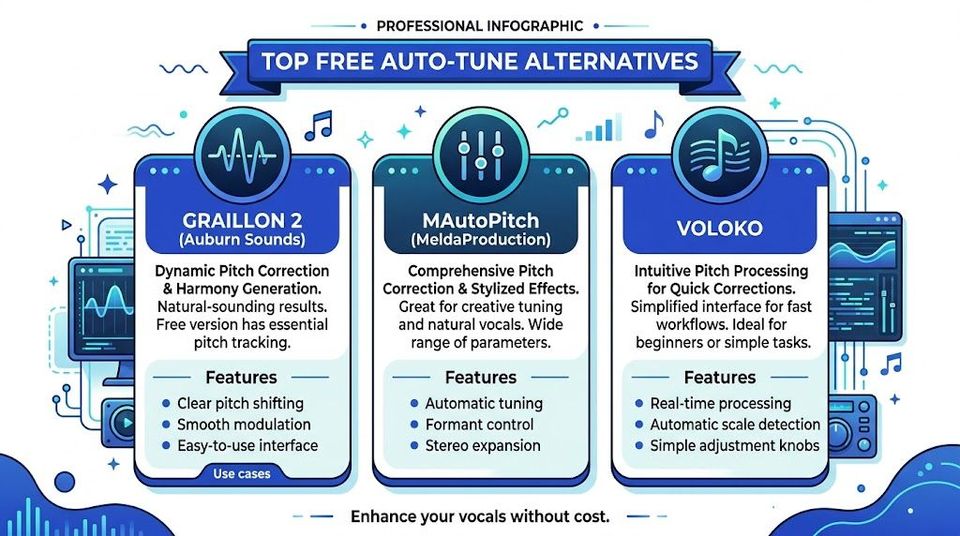
| Tool | Best at | Limitation to watch |
|---|---|---|
| Graillon 2 free edition | Musical correction with character | Less ideal for deep manual repair |
| MAutoPitch | Fast utility work and extra vocal shaping | Interface can feel busy |
| GSnap | Basic correction on older Windows setups | Older workflow and rougher handling |
| Voloko | Mobile sketches and quick ideas | Not the same as full DAW workflow |
Those aren’t equal substitutes for Auto-Tune Pro. They’re fallback tools. For non-critical fixes, that can be enough.
Pick the tool that matches your role
A producer finishing their own single can tolerate more experimentation. A channel owner with scheduled premieres needs predictable output.
That changes the decision:
Use Graillon 2 if you want a cleaner musical feel and you’re mostly doing light polish.
Use MAutoPitch if you want a general utility plugin for everyday checks.
Use GSnap only if your setup is older and you already know its quirks.
Use Voloko for ideas or rough review, not final channel prep.
A lot of people overbuy here. They assume every premiere needs high-end manual tuning. Most don’t. If the take is decent, a modest tool with careful settings will often do enough.
This video gives a useful visual look at free pitch-correction options in action:
If you want more budget-friendly production tools beyond tuning, this roundup of free VST plugins is a good next step for building a practical channel-prep setup.
Why you must avoid ‘free’ cracked software downloads
Cracked vocal plugins don’t just create legal problems. They create operational problems. That’s the part many producers learn too late.
If your channel runs on schedules, approvals, and client trust, unstable software is a business risk. A bad plugin can wreck a session, corrupt a machine, or force you to delay a premiere you already promised.

The risk isn’t abstract
The verified data here is blunt. According to the referenced source, up to 70% of cracked software carries malware, and user forums report 40% crash rates in cracked versions versus less than 5% in legitimate installs. For channel owners, that kind of instability can directly jeopardize premiere schedules, as noted in this YouTube source on cracked Auto-Tune risks.
That means the price of a cracked plugin isn’t zero. The cost can show up as:
- Missed upload dates
- A crash during final prep can push a premiere off schedule.
- Damaged trust
- Labels notice when delivery gets sloppy.
- System cleanup
- Malware recovery eats time you should be spending on curation and release planning.
- Broken updates
- Pirated builds often stop working when your DAW or OS changes.
Cracks also make you work worse
Even when a cracked plugin appears to work, it changes how you operate. You stop updating your system. You avoid changing machines. You keep weird workarounds alive because you’re afraid the plugin will break.
That slows everything down.
Professional workflow means your tools open when you need them, authorize correctly, and export without drama.
For premiere channels, reliability is part of the product. You aren’t just posting tracks. You’re selling placement, timing, and presentation. A session that crashes before a scheduled release damages more than one file. It damages confidence in your process.
The better budget mindset
Use official trials. Use free companion tools. Use free alternatives when they fit the job. Send tracks back for revision when they need more than light repair.
That’s the grown-up version of producing on a budget. It keeps your setup legal, stable, and predictable.
If you’re running premieres or reposts as a real business, Premierely gives you one place to accept track submissions, collect payments through Stripe Connect, schedule uploads, and automate your SoundCloud posting workflow. It’s built for channel owners who want a structured booking system instead of managing releases through scattered emails and DMs.