Finding the right machine is critical to running a premiere channel, as the best music production laptops are the core of your operation. A great machine means faster turnarounds on submissions from labels and fewer technical headaches. A sluggish one means missed opportunities and a less professional service. Think of it as a direct investment in your channel's reputation and ability to grow.
Treat your laptop as a critical business tool
For anyone treating premieres and reposts as a business, the laptop is mission control. It is where you manage every part of your workflow. From the moment a label submits a track to its automated upload on SoundCloud, your computer does the heavy lifting.
A slow or unreliable machine creates bottlenecks that cost you real time. It can also damage your professional image with the artists and labels you work with. Imagine your system stuttering while you give feedback on a high-fidelity WAV file from an important label. A crash could even wipe out your entire scheduled premiere lineup for the week.
The hub of your premiere business
Your laptop is much more than a device for checking emails. It is an active part of how you deliver your premiere service day in and day out.
Consider these daily tasks for a channel owner:
- Reviewing submissions: You must open and play high-quality audio files. This often happens inside a Digital Audio Workstation (DAW) to check for mastering issues.
- Managing bookings: Running a premiere booking platform like Premierely alongside other browser tabs requires a machine that can multitask.
- Content preparation: You might need to edit track metadata or create quick artwork before scheduling an upload.
- Communication: A responsive system is essential for keeping up with labels and artists about their submissions.
Your laptop is the engine of your entire operation. A powerful machine means faster turnaround times and a more professional service for artists.
Match performance to your professional goals
Laptops have become the dominant tool for music professionals. In fact, many producers now rely on them as their primary production device. This trend is about the need for high-performance machines that run complex DAWs without skipping a beat.
For a SoundCloud curator managing a premiere service, a capable laptop separates a hobby from a business. It allows you to replace a messy inbox of premiere requests with a structured booking system. It gives you the power to handle a high volume of submissions and schedule uploads efficiently.
This guide will walk you through the core components-CPU, RAM, and storage. It shows you how they impact your daily business operations. You might also find our guide on the best BPM analyzer tools useful for your toolkit.
Decode laptop specs for your music business
Choosing the right laptop for your music channel means focusing on what powers your workflow. For a channel owner, the right specs are about business efficiency. A powerful machine means faster quality checks on submissions from labels and smoother booking calendar management.
Let’s break down the three pillars of a production laptop. We will explain how they directly impact your day-to-day operations. Once you understand this, you can look at any spec sheet and know how that machine will perform. For real-world context, a deep-dive like this Macbook Pro 16 2019 review shows how these components perform in practice.
The Central Processing Unit (CPU): The brain of your operation
The Central Processing Unit (CPU) is the brain of your laptop. For music production, everything hinges on its performance. Focus on two things: core count and clock speed.
Think of cores as individual workers on an assembly line. More cores mean you can assign more workers to different tasks at the same time.
When you vet a complex track with dozens of effects, each plugin is a task. A CPU with a high core count (8 cores or more) can juggle those plugins without lag. This is essential for a professional workflow where you need to give quick, reliable feedback to artists.
Clock speed, measured in gigahertz (GHz), is how fast each of those workers operates. High clock speed is great for single-threaded tasks, like running one demanding virtual instrument. For a premiere channel owner, multi-core performance is almost always the priority.
Random Access Memory (RAM): Your workspace capacity
If the CPU is the brain, then Random Access Memory (RAM) is your laptop's short-term desk space. It holds everything you are actively working on. This includes your DAW, the audio file you are reviewing, and your browser with the booking calendar open.
A lack of RAM is one of the most common and frustrating bottlenecks in music production. When you run out of RAM, your system grinds to a halt. It is forced to use your much slower storage drive as a temporary workspace.
For running a premiere business, 16GB of RAM is the absolute minimum. We strongly recommend 32GB or more. This gives you the breathing room to run your DAW, booking platform, and multiple browser tabs at once. With 32GB, you can flick between vetting a track and managing your schedule instantly.
Storage: Your digital filing cabinet
Your laptop's storage drive is the filing cabinet where all your files live. This includes your operating system, sample libraries, and all the track submissions you receive from labels. Two things matter here: capacity and speed.
Capacity is simple-you need enough space for all your files. But speed dramatically changes your daily workflow.
Modern laptops use Solid-State Drives (SSDs), which are much faster than old Hard Disk Drives (HDDs). The current standard is the NVMe SSD. A machine with an NVMe drive boots in seconds and loads massive project files almost instantly.
For a channel owner, this speed saves a huge amount of admin time. That frustrating minute you spent waiting for a library to load becomes a few seconds. Those seconds add up throughout the day, letting you get more done. Speaking of tools, our guide on the best free VST plugins can help you build your software library.
Compare minimum vs recommended specs for music production
Let’s look at the difference between a setup that just gets by and one built for professional work. For hobbyists, the minimum specs are fine for sketching out ideas. But for a channel owner managing multiple projects, the recommended specs are where you want to be.
| Component | Minimum For Hobbyists | Recommended For Premiere Channels |
|---|---|---|
| CPU | Intel Core i5 / Apple M1 (4-6 Cores) | Intel Core i7/i9 / Apple M1 Pro/Max (8+ Cores) |
| RAM | 8GB | 32GB or more |
| Storage | 512GB SATA SSD | 1TB+ NVMe SSD |
These recommended specs are a practical investment in efficiency and reliability. They ensure your hardware never becomes the bottleneck in your business of running a premiere channel.
Now, let’s discuss Mac versus Windows. This is a foundational choice that shapes your entire workflow. The right operating system should feel like a natural extension of your creative process.
Both platforms are more than capable of producing professional-grade music. I have seen incredible studios running on both. The decision boils down to your workflow, budget, and personal preference.
The case for macOS
There’s a reason you see so many MacBooks in studios. Apple has built a solid reputation in the creative world. The magic is in the integration-Apple controls both the hardware and the software.
For music production, the key feature is Core Audio. This is the built-in audio engine for macOS, and it is fantastic. It gives you low-latency performance with almost any audio interface right out of the box. That "it just works" philosophy is a huge selling point.
Here’s why so many producers stick with Mac:
- Plug-and-play stability: Core Audio is a major benefit. You plug in your gear, and it works with reliably low latency.
- A clean, simple experience: The user interface is consistent and intuitive. This means less time fighting with settings.
- Strong resale value: MacBooks hold their value well. Think of it as a long-term investment.
Of course, the big catch is the price. MacBooks carry a premium. You will often get less raw power for your money compared to a Windows laptop. Upgrades are also difficult, as RAM and storage are usually soldered to the motherboard.
The case for Windows
Where macOS offers a curated experience, Windows offers a universe of choice. The single biggest advantage here is the price-to-performance ratio. For the same amount of cash, you can almost always buy a Windows machine with better specs.
This flexibility is the core appeal. You are not locked into one manufacturer. You can pick from dozens of brands like Dell, Razer, or ASUS. This lets you build a machine that is perfectly suited to your specific needs.
While macOS is famous for its ease of use, a well-configured Windows machine can be just as stable. The key is taking time to set it up right. This includes installing dedicated ASIO drivers (such as ASIO4ALL) and tweaking system settings for audio.
These days, the software gap has all but disappeared. Modern DAWs like Ableton Live and FL Studio run beautifully on both platforms. Plugin compatibility is rarely the problem it once was.
Ultimately, it comes down to what you are comfortable with. If you enjoy tweaking your setup and want the most for your money, Windows is a fantastic option. If you have the budget and prefer a simple system, macOS is a reliable workhorse.
Identify which ports and connections matter for you
A powerful laptop is useless if you can’t plug your gear into it. For music producers, ports are not an afterthought. They are the physical handshake between your digital world and your daily tools.
Think of your laptop as the central nervous system of your studio. It needs to talk to your audio interface, studio monitors, and MIDI keyboards. Without the right I/O (Input/Output), you create frustrating bottlenecks.
The modern standards: USB-C and Thunderbolt
Today’s connectivity is all about two powerful standards: USB-C and Thunderbolt. They share the same oval-shaped connector but have different capabilities.
- USB-C: This is your do-it-all workhorse. It handles data, video, and power, often through a single cable. Most modern gear, like the Focusrite Scarlett series, now uses USB-C.
- Thunderbolt (3, 4, or 5): This is a supercharged version of USB-C. It offers much more bandwidth for fast data transfer speeds. A laptop with Thunderbolt is your best bet for future-proofing your setup.
For any serious producer, having at least two of these ports is non-negotiable. It means you can plug in your audio interface and an external drive at the same time. A single Thunderbolt port can often power your entire desk setup with one cable.
The essential connections for your workflow
While USB-C and Thunderbolt are important, a few other ports are still vital. When you are scouting for a laptop, look for a practical mix of new and old I/O.
A well-designed production laptop should not make you choose between charging it and plugging in your audio interface. A healthy number of ports is a sign of a machine built for real-world work.
Here are the other connections that will make your life easier:
- At least one USB-A port: Much of our gear still uses the classic rectangular USB-A plug. Having one built-in saves you from needing adapters.
- A headphone jack: This is absolutely essential. It is perfect for quick audio checks or working late at night.
- An HDMI port: A dedicated HDMI port is the simplest way to connect an external monitor. Seeing your entire arrangement on a large screen is a huge benefit.
- An SD or MicroSD card reader: This is incredibly handy for pulling samples from a field recorder or transferring promo assets.
Your laptop is the heart of your creative operation. Making sure it has the right connections means you can build a reliable workspace. This lets you focus on what actually matters: finishing the next track for a premiere.
Find a laptop that fits your budget
Choosing the right machine for your channel boils down to matching your budget to your actual needs. Finding the best laptop for music production is not about buying the most expensive model. It is about picking the right tool that makes your workflow faster without overspending.
To make it easier, we have broken down our recommendations into three tiers. Each one is aimed at a different stage of running a premiere channel. This structure will help you find a perfect balance between price and performance.
Entry-level pro laptops
This tier is for the channel owner who is serious about their work but has a tight budget. These are not average consumer laptops. They are powerful, cost-effective machines that meet our recommended specs for running a premiere channel.
A laptop in this category, like a Dell Inspiron with a modern Intel Core i7, gives you plenty of power. You can manage submissions, run a DAW for quality checks, and handle your booking system. Prioritize the core components-CPU and RAM-to ensure your daily tasks run smoothly.
Mid-range powerhouse laptops
This is the sweet spot for established curators dealing with a high volume of submissions. If your inbox is always full, this tier is for you. An investment here delivers a serious jump in performance and efficiency.
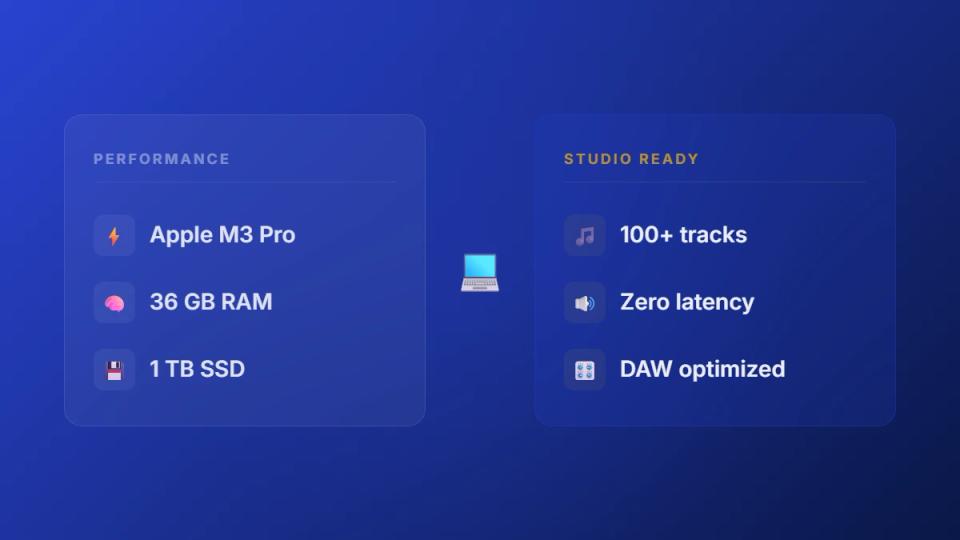
Think of models like the Razer Blade 15 or an Apple MacBook Pro with an M-series Pro chip. These laptops usually come with faster processors, a minimum of 32 GB of RAM, and larger NVMe SSDs. That extra power means you can run complex DAW sessions and manage your calendar without a stutter. You can learn more about channel operations in our guide on SoundCloud channel management.
This diagram shows the key ports you should be looking for.
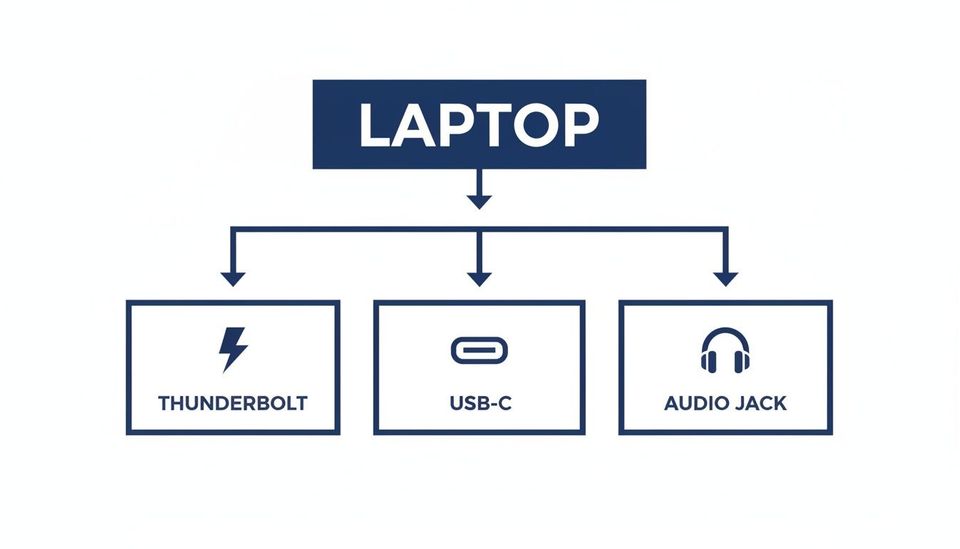
Having a good mix of these ensures you can plug in all your gear without a sea of adapters.
Top-tier investment laptops
For professionals running their premiere channel as a full-time business, this tier is the pinnacle of performance. These are the best machines, offering maximum power and premium build quality. Think of it as an investment in your business’s core infrastructure.
Models in this category include a fully-loaded Apple MacBook Pro with an M-series Max chip. You could also choose a high-end Windows workstation from a brand like MSI or ASUS. With these machines, you get powerful mobile CPUs, 32 GB to 64 GB of RAM, and massive SSDs.
The performance gains here open the door to incredibly complex workflows. For a full-time channel owner, a top-tier laptop is a tool that removes all technical roadblocks. It lets you focus entirely on the quality of your service.
To give you a clearer picture, here is a breakdown of some great options available in 2026.
2026 laptop models by budget tier
| Budget Tier | Example Model (Windows) | Example Model (Mac) | Key Strengths For Curators |
|---|---|---|---|
| Budget-Friendly | Dell Inspiron 16 Plus | MacBook Air (M3) | Solid CPU and RAM for core tasks; great value for starting out. |
| Mid-Range | Razer Blade 15 | MacBook Pro (M3 Pro) | Excellent multitasking power; handles heavy plugin use and multiple apps smoothly. |
| Premium | MSI Creator Z17 | MacBook Pro (M3 Max) | Top performance for video editing, complex audio, and extreme multitasking. |
These models are just examples, but they give you a solid idea of what to look for. The key is to find the machine that meets your current demands. It should also give you room to grow your premiere business.
Optimize your laptop for peak audio performance
Buying a powerhouse laptop is a great start, but it's only half the job. To get the rock-solid stability your music business demands, you need to set up your machine for audio work. A properly tweaked laptop is your best defense against crashes and audio dropouts. A fast laptop also lets you test sound effects for DJ sets without glitches before you play them live.
A system crash while bouncing a final master for a label is a disaster. It can delay a release and make you look unreliable. These tips will help you turn your new hardware into a dependable studio workhorse.
Essential system tweaks for Windows
Windows is versatile, but its default settings are for general use. They are not built for running a demanding Digital Audio Workstation (DAW). A few quick adjustments can make sure it prioritizes your music.
First, you need to tackle the power plan. By default, Windows saves energy by throttling your CPU. This is a recipe for audio glitches.
- Go to Control Panel > Power Options.
- Switch the plan to High performance.
- Click Change plan settings, then Change advanced power settings.
- Make sure that Processor power management > Minimum processor state is set to 100%.
This simple change forces your CPU to run at its full speed consistently. While you are at it, open Task Manager and disable non-essential apps from launching at startup. Every bit of freed-up RAM and CPU counts.
Fine-tuning your macOS setup
While macOS is known for smooth performance, a couple of small tweaks can make a real difference. It is all about taming background processes and interruptions.
The big one is automatic updates. An unexpected update can steal CPU cycles and cause your DAW to stutter. Turn them off and schedule them for downtime.
You should also get familiar with Focus modes to kill notifications. A simple pop-up can be enough to interrupt audio playback.
For anyone running a studio or label, every ounce of CPU and RAM is gold. Stopping unnecessary background tasks ensures those resources are dedicated to what actually matters: finishing a mix without a hiccup.
Keep drivers and plugins organized
Outdated audio drivers are one of the most common causes of an unstable system. Do not rely on generic drivers from your OS. Always go directly to your audio interface manufacturer's website for the latest drivers.
Plugin management is just as crucial. A messy plugin folder can slow down your DAW's loading time. Take the time to create a structured folder system for your VSTs. It is also good practice to regularly remove any broken or unused plugins.
Finally, power management is key if you work on the go. It is worth learning a few tricks to extend your laptop's battery life. A well-cared-for battery means you can work from anywhere without being chained to an outlet.
Answer your top questions about production laptops
Choosing a new laptop for music production always brings up questions. If you are running a premiere or repost channel, you need straight answers. Let's tackle the most common queries so you can pick the right machine for your workflow.
Are gaming laptops good for music production?
Yes, absolutely. In fact, gaming laptops often make fantastic music production machines. They are built for performance, usually packing powerful CPUs, plenty of RAM, and fast graphics cards. These all help a demanding Digital Audio Workstation (DAW) run smoothly.
Their biggest advantage is their cooling systems. They are designed to handle intense use without overheating. This prevents your CPU from slowing down in the middle of reviewing a complex submission. The main trade-offs are usually a more "aggressive" look and shorter battery life.
How much RAM do I really need for music production?
For a professional channel owner, my strong recommendation is 32GB of RAM. You can get by with 16GB as a bare minimum. But you will feel the limitation quickly, especially when you are multitasking.
With 32GB of RAM, you have the headroom to run your DAW, keep a browser open with your booking calendar, and handle other tasks without slowdowns. That breathing room is crucial for a smooth workflow when you are trying to manage submissions efficiently.
If your work involves massive sample libraries or video editing, bumping up to 64GB can be a smart move. For most premiere channel operators, though, 32GB is the perfect sweet spot.
Do I need a dedicated graphics card (GPU)?
A dedicated graphics card is not strictly essential for audio processing itself. However, I highly recommend getting one. Modern DAWs and many plugins are offloading their visual interfaces to the GPU. This frees up your CPU to process audio, resulting in a snappier experience.
If you plan on doing any video editing for promo clips, a dedicated GPU is a must-have. For a channel owner building a versatile setup, even a mid-range GPU offers a noticeable performance lift. It also helps future-proof your investment.
Speaking of more advanced workflows, if you are looking to improve your channel's operations, consider Premierely. It offers download gates that require likes or comments to convert listeners into followers and grow your social proof automatically.
Ready to turn your professional setup into an organized business? Premierely provides the tools you need to manage submissions, schedule uploads, and collect payments automatically. Replace your manual email workflow with our dedicated premiere booking platform.