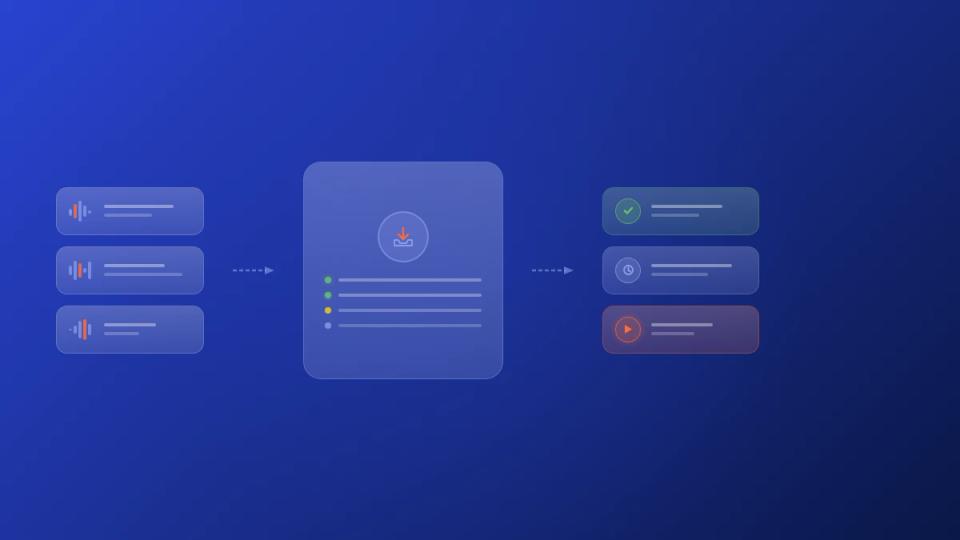
If you want to manage SoundCloud submissions effectively, you have to stop the chaos. This means replacing DMs and messy emails with a professional submission page. This page becomes your central hub for collecting artist info, tracks, and social links. It is the difference between constant administrative work and a clean pipeline for approving new music.
Build a central hub for all your submissions
Scattered submission requests are a major bottleneck for most premiere channels. When artists send you tracks through Instagram, emails, and SoundCloud messages, you waste hours tracking everything. This disorganization is inefficient. Information gets lost, you forget to follow up, and it makes your channel look amateur.
This messy process costs you more than just time. It creates a poor first impression for the artists you want to attract. Jumping between platforms makes it impossible to build a consistent review process.
A dedicated booking page is the foundation of an organized workflow. It acts as a single front door for every artist submitting music. Instead of you chasing them for files, the form makes them provide everything upfront. For a deep dive, learning how to create a booking website will help you establish the central hub you need for all your SoundCloud submissions.
Set up essential fields for your submission form
Your intake form needs to be balanced. It should be detailed enough to get all necessary information but not so long that it deters artists. A well-designed form is your first defense against incomplete, time-wasting submissions.
Here are the must-have fields for any premiere or repost channel:
- Artist Information: Get the primary artist's name and their email address. This is the bare minimum.
- Track Details: Include fields for the track title, genre, and a short description. Genre tags are key for curators who run multiple channels with different sounds.
- File Upload: Require a high-quality audio file (WAV or 320kbps MP3). A direct upload is much better than dealing with large email attachments or expiring links.
- Social and Streaming Links: Ask for SoundCloud, Spotify, and Instagram profile links. This gives you a quick snapshot of their online presence.
- Release Information: A field for the proposed release date is crucial for scheduling. It is also helpful to ask if the track is signed or a self-release.
A great submission form does more than collect data; it sets a professional tone. It signals to artists that you operate like a business, which attracts higher-quality music.
Compare manual DMs vs. an automated submission form
Switching from chasing DMs to using a central submission form is a huge operational upgrade. The difference impacts how you spend your day and your relationships with artists. A structured intake process is also the first step toward building a better link-in-bio strategy, which we cover in our guide on how to use a link in bio for SoundCloud.
Let's compare the two approaches to see how big the difference is.
| Feature | Manual DM and Email Method | Automated Submission Form |
|---|---|---|
| Information | Often incomplete; requires follow-ups. | Standardized and complete on first contact. |
| File Management | Scattered links, expiring downloads. | Centralized, secure file hosting. |
| Artist Experience | Inconsistent and unprofessional. | Professional, clear, and easy to navigate. |
| Time Investment | Hours per week on administrative tasks. | Minutes per week reviewing organized entries. |
| Scalability | Difficult to handle more than 10-20 submissions. | Easily manages hundreds of submissions. |
The old way just doesn't scale. While DMs might feel personal at first, they quickly become a bottleneck that prevents growth. An automated form creates a system that works for you, freeing you to focus on the music.
Automate your premiere scheduling and payment collection
Once you approve a track, the real administrative work begins. The endless back-and-forth emails to lock in a premiere date can consume hours. Then comes the awkward process of chasing payments, which can make your operation feel like a hobby. To professionalize your channel and handle submissions at scale, automating this sequence is necessary.
This is where you move from a clunky, manual process to a proper booking system. The goal is simple: create a workflow where artists can see your available slots, pick a date, and pay you. This completely removes you from the time-consuming administrative loop.
This flow chart maps out how a submission moves from the initial form to a central, organized hub once approved.
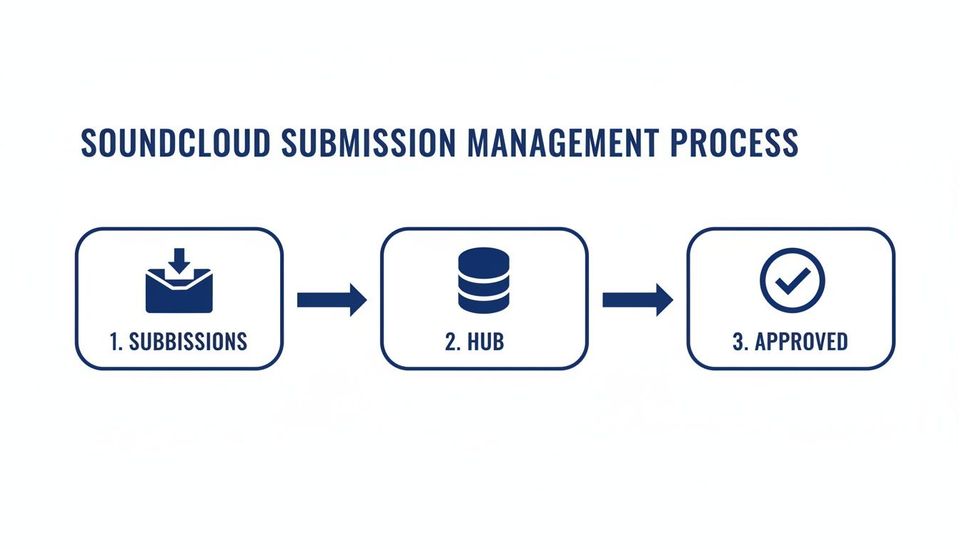
A tight system ensures every track follows the same repeatable path-the foundation for real automation.
Implement a self-serve booking calendar
A self-serve booking calendar is the core of an automated setup. Instead of asking artists, "What date works for you?", you show them your calendar of open slots. This one change shifts responsibility to the artist and eliminates double-bookings.
Configure your calendar to reflect your actual capacity. Set rules to block last-minute bookings, reserve personal time, and cap daily or weekly premieres. This gives you total control over your content pipeline while giving artists a professional booking experience.
Making this process efficient is critical given the trends on SoundCloud. Electronic music's growth has been relentless, with uploads jumping from one in four tracks in 2020 to over one in three by 2025. At the same time, the #DJset hashtag saw a 39% year-over-year jump, signaling a surge in DJ-focused submissions. This electronic boom is both a market opportunity and an operational challenge to prepare for.
Integrate payment collection directly
The most important step in automating your revenue is requiring payment at the time of booking. This "pay-to-confirm" model gets rid of invoices, payment reminders, and the risk of non-payment. You get paid for your work upfront every time.
The most direct way to do this is by connecting a payment processor like Stripe Connect to your booking system. When an artist picks their premiere slot, they are immediately prompted to pay.
Only after payment is the slot confirmed in your calendar. This simple, automated workflow turns your premiere service into a reliable income stream.
By automating payments, you stop chasing revenue and start collecting it. This change solidifies your premiere channel as a business and is key to scaling your services.
For other tasks, it is worth exploring general marketing and open source automation tools available. They can help with everything from screening tracks to managing communications.
Create automated communication workflows
Once a booking is confirmed, automated emails can handle all follow-up communication. This ensures artists get all the info they need without you manually typing any messages.
Your automated sequence should include a few key touchpoints:
- Booking Confirmation: An instant email confirming the premiere date, time, and payment receipt.
- Pre-Premiere Reminder: A heads-up sent 24-48 hours before the upload, reminding the artist.
- Premiere Live Notification: An email with the live track link the second it is published.
These automated messages keep artists informed and confident in your process. It builds trust and reinforces the professionalism of your premiere channel. To learn more about building a strong brand, check out our guide on how to grow your SoundCloud premiere channel. This system lets you finally replace messy DMs and emails with a predictable, scalable booking engine.
Use download gates to build your social proof
A premiere is not just a one-day spike in plays. It is a chance to turn that interest into a long-term asset for your channel. This is where download gates come in. Instead of just letting people listen, you create a simple exchange: they get a free download, and you get tangible social proof.
This is how you convert passive listeners into engaged followers. You can set up gates that require specific actions-a like, comment, repost, or follow-before someone can get the track. Each action feeds SoundCloud’s discovery algorithms, building momentum that lasts beyond premiere day. It’s an automated way to grow your channel’s influence with every release.
These are not vanity metrics. They have a direct impact on how your channel is discovered. The 2026 SoundCloud Music Intelligence Report highlighted how powerful social discovery is on the platform. It found that listeners who find tracks through 'Liked By' playlists are over 3x more likely to engage with those tracks. Discover more insights from the SoundCloud Music Intelligence Report here.
Choose the right actions for your gate
The actions you require should align with your channel's growth goals. Not all social actions have the same weight, and picking the right combination can speed up your progress. A smart setup ensures you get maximum value from every listener without creating a frustrating experience.
Here are the most common gated actions and what they do for you:
- Require a Follow: This is the most direct way to build your subscriber base. Every download adds a new follower to your channel.
- Require a Repost: This is all about reach. A repost puts your track directly into the streams of your listeners' followers.
- Require a Like: Likes are a clear signal to the SoundCloud algorithm, helping your track get pushed into discovery playlists.
- Require a Comment: Comments add visible social proof and can start conversations around a release.
- Require an Email Signup: This is a power move. An email list lets you announce new premieres or promote paid services directly to fans.
Think of your download gate as a conversion tool. The goal is to make the exchange feel fair and valuable. Offering a high-quality track for a simple follow or repost is a trade most fans are happy to make.
Follow best practices for your gates
A clunky download gate will annoy listeners and hurt your reputation. The key is to make the process as smooth and transparent as possible. You are trying to encourage engagement, not build a wall that drives fans away.
First, be upfront about the value exchange. Your track description should clearly state that a free download is available. Honesty builds trust and sets expectations from the start.
Next, think about the user experience. Limit the required actions to one or two of your most important goals. Asking for too much is overkill and most people will give up. A simple "Follow to Download" or "Repost to Download" gate is usually the most effective.
Finally, always deliver on your promise. Make sure the download link works and leads to a high-quality audio file. A broken link after someone has followed you is a surefire way to lose a fan forever. For a deeper look at different platforms, check out our guide on the best download gate tools for SoundCloud.
Build a system for reviewing and replying to artists
Once your submission form is live, your inbox will fill up fast. A high volume of tracks demands a clear, repeatable system for listening, sorting, and responding. Without one, you will drown in admin work, and great tracks will fall through the cracks. The goal here is an efficient triage process, not a chaotic email folder.
This system is your channel's quality control. It is how you separate perfect fits from near misses and rejections. If you run your channel like a business, this review stage needs serious attention. A professional and timely response-even a "no"-builds a reputation that attracts high-quality artists.
Create a triage and tagging workflow
The first step in managing a flood of music is effective filtering. Just listening and deciding on the spot does not scale. You need a way to tag submissions to see what is in your queue at a glance. This lets you prioritize your listening time.
A simple tagging system can sort tracks by key criteria:
- Status: Tags like
Pending Review,Accepted,Rejected, orOn Holdgive you an instant visual. - Genre/Style: If your channel is diverse, tags like
Deep HouseorFuture Bassare essential. - Priority Level: You might use
High Priorityfor submissions from artists you already know.
This turns a messy inbox into an organized database. It lets you sort your submission queue based on what you need to focus on right now. This is a core function of a dedicated premiere booking platform like Premierely, which is built to handle this exact workflow.
Use templates for professional communication
How you talk to artists defines your channel's brand. Every email is a chance to be professional, respectful, and clear. Using templates for common responses reduces your admin time from hours to minutes while keeping everything consistent.
A respectful rejection is often more valuable than a vague acceptance. Artists appreciate clear, direct feedback. It shows you take their work seriously and encourages them to submit again with a better fit.
Let's build a few core templates for your most frequent interactions.
1. The Automated Submission Confirmation
This should be sent the instant an artist submits. It is a simple acknowledgment that you have received their track and sets a rough timeline for review.
- Example: "Thanks for submitting [Track Title]! Our team has it. We listen to everything and will get back to you within 7-10 business days if it's a good fit for our channel."
2. The Acceptance Email
When you find a track you love, the acceptance email needs to be enthusiastic and clear about the next steps. This is where you smoothly transition them into your booking and payment process.
- Example: "Great news! We loved '[Track Title]' and would be excited to premiere it. The next step is to book your premiere date on our calendar and complete the payment. You can do that right here: [Booking Link]"
3. The Respectful Rejection
This is the most important template you will write. A thoughtful rejection maintains a good relationship. Avoid generic phrases and, if you have a moment, offer one small piece of constructive feedback.
- Example: "Thanks so much for sending '[Track Title]' our way. While we enjoyed the production, it isn't quite the right fit for our current programming. We definitely encourage you to send future tracks. Best of luck with this release."
Nail your publishing and promotion strategy
You have dialed in your submission process and have a killer track approved and scheduled. Now it is time to make sure it gets heard. Publishing is not just about hitting the 'upload' button. It is the start of a promotional campaign for both the artist and your channel.
A smart approach turns a single premiere into a visibility campaign. This means automating the upload and the promotional bits that follow. Think of it as building a small, repeatable marketing engine for every track you feature. This way, every premiere gets a consistent push.
This focus on new music is what SoundCloud listeners want. Data from SoundCloud's 2026 Music Intelligence Report revealed that users in the United States spend 43% of their listening time on current music. That is nearly double the industry average of 24%. For channel owners, this confirms that SoundCloud is a discovery engine where new premieres can find an eager audience. You can read the full research about SoundCloud consumption trends here.
Schedule uploads and reposts ahead of time
The secret to a solid promotion strategy is timing. Manually uploading tracks at peak times is a pain and easy to mess up. A better system is scheduling everything in advance. This creates a predictable content calendar you can set and forget.
The process has two key actions:
- The Initial Premiere Upload: Scheduling the main track to go live on your channel at a specific date and time.
- The Repost Campaign: Scheduling a series of reposts across your own network or with partner channels.
Platforms built for this, like Premierely Pro, let you schedule both the main upload and a full sequence of automated reposts from a single dashboard. It automates what you are probably already doing manually.
Create a multi-touch promotion cadence
A single upload can easily get lost in a busy feed. A "multi-touch" strategy means the track gets seen multiple times, increasing its chances of gaining traction. By planning a sequence of promotional actions, you create a campaign that builds momentum over several days.
A typical cadence might look like this:
- Day 0 (Premiere Day): The track automatically uploads to your channel. The artist gets an automated notification with the live link.
- Day 1: An automated repost of the track goes live on a secondary or partner channel.
- Day 3: A second repost is scheduled on another network channel targeting a different listener.
- Day 7: A final repost can give the track a late boost.
This approach transforms a premiere from a one-off event into a small promotional campaign. It provides more value to the artist and systematically drives more engagement back to your channel.
Time your promotions for peak listener activity
Timing is everything. Dropping content when your audience is most active can give you a boost in initial engagement. While the best times vary by genre, general patterns can guide your scheduling. Dive into your SoundCloud stats to see when your plays peak.
Here are a few best practices to consider for timing:
- Mid-week is often best: Tuesdays, Wednesdays, and Thursdays tend to see higher engagement.
- Target commute and evening hours: Schedule uploads for morning commute times (8-10 AM) or evening hours (7-10 PM).
- Avoid crowded release days: Fridays are standard for major label releases. Scheduling on a Tuesday or Wednesday can help you cut through the noise.
By scheduling your uploads and reposts to hit these peak windows, you give every track the best shot at being discovered. This strategic timing, combined with an automated promotion plan, is how you scale your channel's impact.
Answer common questions about premiere automation
Here are a few common questions that come up when channels start treating their premiere service like a business. We will cover pricing, rejections, and how to expand your offerings.
How much should I charge for a premiere?
Pricing is more of an art than a science. What you can charge depends on your channel's size, engagement, and reputation. A channel with 5,000 dedicated followers can often charge more than one with 20,000 who never interact.
Before you set a price, look at your numbers. What are your average play counts? This data is your foundation. For smaller channels, a good place to start might be in the $25-$50 range. Established channels can easily command $100-$300 or more.
It is also smart to think in tiers. You could create different packages:
- A standard premiere upload.
- A premium package that adds a repost on a partner channel.
- An all-inclusive deal with a download gate and a social media shout-out.
This lets artists pick an option that matches their budget and helps you increase your average earnings per premiere.
What is the best way to reject a submission?
Turning down a track is a delicate but necessary part of running a curated channel. The key is to be professional, respectful, and brief. A good rejection experience can encourage artists to send you another track later.
Whatever you do, do not just ignore a submission. Ghosting people is unprofessional and kills your reputation. A simple, polite template is all you need.
Crucial Tip: Avoid giving a detailed, harsh critique. A simple "not the right fit for our current programming" is respectful and gets the point across. It closes the door on that specific track without burning the bridge.
Your real goal is to maintain a good relationship. A quick, courteous "no" is much better than leaving an artist hanging. It builds goodwill and cements your channel as a professional outfit.
Can I automate reposts as well as premieres?
Yes, and you should. Automating reposts is a fantastic way to add more value for artists and open another revenue stream. A premiere’s initial buzz is short, but a few well-timed reposts can keep a track in people's feeds for days.
You can set up automation to handle this easily. For example, a platform like Premierely Pro lets you schedule a series of reposts across your network of channels. An artist could book a premiere for Tuesday and get an automated repost on Thursday.
This multi-touch approach keeps the track from getting buried in the feed. It turns a one-off premiere into a full promotional campaign, a massive selling point for any artist. Automating it all means you deliver every time without having to remember to log in and hit "share" yourself.
Ready to stop juggling DMs and start running your channel like a business? Premierely is the only platform built specifically for the SoundCloud premiere and repost workflow.
Accept track submissions, collect payments, and schedule uploads – all from one dashboard.