If you've battled with setting up a sidechain compressor for that classic 'pumping' effect, you know the frustration. Routing audio and tweaking settings is a workflow killer. The Nicky Romero Kickstart plugin was built to solve this problem. It’s designed for one job: instant, perfect sidechain ducking with almost no effort. For premiere channel owners and independent labels, this speed is critical.
Kickstart creates rhythmic space in your mix. It automatically ducks the volume of one track, like a bassline, when your kick drum hits. This move is the secret to clean, energetic low-end in modern electronic music. It adds groove and stops your kick and bass from fighting for the same frequencies, producing a track ready for submission.
What Kickstart is and why you'll actually use it
Think of Kickstart as the ultimate production shortcut. The traditional way to get that pumping sound involves a sidechain compressor on your bass track. Every kick hit triggers the compressor, turning the bass down for a split second. Kickstart replaces that entire signal chain with a single, intuitive plugin.
For producers running a premiere channel or independent label, time is a valuable asset. Kickstart delivers a professional sound without the setup time, helping you get tracks ready for release faster. It lets you focus on curation and promotion instead of tedious mixing tasks.
Kickstart plugin core features at a glance
| Feature | Benefit for Producers |
|---|---|
| One-Click Setup | Get a professional sidechain effect instantly without any complex routing. |
| 16 Hand-Crafted Curves | Quickly find the perfect pumping shape for any genre, from subtle to aggressive. |
| Large Visual Display | See exactly how the volume is being modulated in real-time. |
| Adjustable Curve Shape | Fine-tune the timing and shape of the volume ducking to fit your track's groove. |
| MIDI Triggering | Trigger the sidechain effect from any custom MIDI pattern for complex rhythms. |
| Low CPU Usage | Use it on dozens of tracks without worrying about your computer slowing down. |
This isn't just about reducing a few minutes of setup. It’s about staying in a creative flow and getting a polished result that's ready for listeners.
The real-world benefits
Kickstart is a "must-have" plugin because it solves a universal mixing problem with elegance.
- Speed and Flow: The ability to add a plugin and immediately hear a professional sidechain effect is a major advantage. No more menu diving.
- Clarity on a Big Screen: The giant curve display provides immediate visual confirmation of the audio modulation, making it simple to adjust timing.
- Groove is Everything: It's fantastic for locking your kick and bass into a tight rhythmic pocket, forming the foundation of a great dance track.
- A Cleaner Mix: By carving out space for your kick, you prevent low-end mud and give your track more punch.
A polished mix is what catches the ear of A&Rs, curators, and fans. Tools like Kickstart help you produce release-ready music that stands out in a crowded submission inbox. While it's a great specialized tool, you can find other workflow-improving gems in our guide on free VST plugins.
Kickstart made the sidechain effect accessible. It turned a tedious mixing task into a creative choice you can make in seconds. You end up focusing on the feel of the rhythm, not the routing.
A tool born from a powerhouse scene
It's no surprise a tool like this came from Nicky Romero, a massive name in the Dutch music scene. The Netherlands is a powerhouse in electronic music, known for its efficiency and global impact. The domestic music market is valued at around €600 million, and streaming revenue shot up by 20% in 2022. In a fast-moving environment where dance music is a major export, producers need tools that deliver results now. Kickstart reflects that high-speed, high-quality production culture. You can read more about how dance music drives the Dutch industry at dutchnews.nl.
Is Kickstart 2 worth it? Honest take after 30 days
If you produce electronic music and find yourself reaching for sidechain ducking on more than half your tracks, Kickstart 2 is worth the price. The plugin pays for itself the first time you finish a mix in 20 minutes instead of an hour wrestling with a compressor and a routing chain. The whole point of the tool is to remove decisions you do not need to make.
Where it stops being worth it: if you only sidechain occasionally, your DAW’s stock sidechain compressor or LFO Tool will get you there with more flexibility. Kickstart 2 trades depth for speed. It is built for producers who want a “good enough” sidechain pump in three clicks, not for sound designers who want full control over the envelope shape. Match the tool to how often you actually need it.
How to install and set up Kickstart in your DAW
Let's get Nicky Romero's Kickstart plugin working in your project. The whole point of Kickstart is speed, which starts with the installation. You can go from download to a working sidechain pump in just a few minutes.
Once you’ve bought and downloaded the installer from the Cableguys website, the process is simple. It installs just like any other VST, AU, or AAX plugin. Run the installer and click through the prompts.
First steps after installation
After the install finishes, your Digital Audio Workstation (DAW) needs to see the new plugin. Most modern DAWs like Ableton Live or FL Studio will find it automatically. If you can’t find Kickstart in your effects list, trigger a manual rescan in your DAW’s plugin preferences.
Restart your DAW after installing. This forces the DAW to properly load everything new. If your computer struggles with bigger sessions, consider our guide on the best music production laptops to ensure your gear can keep up.
Correct placement in your signal chain
This is the most important part of the setup. You do not put Kickstart on your kick drum track. That is not how it works.
Instead, you load it as an insert effect directly onto the track you want to duck.
- For Pumping Bass: Put Kickstart right on your bass channel.
- For Breathing Pads: Load Kickstart onto your synth pad channel.
- For Group Effects: Drop it onto a bus or group channel that has multiple instruments you want to pump together.
By placing Kickstart on the target track, it controls that track's volume directly. No complicated sidechain routing from your kick drum is needed. This is the magic of why Kickstart is so fast.
The logic is simple: Kickstart isn't listening to the kick. It's a self-contained volume shaper that automatically syncs to your project's tempo. You just tell it what to duck and how to duck it.
Navigating the user interface
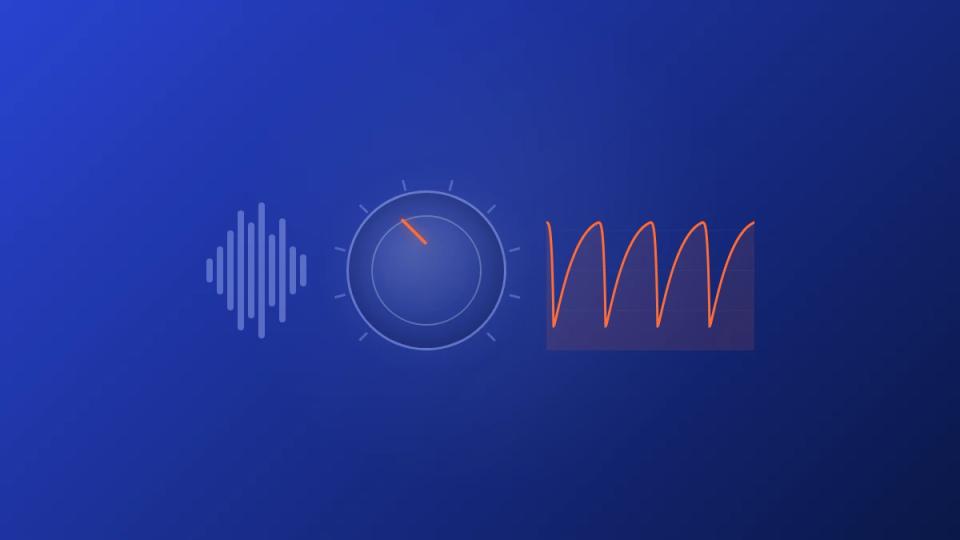
When you open Kickstart, you’ll see its clean interface. The big curve display in the center shows the exact shape of the volume automation. You have 16 different preset curves to choose from, each designed for a different rhythmic feel.
Here are the only controls you need to get started:
- Main Curve Display: Use the left and right arrows to flip through the different sidechain shapes.
- Mix Knob: This is your wet/dry control. At 100%, you get the full ducking effect. Dialing it back blends in the original signal for a more subtle pump.
- Sync/Retrigger Modes: The plugin defaults to
Syncmode, which locks the pumping effect to your DAW's tempo. TheMIDImode lets you trigger the volume dip with a MIDI note for complex patterns.
Finally, you’ll see the timing buttons—1/4, 1/8, 1/2. These set how often the ducking happens. For a classic four-on-the-floor track, 1/4 is your starting point. With these few controls, you can dial in the perfect rhythmic pulse for your track in seconds.
Kickstart 2 in FL Studio: setup walkthrough
FL Studio users get the smoothest Kickstart workflow of any DAW. Drop the plugin on the bass channel, pick a curve from the 16 presets, set the rate to match your project tempo (Kickstart auto-syncs to the host BPM by default), and the pump is live. No sidechain routing, no aux buses, no peak meters to watch.
For trigger control, switch the mode toggle from “host sync” to “MIDI” and route a MIDI clip from your kick drum pattern. This gives you per-hit control which matters when your kick pattern is not a four-on-the-floor. FL Studio’s pattern editor makes this faster than Ableton or Logic – you can copy the kick MIDI directly onto a new pattern channel and feed it to Kickstart in two clicks.
Create the perfect pump with sidechain curves
The real magic of the Nicky Romero Kickstart plugin isn't just that it ducks volume—it's how it ducks volume. Mastering its sidechain curves is what separates a stiff pump from a musical one. This is where you dial in the feel of your track.
Kickstart gives you 16 preset curves out of the box. Each one creates a different rhythmic pocket. Choosing the right one is key to making your track breathe and hit just right.
Choose the right timing and shape
A sharp, fast curve is your go-to for aggressive, four-on-the-floor tracks. It creates that iconic, hard-hitting duck that lets the kick punch through everything.
On the other hand, a smoother, slower curve gives you a more subtle, "breathing" effect. This works wonders on atmospheric pads or a synth bus. It adds movement without screaming "sidechain!" at the listener.
The plugin gives you timing options like 1/8, 1/4, and 1/2 notes to lock the effect to your track's tempo. For most dance music, 1/4 note timing is the starting point. It aligns the pump perfectly with a kick on every beat.
Experimenting here is how you find the real groove.
- 1/8 notes can create a rapid, stuttering effect. It’s great for faster tracks or for adding syncopation to percussion loops.
- 1/2 notes deliver a longer, more drawn-out pump. This can build a dramatic sense of rise and fall in your build-ups.
Getting Kickstart into your DAW follows the same simple process as any other plugin.
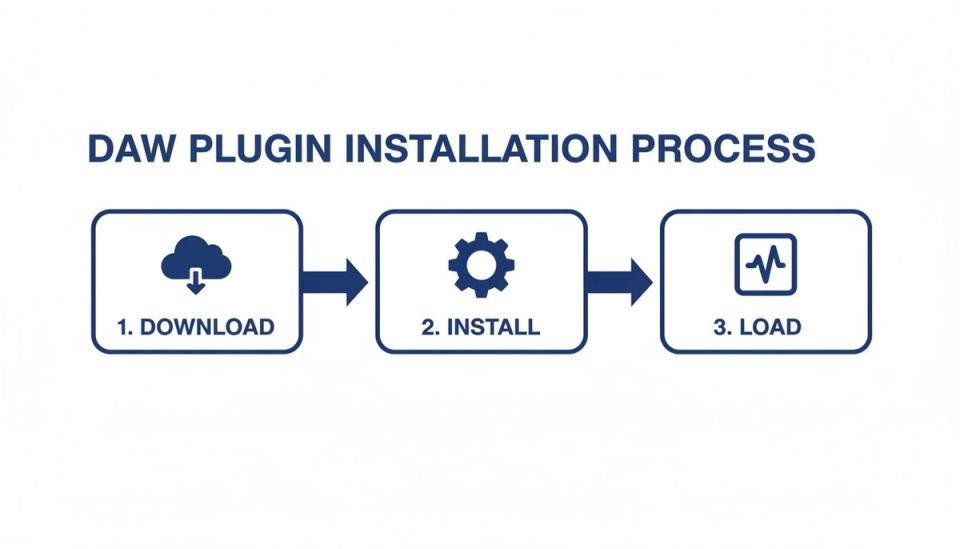
You just download the installer from the developer, run it, and then load the plugin on a track in your DAW.
Blend with the mix knob
Not every track needs an extreme pumping effect. The Mix knob is your most important control for fine-tuning. It's a simple wet/dry control, letting you blend the sidechained signal with your original audio.
A classic mistake is leaving the Mix knob at 100%. While that's perfect for an aggressive bassline, try dialing it back to around 50-70% on pads or synths. This creates a much more transparent pump, adding rhythmic energy without being too obvious.
Practical scenario: sub bass and kick
Imagine you have a massive sub-bass that clashes with your kick drum, turning the low-end to mud. This is a perfect job for Kickstart. Just drop it on your sub-bass track and pick a tight, fast curve.
Instantly, it carves out space for your kick's transient to hit cleanly. The sub then swells right back in. This creates a powerful one-two punch that feels tight and cohesive.
Tools that give you precise control over volume curves are powerful in modern production. You can learn more about similar techniques in our guide covering the best audio fade tool options.
Use advanced Kickstart techniques for a professional mix
So you have mastered the basic four-on-the-floor pump. The Nicky Romero Kickstart plugin is more than just a simple ducking tool. It becomes a powerful creative tool for shaping rhythm and carving out space in your mix with precision.
This is where Kickstart goes from a simple utility to a core part of your sound design.
One of the most powerful tricks is MIDI re-triggering. The default sync mode is great for house and techno but falls apart with complex rhythms. Think breakbeats or syncopated basslines.
By switching Kickstart over to MIDI mode, you take full control.
Just create a new MIDI track in your DAW and send its output to your Kickstart instance. Now, every note you draw in that MIDI clip will trigger the volume curve. This lets you craft groovy pumping effects that follow your kick pattern, no matter how off-grid it gets.
Use group processing for a cohesive groove
Applying Kickstart to an entire group of instruments can make your whole mix breathe as one unit. Pro producers use this technique to create a powerful, unified groove.
Instead of loading separate instances on every synth and pad, route them all to a single bus. Then, place just one Kickstart plugin on that bus.
This move pays off in two major ways:
- Cohesion: Every element in the group ducks in perfect sync, creating a super tight rhythmic pulse.
- Efficiency: You're running one plugin instead of ten, which keeps your CPU usage low and your project running smoothly.
Use surgical sidechaining with Kickstart 2
If you have upgraded to Kickstart 2, you have a powerful mixing feature at your disposal: the band-split. This lets you apply the ducking effect to a specific frequency range. It is an incredible tool for cleaning up a busy mix.
Imagine your atmospheric pad's low-mids are clashing with your kick drum. With the band-split, you can set Kickstart to only duck frequencies below 300 Hz. The pad’s low-end gets out of the way for the kick, but its airy top-end shines on, completely intact.
This kind of precision is what separates a good mix from a great one. Whether you’re using MIDI triggers, bus processing, or frequency-specific ducking, these advanced techniques make the Nicky Romero Kickstart plugin an indispensable tool.
Kickstart vs LFO Tool: which sidechain plugin to pick
Both plugins solve the same problem, with very different philosophies. Kickstart 2 gives you 16 hand-crafted curves, sync to host or MIDI, and a single mix knob. You ship the pump in three clicks. LFO Tool from Xfer gives you a fully drawable LFO with up to 30 points, separate envelopes for volume, pan, and filter, and a much steeper learning curve.
Pick Kickstart if you make house, techno, big-room, or trap and want speed. Pick LFO Tool if you make sound design, complex breakdowns, or unconventional rhythms where the sidechain shape itself is part of the creative work. Most working producers end up with both – Kickstart for ducking bass under kicks on every track, LFO Tool for the one or two builds per project where the LFO becomes a feature, not a utility.
Fix common Kickstart issues
The Nicky Romero Kickstart plugin is built to be a set-and-forget tool, but issues can arise. Luckily, the fixes are almost always simple. Once you know what to look for, you’ll solve problems in seconds.
Fix that annoying clicking sound
The most common complaint is a click or pop every time the volume ducks. This is a sign that your volume curve is too aggressive. This isn't a bug.
When you force an audio signal to drop to zero volume instantly, it creates a tiny digital artifact. To fix it, you just need to smooth out the curve’s attack and release. Try a different preset shape inside Kickstart with a gentler slope at the start and end.
Fix when the pumping feels off-beat
Ever had the pumping feel like it’s rushing or lagging behind the beat? This is often caused by plugin latency from other effects in your project.
Kickstart 2 has a simple offset control built just for this. You can slide the entire curve forwards or backwards by milliseconds. Tweak it slightly until the ducking locks perfectly into the groove of your track.
Also, double-check you’ve selected the right rhythmic division. A 1/4 note setting is standard for a four-on-the-floor house track.
A simple mental checklist can solve 99% of Kickstart problems. When it seems like nothing is happening, run through these three steps. It's almost always a simple oversight.
Fix why the plugin is doing nothing at all
You’ve loaded Kickstart onto a track, but you hear no change. Before you assume it’s broken, check these three things. The solution is almost always one of them.
- Is Your DAW Playing? Kickstart needs your DAW’s transport to be running to sync its timing. Just hit play, and the effect should kick in immediately.
- Is It on the Right Track? A classic mix-up. Make sure Kickstart is on the track you want to affect (like your bass), not on the kick drum track itself.
- Did You Check the Mix Knob? This is the number one culprit. If the Mix knob is at 0%, you're only hearing the dry signal. Crank it up to 100% to hear the full effect.
Let’s answer some common questions producers have about Kickstart.
Is Kickstart still worth it in 2026?
Absolutely, for one reason: speed.
You can get the same sidechain effect with more complex tools like LFO Tool or stock plugins. But nothing beats Kickstart for sheer immediacy. You just drop it on a track, pick a curve, and you're done.
For anyone who treats music as a business, that is everything. It helps you get ideas down and mixes sounding tight with zero friction. It’s not about having the most features; it’s about the fastest path to a pro sound.
Can I use it for genres other than EDM?
Definitely. While born in the world of big-room house, the idea of carving out rhythmic space is universal. When you use the pumping effect subtly, it becomes a powerful mixing tool in any genre.
- Hip-Hop: Try a gentle curve on a long 808 to make it duck for the kick, preventing a muddy low-end.
- Pop: Apply a light pump to synth pads or background vocals to add a modern sense of movement.
- Lo-Fi: A slower, rounded curve on a sampled loop can create a wobbly, vinyl-like vibe.
It all comes down to context. Dial back the mix knob, pick a smoother curve, and Kickstart becomes a dynamic shaping tool.
The jump from Kickstart 1 to Kickstart 2 was huge. Adding an audio trigger and a movable curve turned it from a simple tool into a flexible sidechain plugin.
What's the difference between Kickstart 1 and Kickstart 2?
The upgrade to Kickstart 2 brought in major features that make it a far more capable tool. Your choice depends on how much control you need.
Here’s the main breakdown:
| Feature | Kickstart 1 | Kickstart 2 |
|---|---|---|
| Curve Shape | Fixed presets only | Fully movable and adjustable curve |
| Trigger Source | Tempo sync only | Tempo sync, audio trigger, MIDI trigger |
| Frequency Range | Full band only | Includes band-split for specific ranges |
The movable curve and audio trigger are the biggest wins. Being able to drag the ducking shape gives you custom rhythmic pockets. The audio trigger lets the kick drum itself start the volume dip, offering more precision. For most producers, Kickstart 2 is the better investment.
Managing a premiere channel is a business, and the right tools make a difference. While Kickstart polishes your sound, the Premierely premiere booking platform automates your entire booking process. Turn premiere requests into a structured booking system instead of a backlog of emails.