
If you're managing premiere and repost requests through DMs and spreadsheets, you're creating operational chaos. That manual process is the single biggest bottleneck holding your channel back from serious growth. To treat your SoundCloud presence like a business, you must replace your chaotic inbox with a proper system to organize SoundCloud submissions.
Your Manual Submission System Is Costing You Bookings
Juggling SoundCloud DMs, emails, and spreadsheet entries is more than a headache. It's a broken workflow that actively hurts your channel's reputation and your bottom line. For every premiere request that gets buried, a label manager questions if your channel is run professionally. This chaos directly leads to missed bookings and damaged relationships.
As your channel grows, the number of submissions explodes. This is especially true for curators in trending genres. Without a solid system, the time you spend on admin tasks balloons. You have less time for what matters: finding and curating great music.
The Real Cost of a Messy Inbox
The problems with a manual process are predictable and expensive. Channel owners who rely on DMs and emails always run into the same issues. This cycle of inefficiency kills growth. These are not small annoyances; they are major business problems.
Common consequences include:
- Missed Opportunities: High-quality tracks from promising labels get lost in the noise. You miss out on great content and the revenue that comes with it.
- Scheduling Conflicts: Without a central calendar, double-booking premiere slots is practically guaranteed. This leads to awkward conversations and damages your credibility.
- Wasted Admin Hours: Manually tracking requests, chasing audio files, and sending payment reminders consumes hours. You could spend that time on content strategy or community building.
Many channel owners feel the manual grind is part of the hustle. But this disorganization makes you look like an amateur. It discourages serious labels from sending their best music.
The Growing Need for Structure in Electronic Music
The pressure to organize SoundCloud submissions is growing, particularly in electronic music. In the Netherlands, for instance, the scene has seen explosive growth. Electronic uploads are projected to hit over 33% of all tracks by 2026. Channel owners in this niche say 40-50% of submissions now come from labels seeking premieres.
Without automation, channel owners can waste up to 60% of their time. This time is lost on scheduling conflicts and chasing payments. You can read more about what these SoundCloud trends mean to grasp the opportunity.
To stop your manual system from costing you bookings, you must automate business processes. This turns operational chaos into a smooth workflow. This isn't about removing your personal touch from curation. It’s about building a professional foundation that lets your channel grow.
By setting up a structured intake process, you replace email requests with a booking form. This lets you handle more submissions professionally. It cements your reputation as a serious operator. A dedicated premiere booking platform like Premierely is built for exactly this.
Build a Centralised Submission Booking Page
If you’re still managing SoundCloud submissions through DMs and email, you're creating a bottleneck. The first, most critical step is to shut down those channels. Build a single, professional booking page instead.
This page becomes your channel's official front door. It immediately stops the back-and-forth for missing track files or social links. It forces every artist and label to give you what you need from the start. A dedicated booking page separates a hobby from a real business.
Without a central hub, your workflow probably looks something like this.
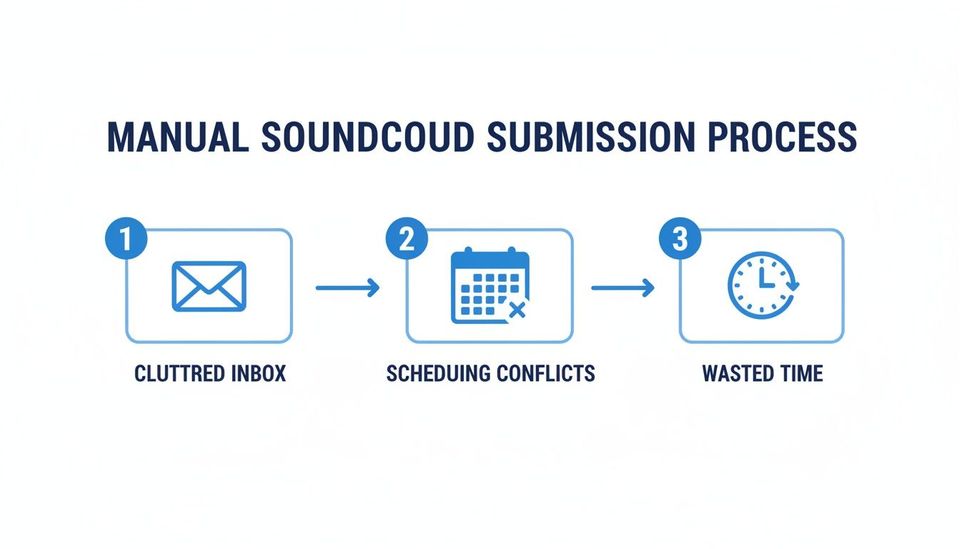
As the diagram shows, a manual process leads from a flooded inbox to scheduling conflicts. It results in hours of wasted time.
Essential Fields for Your Booking Form
Your submission form is the heart of this new system. The goal is to capture everything you need. But keep it simple enough that artists don't leave.
An effective form should gather different information for premieres versus reposts.
For All Submissions:
- Artist Name: The official name for the track credit.
- Contact Email: Your single point of contact for all communication.
- SoundCloud Profile URL: A direct link to their main channel.
- Social Media Links: Key promo accounts like Instagram or X.
Premiere-Specific Fields:
- Track File: An upload field for a high-quality WAV or AIFF file. State clearly that you do not accept private SoundCloud links.
- Artwork: An upload field for high-resolution cover art (e.g., 3000×3000 pixels).
- Desired Release Date: A calendar selector for them to request a date.
- Track Title: The final, official title of the song.
- Genre/Subgenre: A dropdown or text field to help you categorize it.
Repost-Specific Fields:
- SoundCloud Track URL: The public link to the existing track they want reposted. Your instructions must be explicit about this.
A well-designed booking page does more than collect data; it sets expectations. By requiring specific files and information upfront, you communicate your standards. You also filter for artists and labels who are prepared to meet them.
Setting Clear Submission Guidelines
Your booking page isn’t just a form—it’s where you set the rules. Clear guidelines are your best defense against irrelevant submissions. They help you organize SoundCloud submissions by pre-qualifying them. This text should be displayed prominently above your form.
Make sure to include these key points:
- Genres You Accept: Be specific. Don't just say "electronic music." List subgenres like "melodic techno," "hardgroove," or "lo-fi house."
- Submission Type Definitions: Clearly explain the difference between a premiere and a repost on your channel.
- Response Time: Set a realistic expectation, like "We review submissions within 7-10 business days."
- No Follow-Ups: Politely state that you won't respond to follow-up DMs or emails.
A dedicated booking page is a core asset. It is as important as your social media profiles. By building this centralized hub, you replace the chaos of email with a structured system. This lays the foundation for a fully automated workflow.
Qualify Submissions with a Curation Framework
You’ve got all premiere and repost requests flowing into one place. The chaos of DMs is gone, but a new problem appears: quality control. A tidy inbox doesn't mean every track is a winner. Listening to everything randomly leads to creative burnout.
To truly organize SoundCloud submissions, you need a framework for qualifying tracks quickly. This isn't about being an elitist gatekeeper. It’s about protecting your brand and your time. It shifts your process from reacting to submissions to a structured review.
Define Your Channel's Sonic Identity
Before you can judge a submission, you need a solid definition of your channel’s sound. "I play good music" is not a strategy. You need a documented sonic identity that acts as your curation guide. This is what attracts a loyal following and tells artists what you’re about.
Start by being specific. Ask yourself:
- What are our core genres? Is it "driving techno and melodic house," or something else? List them out.
- What's the energy level? Is your channel for high-energy club tracks or laid-back beats?
- What's the minimum production quality? Define what "professional" means to you. This covers mixdown clarity and mastering levels.
Writing this down makes your decisions objective. It’s no longer about your mood; it’s about criteria. That’s the difference between a real curator and just someone making a playlist. It is what builds brand consistency.
The Three-Point Curation Check
Once your sonic identity is clear, run every submission through a quick, three-point check. The goal is a fast, decisive assessment. This process should not take more than a few minutes per track.
First, Genre and Vibe Fit. Does the track align with the sonic identity you defined? This is a simple yes or no. If a track is completely off-genre, it’s an immediate pass.
Next, Production Quality. Is the track technically solid? Listen on good headphones for a clean mix and decent mastering. A great idea with poor execution doesn't belong on a trusted premiere channel.
Finally, the Originality and "X-Factor." Does the track bring something new? This is where your taste comes in. You're looking for an interesting arrangement or a hook you can't forget.
A structured review process transforms curation from a chore into a skill. It allows you to build a reputation for quality. This makes your channel a destination for listeners and high-caliber labels.
This systematic approach is critical, especially in active music scenes. Before platforms like Premierely existed, channel owners were drowning in submissions. Many faced a staggering 45% drop-off rate from payment issues alone. It’s a perfect example of why organized curation is non-negotiable.
Handling Rejections Professionally
Rejecting music is part of the job. But it doesn't have to mean burning bridges. How you say 'no' says a lot about your professionalism. Ghosting an artist is a surefire way to get a bad reputation.
Create a polite, templated response for tracks that aren't a fit. Your template should:
- Thank them for sending their music.
- Clearly state it isn't the right fit for your channel's current sound.
- Avoid harsh, unsolicited feedback.
- Encourage them to send other tracks in the future.
A premiere booking platform like Premierely lets you manage these templates right from your dashboard. It helps you maintain good relationships. It also keeps quality artists coming back.
Get Your Scheduling and Payments on Autopilot
Manually building a schedule and chasing invoices are huge time sinks for any channel owner. This is where you graduate from being organized to actually getting your week back. Automation is how you build a premiere business that scales, not one that burns you out.
Most of the friction in your workflow happens right here. It's the messy gap between approving a track and seeing it go live. For many curators, this space is a chaotic mess of DMs and double-booked slots. Automating this mess turns your channel into a professional operation.
Ditch the Spreadsheet and Centralise Your Schedule
First, you need to get your entire content calendar in one place. A disorganized schedule is a recipe for disaster. Overlapping premieres wreck your reputation with labels and artists.
A central calendar gives you a bird's-eye view of your content pipeline. It becomes the single source of truth for all bookings.
- Kill Double-Bookings for Good: A proper calendar system automatically blocks off dates as they’re claimed. This prevents the most damaging scheduling mistakes.
- See Your Content Pipeline Visually: Get a clear look at your upcoming schedule. This helps plan content and manage your workload.
- Show Your Availability: Some systems let you show available slots on your booking page. This stops guesswork and makes the submission process smoother.
Putting a real calendar system in place is a critical step to organize SoundCloud submissions properly. If you want to see what this looks like, our guide on finding the right premiere scheduling tool is a good place to start.
Get Paid Upfront, Not After the Chase
Chasing invoices feels unprofessional because it is. It puts you in the uncomfortable position of being a part-time debt collector. This can quickly sour relationships with artists. The fix is simple: get paid before the work starts.
Integrating payment processing into your booking flow is the most important step to professionalize. Instead of sending an invoice and hoping, payment becomes a non-negotiable step.
This shift in your process is fundamental. When you require payment upfront, you eliminate no-shows and last-minute cancellations. It guarantees you're only spending time on serious, committed partners.
This is where a purpose-built platform really shines. A system like Premierely, for example, is designed for channel owners who treat premieres as a business. It uses Stripe Connect to collect payment at booking. As soon as payment is complete, their premiere is automatically confirmed. The chase is over for good.
The Real Payoff of an Automated Booking System
Putting your scheduling and payments on autopilot does more than just cut down admin work. It completely changes how your business operates. It also changes how it's perceived by your clients.
Here are the key operational wins:
- Look Like a Pro, Build Real Trust: Requiring payment upfront signals you’re a serious business operator. This builds immediate trust and attracts higher-quality, professional clients.
- Fix Your Cash Flow: You get paid the moment a booking is confirmed, not weeks later. This predictable income lets you plan ahead and reinvest in your channel.
- Slash Your Admin Time: You eliminate time spent creating invoices and sending follow-up emails. This can shrink your booking admin from hours down to just a few minutes.
By connecting scheduling and payments, you create a self-running system. It takes the manual grind you're already doing and puts it on autopilot. This frees you up to focus on curation and growing your brand.
Automate the SoundCloud Upload and Publishing Process
You’ve nailed your intake form, you’re triaging submissions, and your schedule is clean. The final piece of the puzzle is automating the actual upload and publishing. This is where all that prior organization pays off. It turns a tedious, manual chore into a hands-off system.
This is about closing the loop. Once a submission is approved and paid for, the system should take over completely. Imagine the track title being generated and the description filled out. The system uploads the audio file and schedules the post for you.
Establish Consistent Track Titles and Descriptions
Your channel’s professionalism on SoundCloud hinges on consistency. Every premiere needs to follow the same format for its title and description. It looks clean and makes your content instantly recognizable.
Copying and pasting that information for every upload is slow and prone to typos. A better approach is creating templates that automatically pull information from the submission form. This ensures every upload is perfectly formatted without you lifting a finger.
Your premiere track description template should always include:
- Track Title and Artist: Right at the top and clear.
- Premiere Announcement: Something simple like "Your Channel Name Premiere".
- Artist Socials: Direct links to the artist's and label's SoundCloud and Instagram.
- Release Information: Details about the track’s upcoming EP or album.
- Support Links: "Pre-save" or "Buy" links for platforms like Bandcamp or Beatport.
With a proper automation tool, you can set these templates up once. This is a core function of a premiere booking platform. It turns a repetitive task into a background process.
The Power of Direct, Automated Uploads
The upload itself is often the most draining part. Logging into SoundCloud, finding the right audio file, and filling out metadata is a huge time sink. When you're handling multiple premieres a week, this becomes a bottleneck.
This is where a direct SoundCloud integration changes everything. Instead of you manually uploading, the system does it for you. Once you approve a track, the platform grabs the audio file and uploads it.
This single piece of automation connects your booking system to your SoundCloud channel. It creates a closed-loop process. No track can be missed or published with the wrong details.
This automation handles all the tedious but critical details:
- Uploading the correct audio file (WAV/AIFF).
- Applying your perfectly formatted, templated title.
- Populating the description with artist links and release info.
- Uploading the high-resolution artwork.
- Setting the track to "private" until the premiere time.
- Scheduling the track to go public on the confirmed date.
This means you can schedule a whole month's worth of content in one session. You can walk away knowing every premiere will go live perfectly.
From Manual Grind to Automated Success
For any channel owner treating their premiere service as a serious operation, this automation is essential. It lets you handle a higher volume of submissions without burning out. Your entire workflow becomes predictable, professional, and efficient.
Platforms like Premierely are built for this exact workflow. The system is designed to automate what you're already doing manually. It's the final step to truly organize SoundCloud submissions from start to finish.
Turn Premieres into Audience Growth with Download Gates
A great submission system does more than organize your inbox; it turns every premiere into a growth opportunity. Once a track goes live, the work isn’t over. The real magic happens when you use that content to actively build your audience.
The best way to do this is with download gates. Instead of a free download link, you create a simple exchange. To get the MP3, a listener must perform an action that helps grow your channel. This transforms each premiere into a repeatable engine for audience growth.
How Download Gates Create a Growth Loop
A download gate creates a self-sustaining cycle. When listeners want the track, they complete a simple task you’ve set. This is a strategic move to build social proof and a direct connection with your audience.
The actions you require can directly boost your SoundCloud presence:
- Follow to Download: This is the most direct way to convert a casual listener into a subscriber.
- Like to Download: The listener likes the track, signaling to SoundCloud's algorithm that your content is popular.
- Repost to Download: This is huge for exposure. A fan reposts the track, broadcasting your premiere to their own followers.
- Comment to Download: This drives engagement on the track page, another positive signal for discovery.
By attaching a gated download to every premiere, audience growth becomes an automated part of your operation.
A premiere isn't just about the initial upload. It's a marketing asset. Using a download gate ensures every play and download directly contributes to growing your channel's followers and authority.
Building Your Most Valuable Asset: Your Email List
Beyond SoundCloud metrics, download gates are effective tools for building your email list. While SoundCloud followers are great, an email list is an asset you completely own. You are not at the mercy of an algorithm to reach your audience.
You can set up your gate to require an email address for the download. Over time, you’ll build a list of active fans who want to hear from you. For a deeper dive, our guide on using a SoundCloud email gate lays out specific strategies.
This direct line of communication is perfect for:
- Announcing new premieres to drive first-day plays.
- Promoting your own label's releases.
- Sharing news about live events or other projects.
Making Growth an Automatic Part of Your Business
The best way to organize SoundCloud submissions is to build a workflow where audience growth is a natural outcome. A platform like the premiere booking platform from Premierely has this functionality built in. You can attach a download gate to any premiere and pick the actions you want to require.
This automates what you're probably trying to do manually. It's a set-it-and-forget-it feature that consistently builds your following. This is how you stop just managing submissions and start building a sustainable media business.
Common Questions About Organising Submissions
Switching from the manual grind to a proper system sounds great. But you probably have some questions. Most channel owners worry about two things: losing their personal touch or getting tangled in tech.
Let's clear the air on some common concerns so you can professionalize your channel.
Can I Still Personally Review Each Track?
Yes, absolutely. Automation is there to kill the admin work, not your creative control. A good system handles the boring parts—collecting files, processing payments, and scheduling. It does not listen to the music for you.
You are still the curator. The system just gives you a clean, organized queue of qualified submissions. You have the final say to approve or reject every track. You just curate from a dashboard, not a chaotic inbox.
How Do Automated Payments Work for International Artists?
This is where a dedicated system shines. Handling international payments manually is a nightmare of currency conversions and high bank fees. An automated platform built for this business model just handles it.
By integrating with a global payment processor like Stripe Connect, you can accept payments from artists and labels anywhere.
- The artist pays in their own local currency.
- The system handles the conversion automatically.
- The money lands directly in your connected bank account.
This feature instantly makes your channel a global business. It removes one of the biggest headaches of working with international artists. It makes you look professional from day one.
Automation handles the admin, not the curation. You maintain full control to approve or reject tracks. You just do it from a clean dashboard instead of a chaotic inbox.
What's the Best Way to Handle Rejections?
Rejecting a track doesn't have to mean burning a bridge. The key is to be polite, professional, and fast. Ghosting artists is a terrible look and will damage your reputation quickly.
The best approach is a polite, templated response. Thank them for the submission. Briefly explain it's not the right fit for your channel's current sound. Encourage them to send future tracks that might be a better match. A platform like Premierely lets you send respectful rejections with a single click.
A platform like Premierely is built to answer these questions by design. It automates what you're already doing manually: submissions, payments, scheduling, and uploads. This allows you to get back to building your brand.