A premiere request is waiting, the artist wants a paid boost, and last week's clicks still haven't turned into saves. You've got room on the calendar, but you can't tell whether another post will bring listeners or just another report full of views.
Learning how to advertise your music starts with that gap. You need to choose the listener action you want, give each channel a clear job, and spend more only when people do something worth paying for.
You match each channel to one listener action
Posting the same artwork everywhere gives you more posts to manage, but it doesn't give listeners a clear route to the track. A person watching TikTok needs to hear why they should care. Someone following your SoundCloud channel may already trust your taste and need only a strong first listen.
Choose the action before you choose the placement. For a new artist, that might mean follows. For a release with an active audience, saves or playlist adds may be more useful.
You give each channel a specific job
Use this comparison as a working plan, rather than a shopping list. You don't need every channel for every release.
What each channel is for
| Channel | Job it does well | Native format | Success signal |
|---|---|---|---|
| SoundCloud premiere or repost | Trusted first listen | Audio and a formatted title | Saves, follows, and reposts |
| YouTube video or Short | Show one musical moment | Landscape video and a vertical Short | Watch-through and profile visits |
| Instagram Story | Remind current followers | Vertical Story | Replies and profile taps |
| TikTok clip | Find new listeners | Short vertical video | Full listens and follows |
| In-app streaming ads | Reach people near a listen | Canvas, Marquee, or Discovery Mode | Save rate and playlist adds |
| Radio or broad social boost | Awareness only | Short audio or a generic clip | Do not scale on clicks alone |
Canvas is a supporting visual, while Marquee and Discovery Mode are campaign tools. They don't work the same way, but each sits closer to the listening session than an off-app announcement.
Treat radio and broad boosts as awareness placements in this plan. They can introduce the artist, but exposure alone doesn't show whether someone becomes a listener.
You remove the handoff that loses listeners
One industry estimate from MusicPulse says only 12% of users who click a music ad complete a full listen on the destination streaming service. That's a reason to inspect the journey, not a universal forecast for your campaign.
Play the musical moment immediately. Make the destination match the promise, and avoid sending someone through a crowded profile when you're asking them to hear a specific track.
For paid Instagram work, Gainsty's Instagram ad strategy tips offer a useful planning resource alongside your release assets. Keep the music campaign focused on a clear next action rather than adding competing requests.
A smaller genre channel can be the better buy when its followers already listen to that sound. Before booking, check recent releases, audience fit, format, cost, and whether the curator is likely to accept the track.
Pick one primary action and two supporting channels. For example, use a SoundCloud premiere to earn the listen and an Instagram Story to remind current followers, with follows as the main result.
You clear the rights before you schedule the post
You can approve a track for your audience without having permission to use it in every promotional format. Editorial approval and rights clearance are separate checks. Keep both visible in your intake process.
SoundCloud's rights verification guide says submitters must own or control the content or have permission to use it, including third-party beats, stems, and samples. A sampled recording can require clearance from both the composition rights holder and the owner of the original master.
Use this checklist before you commit to publication.
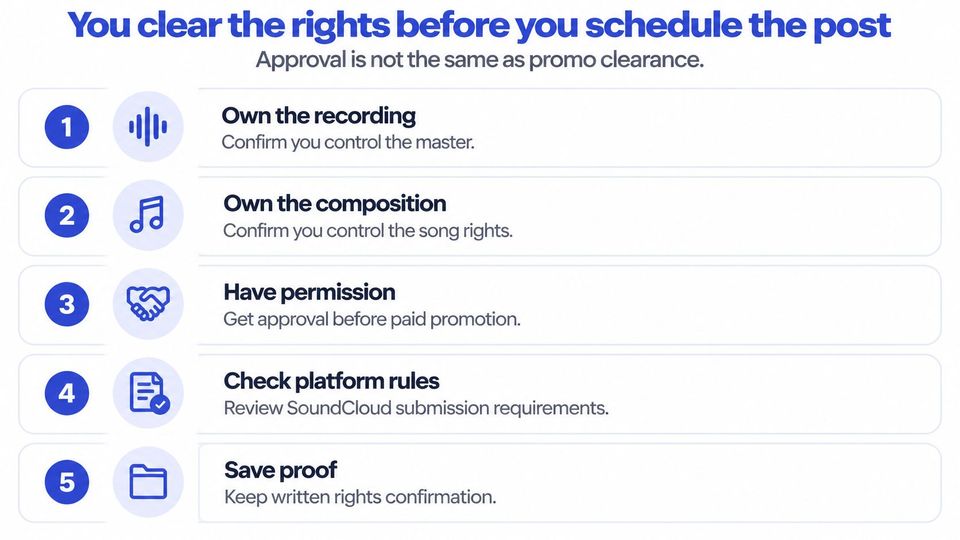
You confirm ownership before choosing the paid route
Ask the booker to confirm who owns the master and the composition. If someone else supplies part of the recording, request written permission that explicitly includes the planned use, rather than accepting a general assurance that everything is cleared.
Check these items in the queue:
- Master ownership. Identify who controls the recording.
- Song rights. Identify the songwriter or publisher who controls the composition.
- Third-party material. Collect permission for samples, beats, stems, and remix elements.
- Visual assets. Confirm permission to use artwork, photos, and supplied text.
- Commercial use. Record which paid and promotional uses the permissions cover.
A music copyright checking workflow helps you organize those questions, but a checker doesn't replace written permission.
SoundCloud's promotion terms limit its paid program to active Premier monetization members and selected partners, with original recordings and compositions already monetizing on SoundCloud. Don't book that route until eligibility is clear.
SoundCloud's monetization rules exclude formats including unofficial covers, remixes, mashups, DJ sets, and podcasts. A track can suit your channel while failing the requirements of a monetization-dependent campaign.
You check TikTok permission separately
Treat a post marketing a release as commercial content when you review permissions. TikTok's Commercial Music Library documentation says the library contains 1 million songs, with selected Commercial Sounds available for organic or paid content, and requires confirmation of the necessary licenses when using outside music with commercial disclosure enabled.
A track's presence in the general music library doesn't automatically clear it for marketing. Keep evidence covering your original sound and the intended post.
Request the upload pack after editorial acceptance, then finish the rights check before scheduling. If proof is missing, delay the placement instead of publishing and hoping.
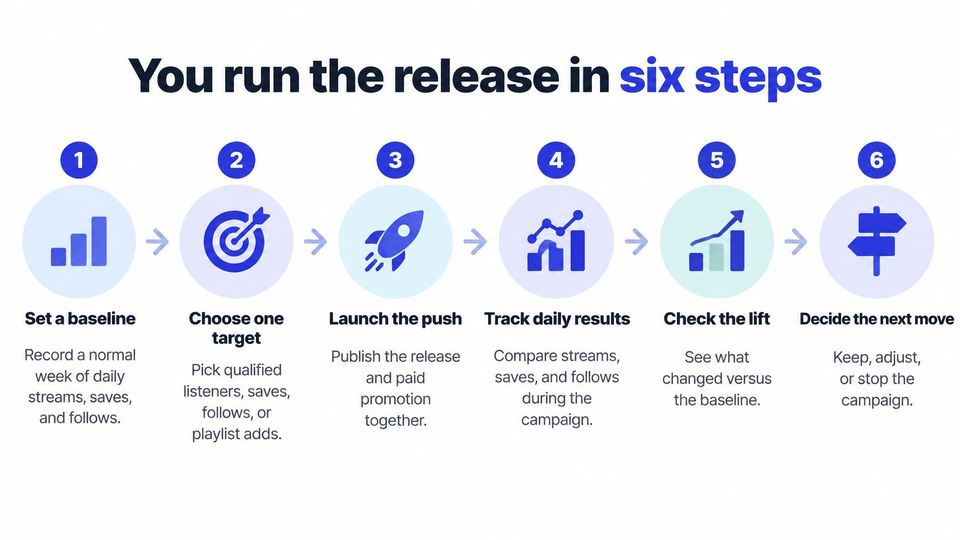
You run the release in six steps
You need a repeatable release routine because weekly bookings leave little room for rebuilding the campaign from scratch. Separate the decisions about the audience, assets, and result so you can tell what needs fixing.
Use this release sequence to keep the work visible.
You prepare the target and assets before launch
- Set a baseline and choose the target. Record a normal week of daily streams, saves, and follows without an extra push. For an unreleased track, use artist-level activity as context, not as an exact prediction of the new song's performance. Choose qualified listeners, saves, follows, or playlist adds as the main outcome.
- Build the asset pack around that result. Prepare a short vertical clip, artwork, and a clear call to action. Choose a musical moment that gives someone a reason to continue, whether that's a vocal entrance, a bass change, or the start of a break. Add Spotify Canvas where available, and use a Spotify pre-save plan if you're asking people to act before release.
- Split the audience by listening context. Separate prior listeners from new prospects, then consider genre, place, and engagement. Don't give a current fan the same introduction as someone who has never heard the artist. Send each group to a destination that supports the request.
You launch tests without losing the comparison
- Test hooks and destinations in small batches. Start with enough control to learn which part works. Keep the audience and destination fixed when comparing opening clips, then test destinations separately. If you change everything together, you won't know what causes the difference.
- Label each placement and follow the listener action. Give each ad or curator placement its own tracking link, and keep the destination names clear in your campaign sheet. A tagged click identifies the route someone takes; it doesn't guarantee you can trace that person's later stream across apps. Keep ads that produce useful listening behavior and pause those that only produce cheap traffic.
- Review direction before making a final call. Read the campaign after the first week, then allow the release cycle to develop before judging it. Don't rewrite the audience and creative on the same day, and don't stop a test because its early clicks cost more.
Spotify's release engagement guidance defines that measure as the percentage of monthly active listeners who stream a new release in its first 28 days; Spotify also reports Canvas exposure associated with 5% more streaming, 145% more sharing, 20% more playlist additions, 1.4% more saves, and 9% more profile visits versus a control group.
Treat those Canvas findings as support for preparing the asset, not as a forecast for your release. Your campaign still needs to show whether the people you reach save, follow, or return.
You check whether the ad caused the stream
A low cost per stream can look good while telling you very little about the ad. Existing fans may hear the track through recommendations, playlists, or the artist's own posts, even if they also see your campaign.
Keep your reporting focused on what changes after the promotion.
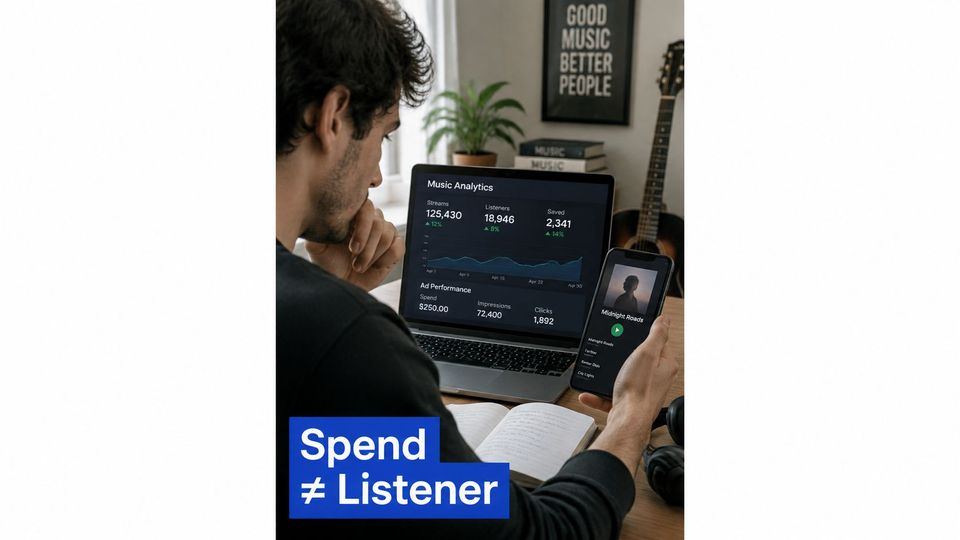
You separate attribution from added listening
Attribution assigns credit to a placement. Incrementality asks whether the placement creates activity that wouldn't otherwise happen. You need both ideas because a track can rise during a campaign without the campaign causing all of that rise.
Start with the baseline recorded before the push. Add the channel name, tracking link, publication time, and spend to your log, then note other activity such as a playlist feature or artist announcement.
Spotify's campaign results documentation observes listener behavior for 14 days after ad exposure and reports later audio or video streams. You can use that as a practical review window elsewhere, but your own report won't have Spotify's listener-level visibility.
For access to the artist-side reporting, get the Spotify for Artists account ready before launch. Agree who will export or share the results so the curator isn't left reporting clicks while the artist holds the listening figures.
A cheap stream is a weak result when the listener never saves, follows, or returns.
You compare exposed and unexposed groups where possible
Hold a small, comparable part of the eligible audience out of the ad when the buying tool allows it. Compare the change in that group with the change among people eligible to see the campaign, rather than treating every later stream as paid success.
For a deeper explanation of control groups, SourceLoop's guide to causal testing for advertising ROI helps frame the difference between receiving credit and causing a result. Small campaigns won't always support a clean test, so label uncertainty instead of hiding it.
Use the same questions when reviewing a premiere or repost:
- Listening. Does activity rise beyond the usual pattern?
- Saving. Do listeners show intent to hear the track again?
- Following. Does the artist gain an audience for the next release?
- Returning. Does listening continue after the publication burst?
Keep the measurement process separate from the excitement of launch day.
Don't add SoundCloud listeners, YouTube viewers, and TikTok viewers together and call them unique fans. Unless you can deduplicate them, report each service separately and name the measure accurately.
A smaller curator placement can earn another booking when saves and profile visits rise against the baseline. It still can't claim every new fan without a fair comparison.
You move the budget only after a small test
Prove the creative before you buy a large audience. Reserve 10 to 20 percent of spend for experiments, then test at least three opening hooks and two calls to action while holding the audience and destination steady.
Treat that reserve as a working budget rule, not an industry average. Change one element at a time, and keep an ad only when it beats the campaign's own median cost per save or engaged listener.
You use a keep-or-stop sheet
Define an engaged listener before testing, using behavior your reporting can show. If you can measure saves reliably but can't connect clicks to full listens, use cost per save rather than inventing a listener figure.
When a test earns more budget
| Test | Hold still | Keep it when | Then do this |
|---|---|---|---|
| Three opening hooks | Same audience and destination | It beats the median cost per save or engaged listener | Pause the weaker hooks |
| Two calls to action | Same winning hook | More saves or follows | Use the stronger line only |
| Retargeting | People who watched, clicked, saved, or visited | They listen again or follow | Move budget to that group |
| Scale | Winning creative and audience | The 7-day read still holds | Confirm again at 28 days |
| Experiment reserve | 10 to 20 percent of spend | A creative has won | Release the remaining budget |
Retarget people only where the ad tool makes that audience available and you have the needed permissions. You won't necessarily be able to build an off-app audience from everyone who saves a track.
Increase spend in stages. If the cost of useful actions rises after you expand the audience, return to the last workable setting instead of defending the larger buy.
You treat Spotify's figures as direction
In its own campaign tools report, Spotify says selected songs averaged 50% higher save rates, 44% more playlist additions, and 37% more artist follows during their first month of Discovery Mode, while Marquee generated an average of ten times more Spotify listeners per dollar than comparable off-platform social ads in its comparison.
Those findings come from Spotify's products and selected campaigns. They justify testing tools near the listening session, but they don't promise the same return for your genre, artist, or release.
Spend more when the audience keeps listening, not when the dashboard makes reach look cheap.
Skip artificial streaming services entirely. Don't buy piles of poorly matched playlist slots, and don't report impressions as if they prove fan growth.
Your final budget decision should account for repeat listening, follows, and playlist adds. A larger audience is useful only when the extra spend keeps producing the action you chose.
You lock the release plan before you spend
Write the plan on a page that the artist and curator can both use. Keep it short enough to check while you're approving requests, with the key decisions visible instead of buried in a press document.
The page should name the main action, supporting channels, destination links, asset owner, and review dates. Record who supplies the listening results, because the curator and artist often see different parts of the journey.
You make every placement answer a clear question
Use a short checklist before you commit money or calendar space:
- Name the result. Choose one listener action that makes this release worth promoting.
- Assign the channels. Give each supporting placement a job and a separate tracking link.
- Set the review. Put the reporting dates on the calendar before publication.
- Name the owner. Make someone responsible for assets, rights proof, and results.
- Reject poor fits. Redirect the artist when your audience isn't right for the track.
A decline is useful when you explain the mismatch. Tell the artist whether the issue is genre, format, timing, or eligibility, rather than selling a placement you don't expect to work.
You keep booking work beside the campaign plan
In Premierely, the booking system for music curators, artists use your booking page to choose the promotions you sell, pay where required, and send the release title, streaming link, and short message. You approve or reject requests from one queue, and the booker uploads audio, artwork, and release details after approval.
The form answers feed your destination templates: audio and a formatted title for SoundCloud, a vertical Story for Instagram, a widescreen video and a vertical Short for YouTube, and a vertical video for TikTok. On Pro, one approval schedules and publishes to all connected channels, while the booking calendar keeps scheduled premieres and reposts organised and titles and descriptions follow your format.
Keep your campaign sheet beside that booking work. Automation handles preparation and posting after approval. You still choose the audience, clear the rights, and judge whether the result earned another placement.
Before approving the next request, check that someone owns every missing task. A full calendar is no reason to accept an unfinished campaign.
You settle three questions before you post
Do free curator posts count as advertising?
Yes, a free post can do the same promotional job as a paid placement. Give it a distinct tracking link and judge it by the listener action you want, rather than the curator's audience size alone.
Include the work involved when comparing options. A free placement that needs repeated chasing may cost more of your time than a well-run paid booking, even though no money changes hands.
Can one video run everywhere?
You can reuse the same musical moment, but you shouldn't assume the same export suits every destination. Cut a vertical version for TikTok and Stories, a Short and widescreen version for YouTube, and keep the full audio ready for SoundCloud.
Check the crop, text placement, opening frame, and call to action in each version. A clip that looks finished in your editing window can hide the artist's name behind app controls.
What do you do when a curator declines a release?
Ask which audience or channel would fit better, then adjust the pitch before submitting again. Keep the useful parts of the asset pack, but don't repeat a mismatch across a longer list of curators.
Advertise the action you want on the channel most likely to produce it, and spend more only after listeners stay.
Premierely offers a booking system where curators accept premiere and repost requests, review bookings, and collect files after approval. Visit it to set up your booking process, then pair each approved placement with a clear listener action and a date to review the result.