You open your inbox on Monday and find six artists asking about a premiere. Two include a music link, another sends artwork without a release date, and one asks for the price but never replies. You spend the morning finding details instead of choosing music.
A good booking landing page gives those artists a clear offer and collects the details you need to judge it. Before anyone pays, it should also explain what you'll deliver, what happens if you decline, and which results you can't promise.
Why visitors leave before they request a slot
Say an artist reaches your page from Instagram with a track ready to pitch. They want to know whether you cover their genre, whether a slot is open, and what it costs. Instead, they find a long form asking for a biography, artwork, billing details, and every social account before they can see an offer.
You haven't received a bad request. You haven't received anything, because the artist leaves before sending it.
In its 2024 checkout research, Baymard Institute reports an average of 11.3 form fields across 5.1 steps, with 17% of shoppers abandoning an order because checkout was too long or complicated. These are e-commerce findings, so treat them as a pattern, not a music-booking benchmark.
Your visitor faces a similar task. They choose a service, provide details, send assets, and pay, though your approval process may change that order. Every question should help you make a decision or deliver the booking.
Ask for the information you need at the point when you can use it.
You can find friction on your own phone
Open your booking page on a phone without signing into your curator account. Pick a service and complete the request as an artist would, including any upload and payment steps.
Time the task, count the questions, and note where you hesitate. If you need to open another page to find the price or check what happens next, fix that gap before adding more traffic.
Your page needs six parts to win a booking
Use the six blocks of a booking landing page as a checklist before you build the form.
| Block | Question it answers | What to write | Example |
|---|---|---|---|
| Offer | What am I buying? | Promotion type, channel and price or free label | Instagram Story, set price |
| Timing | When does it run? | Open dates and the publication window | Friday slots, booked on your calendar |
| Approval | What happens after I ask? | Who decides, and what a rejection means | You review each request and accept or decline it |
| Request form | What do you need from me? | Stage-one fields only | Release title, streaming link, short message |
| Asset specs | What files do I send? | Formats, quality, file size and artwork rules | WAV or MP3 audio, square artwork file |
| Results | What do I get back? | What you share after publication | Links to each live post |
The offer needs the most care. A music-promotion package can mean an original upload, a repost of an existing track, or a social post. Those actions need different assets and create different expectations, so give each its own card.
Name the channel account, the action you'll take, and the price or free label. If a service includes several channels, list them rather than leaving the artist to infer them from social icons.
For a broader page-layout check, the conversion tips from MD TECH TEAM offer a useful companion to this music-specific checklist. Keep the booking decision central when you apply general landing-page advice.
You should make delivery visible
For a premiere, say whether you publish a new upload on your account. For a repost, ask for the existing track link and make clear that you're sharing that item rather than uploading another copy.
The artist chooses a service and pays on your channel's booking page, so the details arrive with the request instead of in separate emails. Your results block should then explain how they receive proof of delivery.
Keep each block short enough to scan. If an offer needs a dense paragraph to explain, separate its options or remove an unclear inclusion.
Build a two-stage form that asks at the right time
Present the offer before asking for release files. Separate the request from asset collection, and state the actual payment timing rather than assuming every booking system handles it alike.
This diagram shows an approval-first route for files and payment; use it only if your checkout follows that order.
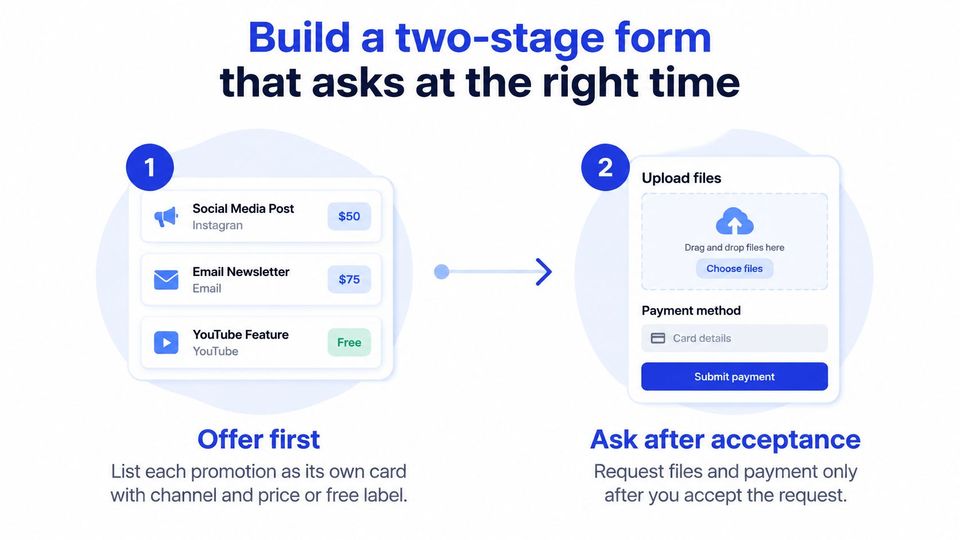
- Present the offers separately. Give each promotion a channel, a price or free label, and a clear deliverable. Don't make visitors decode a package before choosing it.
- Collect the review details. Ask for the release title, music streaming link, genre, channel, preferred date, and a short message. These let you assess fit without requesting the full release folder.
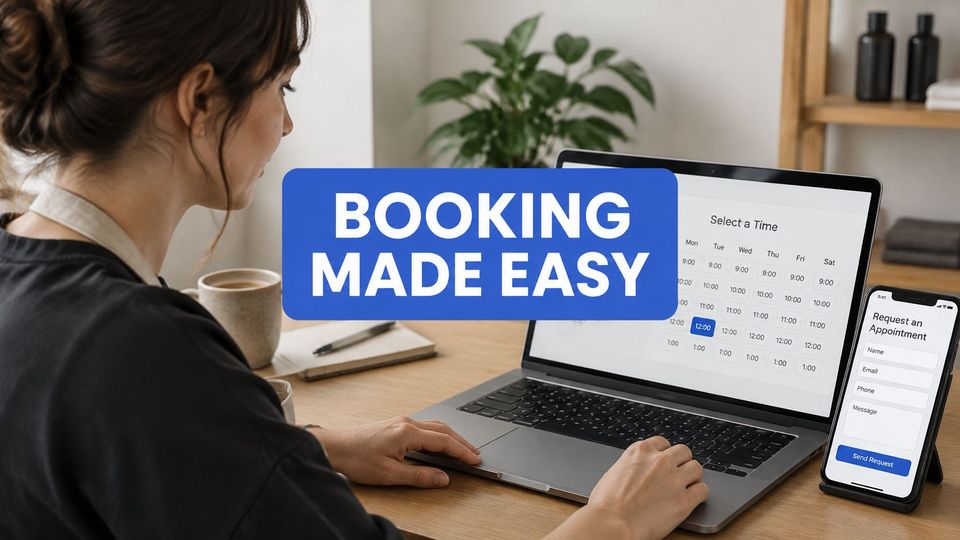
- Use real availability. Let the booker choose an open calendar date so you don't accept competing requests for the same slot. State the publication time zone.
- Match the payment rule to checkout. Place charge timing and rejection terms above the payment step. If you collect payment before review, don't describe it as payment after acceptance.
- Collect assets after approval. The booker then uploads audio, artwork, press text, and release details. Show YouTube descriptions or TikTok asset fields only when the chosen service needs them.
- Support unfinished requests. If you build a custom form, provide save-and-resume and test it on a phone. Use clear labels and errors that explain how to fix the problem.
Baymard's checkout usability benchmark describes an ideal flow of roughly 12 form elements, compared with 23.48 elements displayed by default in the average U.S. checkout. Treat that as a complexity check, not a quota, and measure mobile and desktop completion separately.
Premierely is a booking system where artists book through your channel link and upload assets after you approve. Use this guide to manage SoundCloud submissions when mapping that handoff.
Tell bookers which files and specs to upload
Give artists a spec sheet beside the upload fields, with separate instructions for audio, artwork, and video. The audio values below come from SoundCloud's upload requirements.
| Item | Value to give bookers | Why it matters |
|---|---|---|
| Audio formats | WAV, FLAC, AIFF, ALAC, MP3, AAC and others | Bookers can send a lossless master |
| Audio quality | Stereo, 16-bit/44.1 kHz or higher | Keeps the master clean on upload |
| Headroom | About -0.5 to -1 dBFS | Reduces clipping |
| Single file limit | Up to 4 GB and 24 hours | Long mixes must still fit |
| Basic account upload time | 2 hours in total | A full allowance blocks new tracks |
| Artist account upload time | 3 hours in total | Plan space before a series |
| Artist Pro upload time | Unlimited uploads | Supports recurring premiere runs without a total-time cap |
Ask for the approved master, not whichever preview file is easiest to find. Include a version field for the original, radio edit, or extended mix so you don't publish the wrong cut.
A lossless master gives you a clear source file to work from. If bookers confuse file extensions with quality, point them to the guide to types of audio file formats instead of adding a long explanation inside the form.
You need channel-specific assets and available space
State your artwork shape, accepted image files, and caption requirements beside their fields. Ask for vertical video for Instagram Stories and TikTok, and specify the standard video orientation you need for YouTube.
Check your own upload allowance before accepting a run of premieres. SoundCloud's uploading FAQs explain that exhausted capacity can block new uploads and that tracks beyond the available allowance may be hidden.
A complete folder doesn't help if your channel can't publish it on the agreed date.
Finish with a publication-rights check before approval. SoundCloud's copyright guidance states that buying or downloading music doesn't grant permission to upload it, and unreleased music remains protected. Ask the submitter to confirm their authority and provide written permission when ownership is unclear.
Show the price and the rules before checkout
Adding more logos won't answer an artist who doesn't know what happens to their payment if you reject the track. Clear limits give buyers something concrete to assess, while vague praise leaves the transaction uncertain.
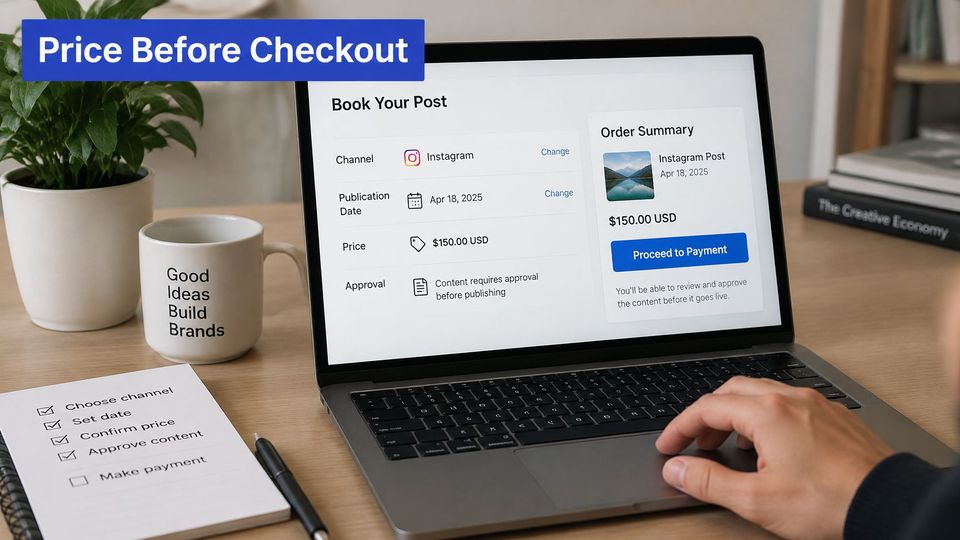
Show these terms before checkout.
- Total price and currency. Include any charges the booker must pay.
- Channel and deliverable. Name the account and the action you'll perform.
- Publication window. Explain when the placement runs and what can delay it.
- Approval and payment timing. State when you review, charge, and schedule.
- Rejection, refund, and rescheduling rules. Explain what happens when either side can't proceed.
The payment screen should keep those terms visible.
Baymard's checkout guidance reports that 40% of shoppers abandon because of unexpected additional costs, 18% because they must create an account, and 9% because their preferred payment method is unavailable. Those are retail figures, but the checkout checks are useful here: offer guest payment where possible and preserve entries after validation errors.
You should promise actions you control
You can commit to review, an agreed schedule, and a publication attempt under stated conditions. You can't guarantee streams, playlist adds, or follower growth; make that distinction explicit in your SoundCloud premiere pricing.
Our booker selects an available calendar date, which prevents double bookings, and pays on the storefront before anything is scheduled. A setup that instead charges after approval must state that different order plainly.
Track where visitors drop off and fix it
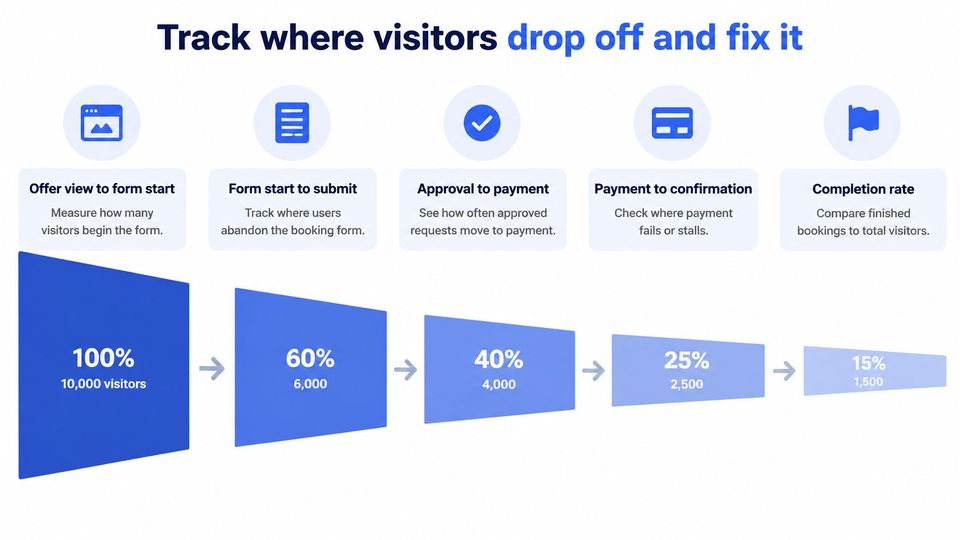
A booking page can attract the right artists and still lose them between the offer and a completed request. Track each step separately so you can see where people stop and investigate the likely cause.
Use this funnel to decide which events to record.
| Metric | What it measures | Where it usually breaks |
|---|---|---|
| Offer view to form start | Visitors who open a service card but never start the form | Price, timing or channel is unclear |
| Form start to submit | Visitors who start but never send the request | Too many stage-one fields or a hard-to-answer required field |
| Approval to payment | Approved bookers who never pay | Payment step is unclear or the gap after approval is long |
| Payment failure | Attempts that fail at checkout | Card errors, missing payment options or lost data after a validation error |
| Refund rate | Paid bookings refunded later | Rules were not stated before checkout |
These patterns point to places to investigate, not confirmed causes. If payment comes before approval, track the steps your process uses, such as paid request to approval.
Use your own event tracking to count form starts, submissions and successful payments. You can also review your site's visitor numbers, but total visits alone won't show where bookers abandon the process.
Compare like-for-like requests
Compare the current period with the previous one using the same definition of a completed booking. Keep free requests separate from paid bookings, and split mobile from desktop so a strong desktop result doesn't hide a phone-specific problem.
A conversion benchmark can provide context, but it is not a target for every booking page. The mix of traffic, price, genre fit and review requirements affects who completes a request.
Use this video as a companion when reviewing the booking workflow.
Check the page on your phone each week, including the upload fields. Each quarter, review a consent-based session recording or run a five-person usability test. Fix the first obstacle that appears repeatedly before changing the rest of the page.
What do bookers ask before they request a slot?
Should you charge for premieres or run them free?
You can do either, but label the offer clearly so artists don't submit under the wrong assumption. A free placement still needs a reviewable track, publication permission, and complete assets after acceptance.
Must bookers create an account before paying?
Offer a guest route where your payment setup supports it. If an account is required, explain why before the artist enters the form rather than introducing it at the last step.
What happens if the submitter lacks publication rights?
Hold the request and ask for written permission from the rights holder. Decline it if the authority remains unclear, even if the submitter can supply the audio file.
How many fields should the first step show?
Keep only the fields you use to decide whether the release fits your channel and schedule. Count controls as well as text boxes, and move captions, credits, and upload details to the asset stage.
Is an events-and-entertainment conversion benchmark a good target?
Use it to frame a question, not to grade your channel. Your traffic source, price, genre fit, and approval rules affect who completes a request, so compare your own consistent results first.
Publish your page and test one real request
Publish the page with an open slot, clear service options, and plain-language approval and refund terms. Then ask an artist to complete one request on a phone without your help. Watch where they hesitate, and revise any instruction or field that causes confusion.
Check the full path: service selection, required details, payment, and confirmation. The page should make clear what the artist is buying and what happens after they submit.
Use analyzing landing page experiments to plan one focused change at a time, such as clarifying a service description or simplifying the opening form. Changing several elements at once makes it harder to tell which edit helped.
Premierely provides a shareable booking form, calendar, repost automation, and Stripe payments. Its Free plan costs €0 and includes unlimited free bookings, 3 paid bookings a month, 1 published premiere per day, and 1 distribution channel. Pro supports publishing across multiple channels after one approval. Visit Premierely to set up your booking page, state your terms, and test a request before sharing the booking link widely.