You're at your desk on Wednesday night with Friday's music still spread across your phone and inbox. A promoter sends a WAV by DM, a label emails artwork without a track title, and a producer pays by bank transfer without naming the release. You have the pieces, but you can't yet tell which booking is ready.
Your premiere week breaks in the same four places
You copy a caption into SoundCloud, then rebuild a vertical clip for Instagram. Before you finish, you notice that you've promised Friday at 6 p.m. to two artists. You stop preparing the posts and start searching old messages to work out who asked first.
The trouble comes from keeping related work in separate places. You check the payment app for a name, your inbox for a cover, and a spreadsheet for the slot. Each move gives you another chance to attach the wrong detail to the right track.
You lose time at the handoffs
Your week breaks at four coordination jobs, even when your music choices are sound.
- Intake breaks when the audio, artwork, and press text sit in different threads.
- Money breaks when a payment arrives without a named request.
- Time breaks when a spreadsheet and your memory disagree about an open hour.
- Outbound posts break when every network needs another upload, caption, and picture shape.
You pay for those breaks through repeated checking. You can also miss a slot or publish the right track with an old cover because you grab the nearest file rather than the approved package.
Keep the track, the request, and the release materials together so you don't have to rebuild the booking from messages.
For the video part of that desk work, Nereo's guide to video automation gives you a useful place to examine repeat production tasks. Keep that question narrow: which actions repeat after you've already made the creative choice?
An auto distribution center, used as a music-workflow metaphor, is the desk that keeps these movements in order. You aren't running an automotive parts warehouse. You're coordinating requests, money, time, and outgoing posts while you still choose the music.
Four jobs split the work between you and the booker
Your premiere week runs like a small distribution center, with four jobs moving a release from request to publication. Automation can take repeat uploading and formatting off your desk, while taste, pricing, and the yes-or-no decision stay with you.
Who handles each job in the music workflow
| Job | Who starts it | What you still decide | What happens next |
|---|---|---|---|
| Submission | Artist or label on your booking page | Approve or reject each request | One queue keeps requests together, and the booker supplies audio, artwork, and release details |
| Payment | Artist on the service's booking page | Set the price or offer a free placement | The request arrives with its booking details |
| Schedule | You approve the request | Choose the time and connected channel | One approval schedules the premiere |
| Publishing | The system after approval | Choose which channels to connect | It publishes to connected channels, such as SoundCloud, Instagram, YouTube, and TikTok |
Read the rows as handoffs, not as decisions being taken away from you. The booker chooses a service and pays on that service's booking page, so the request arrives with its details instead of being pieced together from separate emails. Your approval then schedules the premiere and publishes it to every connected channel.
You keep the decisions that need judgment
The artist starts by choosing a premiere or repost on your booking page. The request enters one queue, where you approve or reject it. You still decide what belongs on your channel.
You set the price for each service, and the same booking path can handle free placements. That keeps the offer and the request together without changing who makes the editorial call.
For scheduling, you choose when an approved premiere should go out. The system schedules it after your approval, while your calendar remains the place to consider how releases fit your week.
Desk rule: Let the booker provide the final release materials, and keep the editorial decision with you.
You remove repeat work after the choice
Once you approve a request, scheduling and publication move through the system. Connected channels receive the release without you starting each upload from scratch, and channel-specific titles, descriptions, and visual templates help adapt the materials to each format. That is the repeat work automation can reduce. It does not decide whether the track suits your audience.
You still listen for fit and choose the price. The time saved comes from fewer handoffs and less repeated formatting, not from giving up control of the premiere.
Use the same division of work when you manage SoundCloud submissions. The request and its release details stay together, while the final yes or no remains yours.
For artwork and video preparation, a reusable workflow can help you reduce creative production bottlenecks. Keep the creative choice in your hands, and use automation for the repeated steps that follow it.
Open slots stop two tracks from sharing one hour
Treat your calendar as shelf space for releases. You need to know what occupies each space, not how many posts appear on a day.
The music-channel booking directory distinguishes a premiere, which creates a new track post that remains on your channel profile, from a repost, which shares an already-released SoundCloud track into followers' feeds. It also describes accepted submissions receiving a date and time, with file upload and open-slot selection forming part of the path to automatic publication.
You reserve space for the kind of post
Say you plan a premiere on Tuesday, Thursday, and Saturday, with reposts in the gaps. You give each new upload its own evening hour because you want room to present the track rather than stack competing announcements.
A repost can sit elsewhere in that grid without pretending to be a fresh upload. If you count every action as an identical post, you lose that distinction and can make a full release week look misleadingly open.
Write a short calendar rule that you can apply without a discussion.
- Premiere space: Don't place another premiere in an occupied premiere hour.
- Repost space: Give reshares their own times so they don't crowd the new release.
- Channel time: State the timezone beside the booking time so artists read the same clock.
The booker, or you, places the accepted request in an open slot before publication. You use the calendar as the check rather than trusting that you'll remember a promise made in a DM.
You clear the exceptions before they become conflicts
A free booking still occupies its hour because listeners receive a post regardless of whether the artist pays. Don't let a paid request displace it merely because the fee makes that request easier to notice.
When you reject a request, make sure any held time becomes available again. Otherwise, you keep a ghost booking that stops another artist from choosing a space you don't intend to use.
A timezone mismatch needs the same care. If the artist lives abroad and your audience listens at night where you are, confirm the booking in your channel's timezone rather than assuming their evening means yours.
RenderIO's guide to building scalable video distribution pipelines is useful when you're thinking through the handoff between a reserved release time and its outgoing video versions. Keep your calendar rule separate from the work needed to prepare each version.
On Sunday, check the accepted requests against the grid. Every accepted track needs a clear time, and no premiere hour should carry competing new uploads.
Each channel needs its own picture and length
You risk a silent Instagram post when you treat the full premiere audio as a finished social video. Meta's music guidelines state that there's no limit on music in Stories, but longer recorded tracks in videos are more likely to be muted or blocked; Meta recommends shorter clips and requires a visual component, with recorded audio not serving as the video's primary purpose.
That distinction matters when you prepare a release package. You need a version suited to the destination, not merely the same file with another filename.
You pack the release for its destination
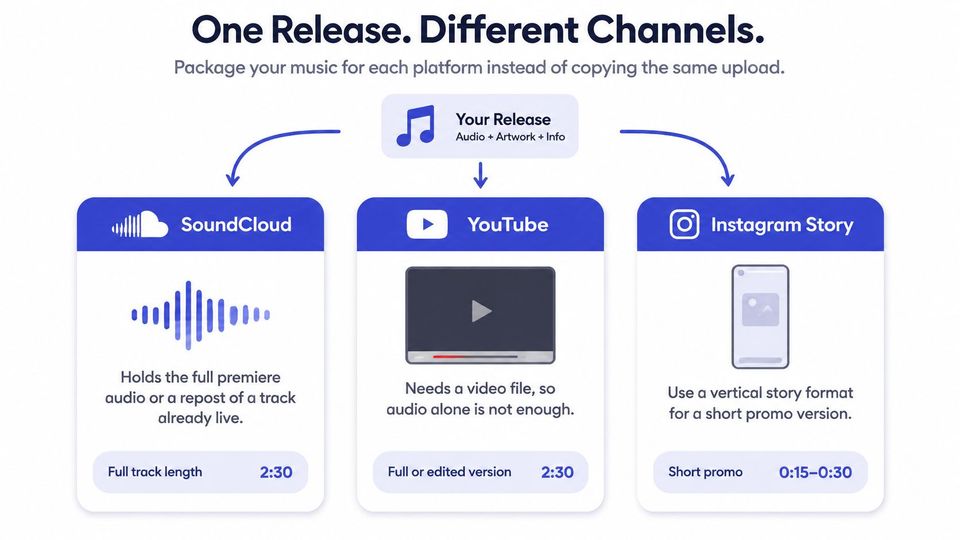
Use the channel requirements as a packing list before the release date. You can then spot a missing video while there's still time to prepare it.
What each channel can carry
| Channel | What goes out | Shape and length | Do not reuse |
|---|---|---|---|
| SoundCloud | New premiere or a repost | Full track for a premiere; an existing track for a repost | A repost counted as a new upload slot |
| Vertical Story or short video | Short clip plus a real picture; music is not the whole point | The full-length premiere audio unchanged | |
| YouTube | Video post | A picture or video rendered with audio, not audio alone | A bare WAV with no image |
| TikTok | Vertical video | Short vertical video | The SoundCloud file unchanged |
For YouTube, a WAV and a still cover are source materials, not yet a finished video file. You need to combine the image and audio into a video before treating the package as ready.
For TikTok and Instagram, check that the text and artwork remain readable in the vertical frame. A square cover dropped into a tall canvas may need a different layout so the track name doesn't disappear behind interface elements.
You prepare the short version before release day
Say you send a six-minute premiere to Instagram as though it were a SoundCloud upload, and the resulting video is muted. Your audience sees the announcement but can't hear the part meant to introduce the track.
Prepare a short vertical cut with artwork or a visual designed for that network instead. A shorter clip doesn't guarantee clearance, so you still need permission to use the music and a visual treatment that follows the network's rules.
Keep profile artwork separate from release artwork, too. The SoundCloud banner size guide helps you handle the channel header without confusing it with the cover attached to a track.
Before you connect another destination, know its picture shape, the length you plan to use, and which source files need conversion. If you publish only to SoundCloud, don't create vertical cuts merely to make the package look more complete.
You approve the track and the booker sends the files
Use a fixed handoff so an artist knows when to book and when to supply the release package. You avoid unnecessary file chasing by making approval the point that starts asset collection.
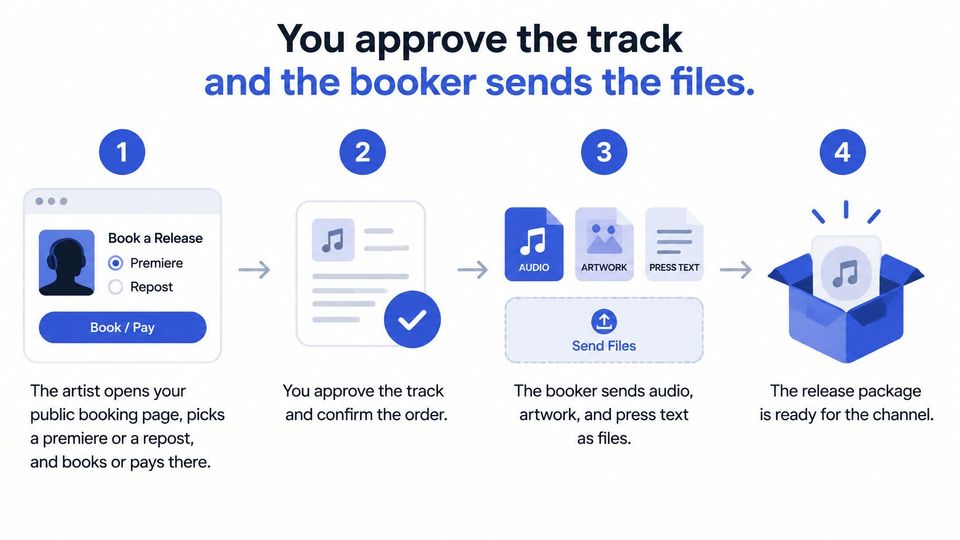
You move the request through a clear sequence
- The artist books on your page. They choose the service and pay there if you charge, or book a free placement. You receive the service, price, and request details together instead of collecting them through separate emails.
- You review the request in the queue. Every request lands in one queue, where you listen and approve or reject it. Rejection stops the publishing path; approval doesn't mean you take on the booker's file preparation.
- The booker supplies the package after approval. They upload the audio, artwork, and press text only after you say yes. You collect final materials for accepted music rather than filling your working folders with packages you won't publish.
- The approved booking moves toward publication. One approval schedules the premiere and publishes it to every connected channel once the required files are ready. Titles and descriptions are formatted automatically, so you don't rebuild the same post text at each destination.
Premierely is a booking system for this desk, where one approval publishes the premiere to every channel you run and connect; multi-channel publishing from that approval is a Pro feature. You can keep the same request workflow for a single destination without building a wider publishing setup.
You check readiness without taking back the booker's job
Ask for clearly named final files, not a folder full of possible masters. Use the guide to types of audio file formats to make your audio request clear enough that the booker can send the intended version.
Your check should answer practical questions. Does the artwork name the right release, does the text match the track, and does the audio open and play as expected?
You save time by removing repeated handling, not by rushing the listen that decides whether the track belongs.
Keep taste, the price list, and account connections in your hands. Those choices define your series, while copying a description into another upload form doesn't.
If you want to measure the benefit, time your repeat upload and formatting work separately from listening. You then know whether the desk saves minutes without pretending that faster administration makes editorial decisions faster.
You can also offer download gates as an optional route to a free file. In a download-gate email workflow, a fan can complete an action such as following an account or leaving an email before receiving the download; keep that action and any consent wording clear, and don't use the gate as a substitute for the booking queue.
One Friday release shows the full path
Say you're preparing a fictional electronic track called Night Relay. On Monday at 11 a.m., its producer books a paid premiere for Friday at 6 p.m. through your public booking page.
At 4 p.m., another artist wants that same hour for a free premiere. You keep the first booking in place and offer Saturday instead, but the second artist doesn't take it. You haven't promised the same release space twice.
You resolve the clash before preparing the posts
On Tuesday, you play Night Relay and approve it. You also listen to the other artist's track, decide it doesn't fit the series, and reject that request rather than keeping it around as filler.
Tuesday evening, the approved booker supplies the WAV, square cover, and press text. For this example, you also prepare a 20-second vertical cut and a three-line description for the outgoing posts, so you don't leave the video version until Friday.
You don't open another email thread to rebuild the accepted package. You check the materials against the booking, correct a title mismatch before release day, and leave the approved wording ready for publication.
Keep the reserved hour and the ready package distinct. A time on the calendar doesn't mean every file is ready.
On Wednesday, a label books a free repost of an existing SoundCloud release for Friday at noon. You can place that reshare there because it doesn't compete with the evening premiere's new-upload slot.
The label supplies the existing track details rather than asking you to create another upload. You keep its noon action separate from the package you're preparing for the evening.
You publish the versions that are ready
On Friday at noon, the repost reaches the SoundCloud feed. At 6 p.m., the premiere audio publishes on SoundCloud, the prepared vertical piece goes to Instagram and TikTok, and the video version goes to YouTube using the wording already attached to the booking.
You still have Saturday available because the artist who asked for Friday never accepts the alternative. You don't treat an offer of a time as a confirmed booking.
If the vertical cut never arrives, you hold the video destinations before publication rather than send an empty frame or an unsuitable file. You resolve that missing material yourself; you don't assume the booking system makes the creative call or invents the absent video.
Your remaining editorial work stays visible in this example. You make two listens, one no, and one yes, while the prepared post text needs no retyping at release time.
Decide what you still pick by hand
Keep control of the tracks, prices, publishing nights, and connected accounts. You protect the identity of your series through those decisions, while a shared booking desk saves minutes by reducing repeated typing and uploading.
If you run a single SoundCloud series, keep the queue focused on that destination. If you already prepare vertical clips each week, connect the networks where those clips have a clear purpose rather than adding accounts you don't intend to maintain.
You choose the smallest useful setup
Start with a public booking page because artists need a clear place to request a service and pay if you charge. Add publishing destinations only when you can supply their required materials without creating a new weekly scramble.
Don't judge the desk by a promise of plays. Judge it by whether you can see what's accepted, what's missing, and what leaves next without searching your messages.
You can settle the common booking questions
Do artists upload before you say yes?
No. They book first and send the audio, artwork, and press text after you approve, so you collect the final package for an accepted request.
Does a repost use a premiere slot?
No. Keep the reshare in its own calendar space rather than counting it as a new track uploaded to your profile.
Why does an Instagram clip go silent?
A long recorded track used as the whole point of a video carries a greater mute or block risk. Use a short clip with a real visual component, and check that you have the rights needed for that use.
Can your week include free posts?
Yes. You can charge or run free, but every confirmed booking still needs available time so you don't promise its space elsewhere.
Write next week's slots first, then keep requests, payment, files, and posts tied to that grid.
Premierely offers a booking system where artists request premieres or reposts and you manage the decisions from one queue. You can start free and use the booking desk to keep weekly release work together. Visit it to set up a public booking page around the slots you're ready to offer.