Your next premiere is booked, but the artwork is still in a message thread, the artist has changed the streaming link, and nobody has checked who owns the sample. You can get the upload out on time and still waste the release if viewers leave before the track gets going.
To promote music on YouTube, you need a clear rights check, a shared release calendar, and a way to judge listening quality. Raw views belong in the report, but they shouldn't decide whether you book the same promotion again.
You check music rights and disclose paid promotion
Music rules by platform for promotion
| Platform | Music rule | What to check |
|---|---|---|
| YouTube | Declare branded content with the paid-promotion setting, as required by YouTube's paid-promotion guidance. | Mark paid premieres and reposts as paid. |
| Instagram feed video | Long clips or multiple full tracks are more likely to be muted or blocked under Instagram's music guidance. | Keep music to short clips with a real visual component. |
| Instagram Stories | Instagram states there are no limits on using music in Stories. | Confirm rights and licensing, since the lack of a limit doesn't remove ownership questions. |
| Instagram Reels | Instagram's Reels guidance explains that licensed audio is attributed to the artist and track, and can be muted if licensing changes. | Verify the audio source and metadata before treating a Reel as a lasting asset. |
| TikTok business posts | TikTok directs commercial users to its Commercial Music Library, which it describes as containing 1 million songs. Other sounds need the necessary license. | Confirm the track is cleared for commercial use. |
Don't hide a paid booking because you think disclosure makes the music look less credible. You can select tracks on merit and charge for publication, provided you tell viewers what the payment covers.
Undisclosed paid exposure may bring short-term clicks, but it creates long-term trust and enforcement risk. The paid-promotion setting is a platform-level check, not a substitute for checking advertising rules in the countries your campaign reaches.
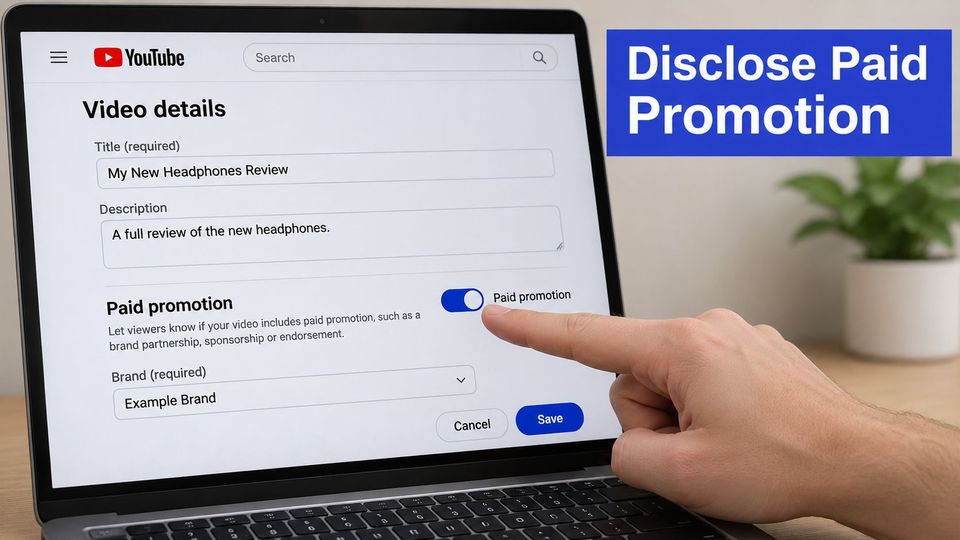
You name the arrangement before you accept the files
Sort the booking into independent editorial acceptance, paid placement, sponsorship, an affiliate deal, or creator-made promotion. Editorial acceptance without compensation differs from a purchased upload; affiliate payments need a different explanation from a sponsor funding the whole video.
Write a plain disclosure sentence that names the actual deal. For example, state that the label paid for this premiere placement, or that you earn a commission from purchases through the listed store link. Don't label an artist's own unpaid upload as sponsored merely because it promotes a release.
Run this checklist before you reserve the publication slot.
- Ownership evidence: Collect confirmation that the artist owns the audio and artwork or holds permission.
- Third-party material: Request the relevant license for samples, recordings, images, or other borrowed assets.
- Takedown contact: Record who can resolve a claim and approve replacement files.
- Payment records: Keep the booking terms and payment record with the release.
- Disclosure text: Save the agreed sentence for the description.
A credit line isn't permission, and noncommercial intent doesn't remove infringement risk, as Instagram's copyright guidance makes clear. Use a music copyright checker workflow to organize the checks, not to replace written permission. Clear rights before the release calendar starts, while you can still reject or replace an asset without disrupting a public date.
Build your release timeline two weeks before upload
A late master doesn't just delay the editor. It can also leave the booker sharing an old page while the channel owner waits for a thumbnail nobody owns.
Start your working calendar two weeks before upload, and give each task a named owner. Treat the schedule below as a practical template, not a claim that YouTube rewards a fixed posting interval.
Release timeline from premiere page to first results
| Timing | Action | What it sets up |
|---|---|---|
| 7 to 10 days before | Create the premiere page | Reminders and shares before release |
| 7 days before | Post teaser Shorts and behind-the-scenes clips | Anticipation and traffic to the page |
| 3 days before | Lock the final title, thumbnail and description links | A stable page for viewers and the algorithm |
| 1 day before | Schedule the live stream | A live audience ready to redirect |
| Release day | Go live about 30 minutes before the premiere and redirect viewers | Live viewers moved into the official video |
| 2 days after | Check impressions and click-through rate | An early signal on the thumbnail and title |
| 28 days after | Compare the release with your channel median and baseline | A fair read on the release's results |
The preparation sequence gives you room to handle outreach without moving the release itself.
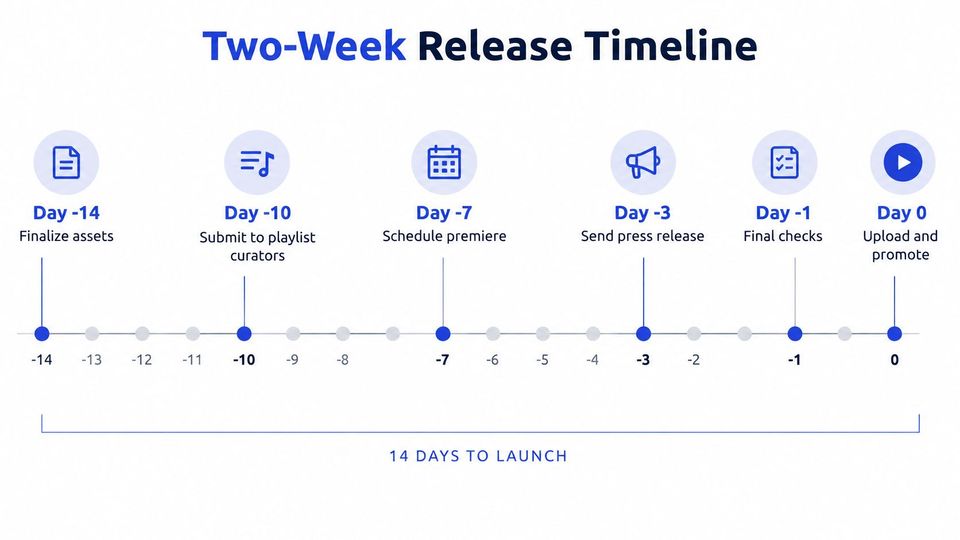
You give every date an owner and a time zone
Put the booker, editor, and channel owner on the same calendar. Record the time zone, asset deadline, public URL, and person who makes the final call if files arrive late.
YouTube reports that more than 2 billion logged-in viewers watch music videos each month, according to its creative entrepreneur update. That scale gives your release a potential audience, not a reason to rush unfinished work.
Use a social media cross-posting workflow to assign each supporting post its own format and destination. Keep the public page stable once promotion starts; change it for a clear error or a measured test, not because several people keep rewriting the title.
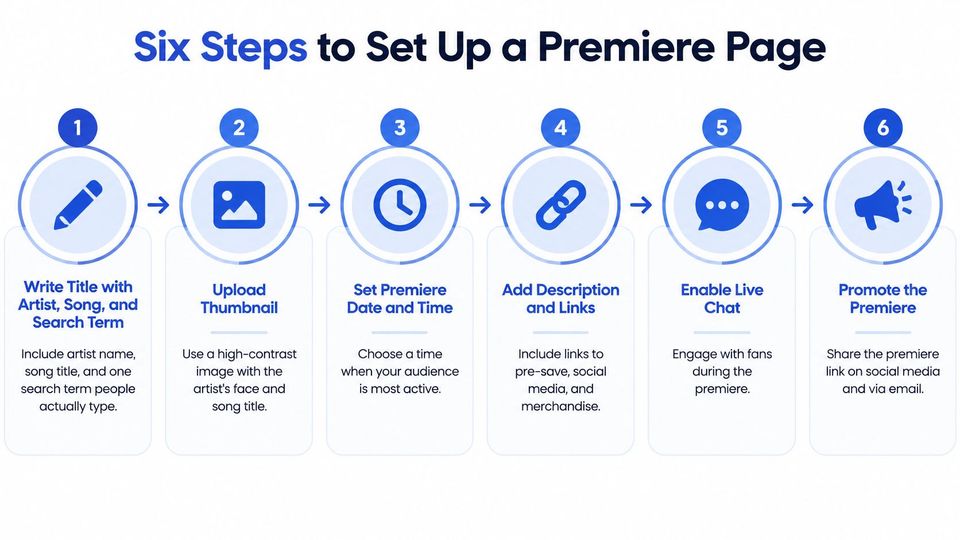
You set up the premiere page in six steps
Build the page around a clear promise, then make sure the video delivers it. YouTube for Artists' resources recommend early Premiere pages, supporting clips, readable artwork, clear links, and live activity around release.
Choose the release time using your audience's activity, rather than the hour that's easiest for your team. Then work through the page as a viewer on a phone, not just as an editor on a large screen.
- Write a title that identifies the release. Include the artist name, song title, and a relevant search term people would use, such as the genre when it adds useful context. Don't stack unrelated keywords or repeat the artist's name until the title reads like spam.
- Make the thumbnail readable at phone size. Use strong contrast and minimal text, then shrink the preview before you approve it. Small catalog text, crowded logos, and detailed artwork can disappear even when the full-size file looks good.
- Put the useful links near the top of the description. Place the streaming destination and a clear subscribe line before long credits, so viewers don't have to search for the next action. Keep the full credits below them rather than removing information that artists and rights holders need.
- Publish the Premiere page several days ahead. Share that same URL through your supporting posts so listeners can set reminders and pass it on. Waiting until release day leaves you asking people to attend an event they haven't had time to plan for.
- Test the route through the release. Open every streaming link, check the end screen, and confirm the live redirect is available and configured for the correct destination. A pasted URL that opens the wrong version is still a failed link, even if it doesn't return an error.
- Host the live audience before the video starts. In this working schedule, begin about 30 minutes ahead, tell chat where the premiere will run, and redirect viewers at start time. Don't end the stream and assume everyone will find the official video without help.
You check the launch as a listener
Assign someone to watch the public experience while you handle the live session. They check audio, confirm that the correct video starts, and flag a broken destination without filling the artist's chat with production messages.
Launch check: A busy chat is useful, but it doesn't excuse a broken listening path.
A healthy launch has viewers arriving through the shared page, chat activity during the premiere, and tracked clicks reaching the intended destination. None of those signals alone proves success, but together they show that your launch mechanics work before you judge audience quality.
Your metrics show whether viewers stay, not just click
A premiere can pull a strong view count and still fail the release. The number that matters is whether viewers stayed: how far into the video they watched, and whether any of them came back or went on to stream the track elsewhere.
Metrics to check after each premiere
| Metric | What it tells you | How to read it |
|---|---|---|
| Impressions | How often YouTube showed the video | Gather enough volume before testing a thumbnail or title |
| Click-through rate | Views from counted impressions divided by those impressions | Compare with your channel median |
| Unique viewers | An estimate of distinct viewers rather than repeat plays | Compare with your channel median |
| Average view duration | How long viewers stay | Read alongside retention to locate a weak intro |
| Engaged views | Whether viewers stay past the initial seconds, where the metric applies | A result above your comparable-format median supports the hook |
| Returning viewers | Viewers who come back | Their share helps you assess lasting interest |
| Watch ratio at each point | Where viewers leave | Sharp early drops suggest an intro problem |
Read these measures together. Strong clicks with weak viewing duration mean the packaging attracts people the video doesn't satisfy. Weak clicks with steady retention mean the music holds attention but needs a clearer first impression. The fix differs completely between those two cases, which is why a single headline number never tells you what to change.
Unique viewers aren't a headcount of verified listeners, and returning viewers aren't automatically owned fans. Track external clicks, email opt-ins, downloads, and repeat listening separately when those are campaign goals.
You separate presentation tests from listening tests
Compare similar formats and release ages against your channel median. Change the thumbnail or title individually, and wait until impressions give you a useful comparison rather than reacting to a handful of clicks.
The watch ratio runs from 0 to 1 at each point in the video and helps you locate exits. Average view duration tells you how long people stay overall; the retention curve tells you where they leave, which is what you need before blaming the intro.
If you outsource presentation work, AI Optimization Services' explanation of what a video SEO service includes gives you a scope to compare with your own checklist. Ask for distinct deliverables and a test log, rather than treating a title rewrite as evidence of audience growth.
You measure downstream listening without claiming every stream
Use the prior 28 days of views, unique viewers, watch time, and external streams as your baseline, then compare the campaign with a similar unpromoted release or matched period, following the approach in RBB Economics' music promotion paper. Separate source URLs, markets, release timing, and catalog activity so you don't count an existing audience as new campaign impact.
Viewers who watch an artist's music video often go on to stream more of that artist's catalog in the weeks that follow. Treat that as an association: the video may have caused the lift, or those listeners were already leaning toward the artist. Your baseline comparison is what separates the two explanations.
Don't credit YouTube for every later stream when playlists, press, and other discovery run at the same time.
YouTube thresholds show where your audience growth must go
YouTube Partner Program thresholds for advertising revenue
The YouTube Partner Program guidance sets out these standard advertising and YouTube Premium entry thresholds and the announced Shorts creator share.
| Requirement | Threshold | What it means for promotion |
|---|---|---|
| Subscribers | 1,000 | Track subscribers gained from each release |
| Long-form watch hours | 4,000 valid public hours in the previous 12 months | Track watch time from full videos, not only plays |
| Shorts views | 10 million valid public views within 90 days | Use teaser Shorts to build reach toward this goal |
| Shorts creator share | 45% of allocated advertising revenue | Eligible Shorts views feed into the creator share |
The subscriber requirement combines with either the long-form watch-hour route or the Shorts-view route. The revenue share is a payment rule, not another entry threshold, and meeting the audience thresholds doesn't remove the program's other eligibility and review requirements.
For Shorts, YouTube distributes allocated advertising revenue according to each creator's proportion of eligible Shorts views. Don't turn that share into an assumed payment per play.
You buy audience fit rather than the largest view count
A release brings exposure, but your next decision depends on what viewers do afterward. Track subscribers gained, watch hours, and eligible Shorts activity for each release so you can distinguish a short burst from useful channel growth.
Say you're choosing between a broad repost channel and a smaller genre-specific premiere series. The smaller placement can be worth more if listeners stay, visit the artist's catalog, and return for the next release.
For a curator, that comparison also protects editorial fit. Accepting unrelated tracks to fill slots can leave you publishing to subscribers who didn't come for that sound.
Keep a tracking sheet with the release name, placement, format, cost, subscriber gains, watch-hour gains, Shorts activity, and review date. Record whether the gains happen on your channel or the artist's channel, because a curator's subscribers don't become the artist's subscribers by default.
Answer the questions you hit mid-plan
What should you do when impressions are too low to test?
Keep the current title and thumbnail unless either contains a clear error, because a tiny sample can't support a useful decision. Continue targeted distribution through relevant teaser clips and artist channels, then review once you have enough exposure to compare results. Don't promise a universal minimum impression count, since traffic mix and release size affect how much confidence you can place in a change.
Should you choose a Premiere or a regular upload?
Choose a Premiere when you have an audience willing to arrive together and someone available to host the event. Choose a regular scheduled upload when attendance would be thin or the artist can't support the live moment. Prepare the private upload and teaser assets ahead either way, but don't promise a public reminder page for a regular upload.
Which element should you test first?
Start with the thumbnail when the title already identifies the artist and track clearly. Keep the title fixed so you can connect the result to the image change, and log when you made it. If the title mislabels the song or genre, correct that error before running a presentation test.
Can an unsigned artist follow this plan without a budget?
Yes, the core work uses time, permission checks, artwork preparation, and YouTube Studio rather than a required advertising spend. Reduce the workload by choosing the promotional formats you can finish well. Don't replace a missing budget with irrelevant posts or messages to curators whose audience doesn't match your music.
You test one release before scaling your plan
Run one upcoming release through the full workflow before you roll it across the catalog. Save the pre-campaign baseline, assign the page checks, and set the review date before public promotion begins.
Keep a short change log beside the results. Judge the release by whether viewers stayed: compare average view duration, returning viewers, and the first minute drop-off against your baseline. If retention holds and returning viewers rise, keep the schedule. If viewers leave early, inspect the opening and audience fit before spending more on distribution.
Next decision: Repeat the parts you can measure, and fix the point where listeners stop moving toward the music.
For the booking side, Premierely is a booking system where you approve the request once, the booker supplies the assets, and scheduled publication runs after that approval. Pro supports publishing across connected channels, with titles and descriptions formatted to your convention.
When you are ready to compare paid distribution with listening results, use the guide to advertising your music. Pick the date for your next test now, and name the specific change you will evaluate.
Keep your rights checks and listening report, but reduce repeated booking and upload work. Premierely offers paid or free premiere bookings and Pro publishing across your connected channels, so you can set up the booking side of your next release test.